
This guide applies to email accounts hosted on cPanel Shared/Reseller Hosting services.
Suspicious email activity does not always mean that the mailbox itself was compromised. Depending on the situation, the issue may be related to unauthorized mailbox access, compromised website scripts, spoofing attempts, email configuration issues, or broader hosting account compromise.
Common signs include:
If you notice one or several of these signs, continue reading the guide.
Before proceeding with case-specific troubleshooting or recovery, consider securing access to the affected mailbox and hosting account.
Recommended actions:
If suspicious activity extends beyond the mailbox itself, review the malware scanning and account security checks from our main hosting compromise guide.
After securing access to the affected services, refer to the section that best matches the issue you are experiencing:
In some cases, email accounts may disappear after unauthorized access to the hosting account or accidental account changes.
Even if the email account no longer appears in cPanel, the mailbox files may still remain inside the hosting account.
You can check this using cPanel >> File Manager. Mailbox data is stored inside the following folders: mail >> domain.com >> email_account_name.
If the mailbox folder still exists, recreate the email account in cPanel using the same mailbox name as shown in this guide. After recreation, the mailbox content should become accessible again.
If the mailbox folder is missing, the emails may still exist inside older backups.
Refer to the 'Restoring email data from backups' section to review available backups and recovery options.
If you notice email accounts that were not created by you, this may indicate unauthorized access to the hosting account.
If suspicious accounts continue to reappear after cleanup, contact our Support Team for additional investigation.
If emails disappeared unexpectedly, the issue is not always related to mailbox compromise or permanent data loss. In many cases, emails may still exist either on the server or inside an email application (for example, Outlook, Thunderbird, Apple Mail, or a mobile mail app).
Start by checking whether the missing emails are visible in cPanel Webmail and the email application you normally use.
1) Emails are visible in Webmail only
This usually means that the mailbox itself is intact, and the issue is related to the email application configuration or synchronization.
In this situation, try re-configuring the email application using the correct mail settings. You can locate the relevant guidance here. General mail client and mobile device configuration guidance can also be reviewed here.
Tip: A common issue is using a domain-based mail server hostname (for example, mail.domain.com) instead of the server hostname assigned to the hosting account (for example, server123.web-hosting.com).
Incoming and outgoing server names refer to the hostname of the server where the hosting account is located. The correct server hostname is provided in the hosting Welcome Email under the Account Information section, or can be located using this guide.
Although domain-based hostnames may function correctly in some cases, using the server hostname is generally recommended to avoid DNS or SSL-related issues and improve connection stability.
This often happens when the mailbox is configured using POP3, and the email client removes messages from the server after downloading them. As a result, the emails may remain available locally inside the email application while no longer appearing in Webmail.
Important: Before making configuration changes, make sure the existing emails are backed up correctly inside the email application to avoid accidental data loss.
To avoid similar synchronization issues going forward, consider configuring the mailbox using IMAP instead of POP3. You can locate the relevant configuration guidance here.
Tip: Emails stored locally inside the email application can also be synchronized back to the mailbox on the server to restore access from multiple devices. The exact process depends on the email application being used. For example, the following guide explains how emails can be uploaded back to a cPanel mailbox using Outlook.
The emails may have been deleted from both the server and the local device.
Before proceeding with recovery, review the mailbox Trash folder in Webmail to verify that the emails were not moved there accidentally.
If the emails cannot be located, refer to the 'Restoring email data from backups' section to review available backup and recovery options.
Losing access to an email account does not always mean that the mailbox was compromised. In some cases, the issue may be related to the following:
First, verify whether you can still access other services connected to the hosting account - cPanel, other mailboxes, websites hosted on the same cPanel account.
If access issues affect multiple hosting services at the same time, the cause may be related to a firewall block, network issue, or broader hosting account access problem rather than the mailbox itself.
Try the following:
If the issue persists, contact our Support Team to investigate and restore access.
2) Only one mailbox is affectedTip: A common issue is updating the mailbox password in cPanel while the old password remains saved inside the email application. This may cause repeated login failures or temporary blocks.
In some cases, especially after mailbox migrations between servers, Outlook may continue using outdated cached credentials or connection settings even when the correct password is entered. If this happens, removing and re-adding the mailbox profile inside Outlook may help restore access.
If the issue persists, contact our Support Team for further investigation.
If emails are being sent from your hosting account without your knowledge, it is important to identify how the emails are being generated. The emails may originate from a mailbox, a website script, a contact form, or spoofed sender activity.
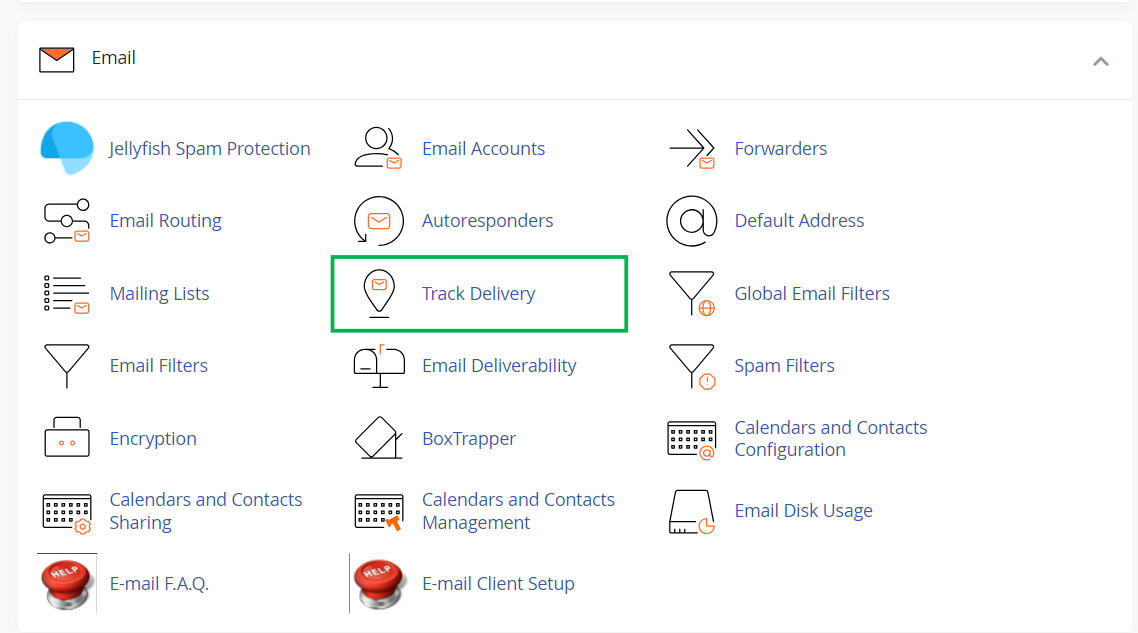
The menu can be accessed from cPanel >> Email section >> Track Delivery:
When reviewing the logs, pay attention to:
Depending on how your website is configured, outgoing emails may appear differently in Track Delivery.
Emails sent directly from a mailbox using Webmail or an email application appear under the actual mailbox address:

Emails sent via a contact form configured with SMTP authentication also appear under the mailbox used for sending:

Emails sent using PHP mail() functions appear under the local cpanel_username@server_hostname sender instead of the mailbox itself:

Important: Track Delivery does not directly show whether an email originated from a specific contact form, plugin, or script. However, the logs can help identify whether the outgoing activity matches the expected behavior of your website.
After reviewing the outgoing activity, the next steps depend on how the emails appear in the logs.
If suspicious emails are visible directly inside the mailbox, you can review the email source/header information to investigate the sending origin more closely.
The following guide may help when analyzing email source/header information.
If the source of outgoing emails remains unclear or additional investigation is required, contact our Support Team for a deeper review of the outgoing mail logs.
Sometimes attackers may send emails that appear to come from your domain name even though they were not sent from your actual mailbox. This is commonly known as email spoofing.
If your email address is being spoofed, it does not necessarily mean that the mailbox itself was compromised. In many cases, attackers simply falsify the sender address while sending spam or phishing emails from external mail servers.
Common signs of spoofing include:
Before treating the issue as spoofing, it is recommended to review recent mailbox activity, check the Sent folder, and change the mailbox password.
Although spoofing cannot be prevented completely because of how email systems work, properly configured SPF, DKIM, and DMARC records significantly reduce the chance of spoofed emails reaching recipients successfully.
You can review and configure these records using the Email Deliverability feature in cPanel.
Important:
By default, SPF records use the ~all policy, which provides a softer validation rule. Switching to -all creates a stricter SPF policy and helps reduce successful spoofing attempts.
Before enabling strict SPF, make sure that all legitimate email services and sending servers are already included in the SPF record (for example, your cPanel hosting server or third-party SMTP services). Otherwise, valid emails may fail delivery after the stricter policy is enabled.
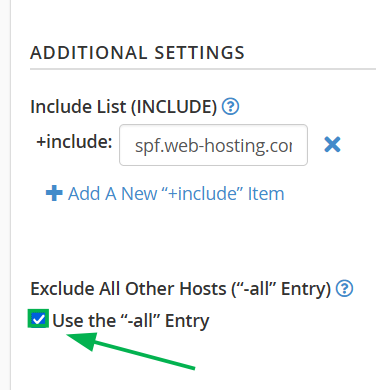
Scroll down to the Additional Settings section and enable the Use the "-all" Entry option:
DMARC quarantine and reject policies can help recipient servers quarantine or reject spoofed emails that fail authentication checks.
Important: Strict DMARC policies may affect legitimate email delivery if SPF or DKIM are not configured correctly.
The following backup options may help restore missing mailbox data.
Mailbox data is stored inside the mail >> domain.com >> email_account_name directory. In most cases, individual mailboxes can be restored selectively from this folder without overwriting the rest of the hosting account.
Important: Full account restoration replaces all current account data with the contents of the selected backup and cannot be recovered afterward. If the account contains recent emails or other data not included in the backup, the selective (per-file) restore options below are recommended for email recovery, leaving full restoration for cases of broader hosting account compromise.
Server-side backups can be restored selectively, allowing individual mailbox folders to be recovered without affecting other account data.
If a server-side backup is not available, but you previously downloaded or generated a cPanel backup manually, mailbox data can also be restored from it using the following guide.
The same mail/domain.com/email_account_name folder structure can be reviewed when restoring individual files through the AutoBackup plugin or from a manually generated backup.
After restoration, recreate the email account if it no longer exists.
To reduce the risk of similar issues in the future:
If you have any questions or need assistance, feel free to get in touch via our Help Desk.
Please note that, as a hosting provider, we do not specialize in malware analysis or manual malware removal. While we will review your situation and assist where possible, some of the checks and steps described in this guide may need to be performed independently or by a qualified security professional. You can review our support boundaries here.
Need help? We're always here for you.