
In this article, we explore the nature of nameservers. We will learn which nameservers are associated with Namecheap, which are associated with the most well-known providers, and how to determine which nameservers your domain is using.
You need DNS records to connect your domain to services such as email and web hosting. There are different types of DNS records, each serving a specific purpose. For example, MX records specify the mail server responsible for receiving emails sent to your domain (i.e., the mail server provided by your email service provider), and A records map your domain to the IP address of the hosting server where your website is stored.
You can learn more about the different types of DNS records and their purposes in our guide to DNS record types.
DNS records must be stored on servers that respond to DNS queries for your domain. Nameservers perform this function - more precisely, authoritative nameservers. They store the DNS zone for your domain and respond to DNS queries. The nameservers assigned to your domain determine which company acts as your DNS provider.
If you order email or hosting services, you must add the corresponding DNS records to your domain’s DNS zone. These records are configured in your DNS provider's control panel.
There are many DNS providers on the market. A domain can be registered with one company, web hosting purchased from another, email services obtained from a third, and DNS (nameservers) managed by yet another provider. For this reason, it is essential to know which company hosts the authoritative DNS for your domain.
Each domain must have at least two nameservers configured to ensure redundancy and maintain availability if one becomes unreachable.
Namecheap provides 4 types of nameservers:
1. Basic DNS:
dns1.registrar-servers.com
dns2.registrar-servers.com
These are the default nameservers for domains registered with Namecheap.
2. Free DNS:
freedns1.registrar-servers.com
freedns2.registrar-servers.com
freedns3.registrar-servers.com
freedns4.registrar-servers.com
freedns5.registrar-servers.com
This is our free DNS service for customers who have third-party domains but do not yet have nameservers, or who want to use Namecheap nameservers.
3. Premium DNS:
pdns1.registrar-servers.com
pdns2.registrar-servers.com
Our paid DNS service has a 100% uptime guarantee.
4. Web-hosting nameservers:
dns1.namecheaphosting.com
dns2.namecheaphosting.com
These nameservers are used specifically with our Shared Hosting plans.
DNS records for domains that use our Basic, Free, and Premium DNS are managed directly in the AdvancedDNS tab in your Namecheap account.
DNS records for domains that use our web-hosting nameservers are managed in the Zone Editor of your cPanel account.
Here are some examples of nameservers operated by third-party providers:
Amazon Route 53:
ns-0.awsdns-00.com
ns-1.awsdns-00.com
ns-3.awsdns-00.com
Bluehost:
ns1.bluehost.com
ns2.bluehost.com
Cloudflare:
alice.ns.cloudflare.com
bob.ns.cloudflare.com
GoDaddy:
ns01.domaincontrol.com
ns02.domaincontrol.com
Google Cloud DNS:
ns-cloud-a1.googledomains.com
ns-cloud-a2.googledomains.com
ns-cloud-a3.googledomains.com
ns-cloud-a4.googledomains.com
Hostinger:
ns1.dns-parking.com
ns2.dns-parking.com
Hostgator:
ns1.hostgator.com
ns2.hostgator.com
SiteGround:
ns1.siteground.net
ns2.siteground.net
Wix:
ns1.wixdns.net
ns2.wixdns.net
Nameservers are set in your domain registrar’s account. If your domain is registered with Namecheap, you can check your nameservers in the Namecheap account.
If your domain is registered with a different registrar, you can check the nameservers in your registrar's account. Another way is to use various online DNS checkers. In the example below, we use this third-party tool.
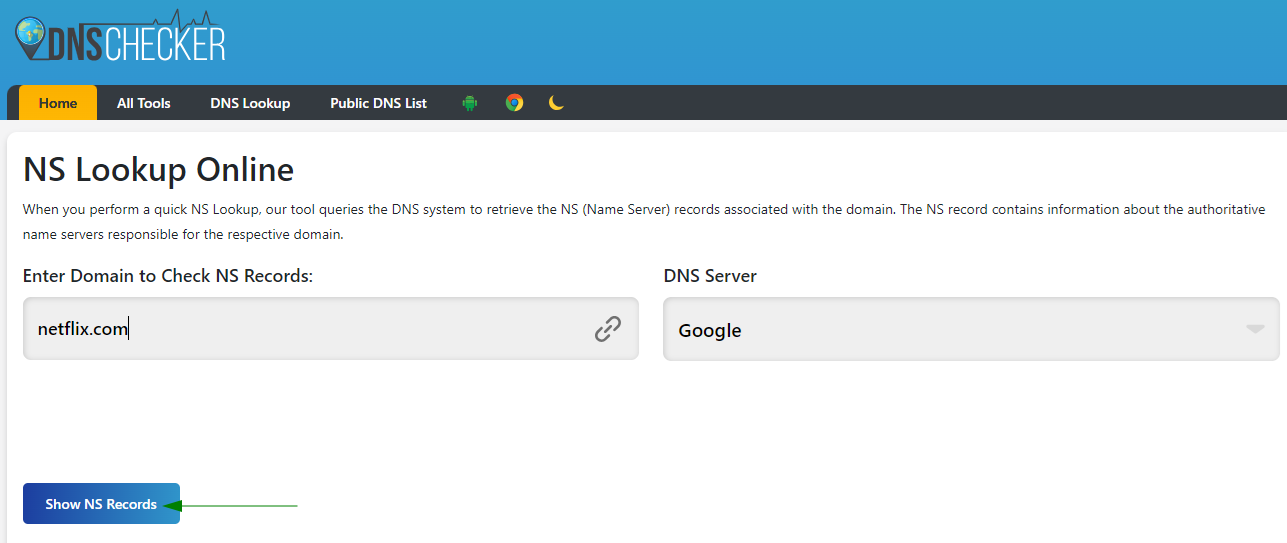
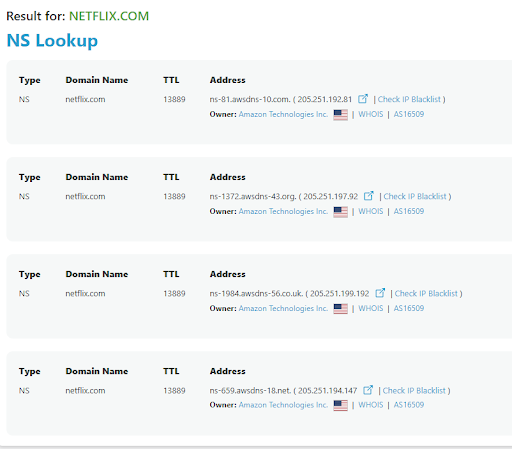
As you can see in the example, the domain netflix.com uses four nameservers that belong to Amazon:
ns-81.awsdns-10.com
ns-1984.awsdns-56.co.uk
ns-1372.awsdns-43.org
ns-659.awsdns-18.net
If you cannot determine your domain's DNS provider, please contact our Support Team.
Need help? We're always here for you.