$ U.S. Dollar€ Euro£ British PoundC$ Canadian DollarsA$ Australian DollarsRs Indian Rupees¥ China Yuan RMBMore Info
What to do if my EasyWP subscription expires?
When auto-renew is turned on, EasyWP renews your plan automatically. It will try to charge your card up to five times. A payment can fail if there’s a problem with your card or not enough money in your account.
If all five payment attempts fail, you may still be able to recover your website, so don’t panic.
Each time a payment fails, you’ll get a “Payment failed” email sent to your Namecheap contact email address. After the fifth failed attempt, you’ll receive a “Subscription canceled” email.
How do I know if my site is still available?
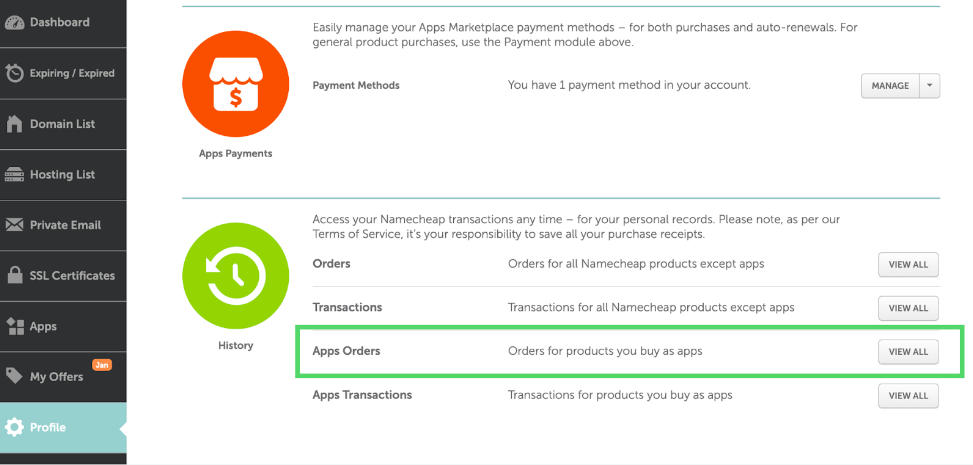
If you notice that your site is gone, first check when the EasyWP subscription was last renewed. You can find EasyWP-related orders in your Namecheap account under Profile >> Billing >> History >> Apps Orders.
If you have a monthly subscription, it renews on the same day each month. Yearly and biyearly subscriptions renew on the same day and month as the previous payment.
If you notice that the site is missing shortly after the expected renewal, you may still be able to recover it.
How much time do I have to restore the site?
The system stores website data for around 30 days after subscription cancellation. These backups are created for internal purposes only. While we try to keep them available, we cannot guarantee their availability or integrity.
To avoid issues, we recommend making sure auto-renewal is enabled and a valid payment method is set under Profile >> Billing >> Apps Payments.
You can manage EasyWP renewal in your Namecheap account >> Apps >> Subscriptions. More detailed steps on EasyWP renewal are available on this page.
Steps to reactivate the site
Our Support team can help with site reactivation. Please reach out to us and be ready to follow the steps below if we confirm that a backup is available.
You’ll only need a new subscription and enough funds to cover the renewal price. Discounts for new purchases cannot be used to reactivate existing sites.
NOTE: We do not recommend reactivating a site from the Supersonic plan to Turbo or Starter, or from Turbo to Starter. Plans with fewer resources may not be enough, and the reactivation may fail.
Choose the EasyWP plan you need on our product page and confirm the purchase.
IMPORTANT: Cancel the new site creation after confirming the purchase.
Calculate the difference between the discounted price and the full price. To do this, subtract the amount you paid from the “Renews at” price shown on theproduct page.
Example: You buy EasyWP Starter Yearly for $38.88, and the renewal price is $68.88. The difference is $30 ($68.88 - $38.88).
Add this difference to your Namecheap account under Profile >> Billing. For illustrated steps, refer to this page.