
{"/api/v1/ncpl/simplekb/getarticle:\"{\\\"articleId\\\":794,\\\"categoryId\\\":67}\"":{"body":{"Id":794,"FriendlyId":"","ArticleTypeId":0,"Title":"How do I activate an SSL certificate","ArticleName":"How do I activate an SSL certificate","ArticleSummary":null,"PreponedSummary":false,"Approved":true,"Body":"DQoJCTxoMj5TdGVwcyB0byBnZXQgdGhlIFNTTCBjZXJ0aWZpY2F0ZSBhY3RpdmF0ZWQ8YnIgLz48L2gyPg0KCQk8cD4NCgkJCQk8Yj5BZnRlciB5b3VyIFNTTCBwdXJjaGFzZSwgYWN0aXZhdGUgeW91ciBjZXJ0aWZpY2F0ZSBpbiBvcmRlciB0byBtYWtlIGl0IHdvcmsgZm9yIHlvdXIgd2Vic2l0ZTwvYj4uIDxiciAvPjwvcD4NCgkJPHA+QmVmb3JlIHlvdSBzdGFydCBTU0wgYWN0aXZhdGlvbiwgeW91J2xsIGZpcnN0IG5lZWQgdG8gaGF2ZSBhIENTUiBjb2RlIGdlbmVyYXRlZCBvbiB5b3VyIHNlcnZlciBieSB5b3VyIGhvc3RpbmcgcHJvdmlkZXIuIFlvdSBtYXkgYWxzbyBnZW5lcmF0ZSBvbmUgeW91cnNlbGYgYnkgZm9sbG93aW5nIG91ciBndWlkZSB0byA8YSBocmVmPSJodHRwczovL3d3dy5uYW1lY2hlYXAuY29tL3N1cHBvcnQva25vd2xlZGdlYmFzZS9hcnRpY2xlLmFzcHgvNDY3LzIyOTAvaG93LXRvLWdlbmVyYXRlLWNzci1jZXJ0aWZpY2F0ZS1zaWduaW5nLXJlcXVlc3QtY29kZS8iPmdlbmVyYXRpbmcgQ1NSIGNvZGU8L2E+LjxiciAvPjwvcD4NCgkJPHVsPg0KCQkJCTxsaT4NCgkJCQkJCTxhIGhyZWY9IiNiZWZvcmVfYWN0aXZhdGUiPkltcG9ydGFudCB0aXBzIGJlZm9yZSB5b3UgYWN0aXZhdGUgU1NMPC9hPg0KCQkJCTwvbGk+DQoJCQkJPGxpPg0KCQkJCQkJPGEgaHJlZj0iI2FjdGl2YXRlIj5BY3RpdmF0ZSB5b3VyIFNTTDwvYT4NCgkJCQk8L2xpPg0KCQkJCTxsaT4NCgkJCQkJCTxhIGhyZWY9IiNjb25maXJtX2FjdHZuIj5Db25maXJtYXRpb24gdG8gZW5hYmxlIHRoZSBTU0wgY2VydGlmaWNhdGU8L2E+DQoJCQkJPC9saT4NCgkJPC91bD4NCgkJPHA+SW4gZWl0aGVyIGNhc2UsIGJlIHN1cmUgdG8gbm90ZSB0aGUgZm9sbG93aW5nIHRpcHMgYmVmb3JlIHlvdSBiZWdpbjo8L3A+DQoJCTxoMyBpZD0iYmVmb3JlX2FjdGl2YXRlIj5JbXBvcnRhbnQgdGlwcyBiZWZvcmUgeW91IGFjdGl2YXRlIFNTTDwvaDM+DQoJCTx1bD4NCgkJCQk8bGkgc3R5bGU9ImxpbmUtaGVpZ2h0OjIycHg7Ij5DaGVjayB3aXRoIHlvdXIgaG9zdGluZyBwcm92aWRlciB3aGV0aGVyIHRoZXkgc3VwcG9ydCB0aGlyZC1wYXJ0eSBTU0wgY2VydGlmaWNhdGVzLjxpPjxiciAvPjwvaT48L2xpPg0KCQkJCTxsaSBzdHlsZT0ibGluZS1oZWlnaHQ6MjJweDsiPlNvbWUgaG9zdGluZyBwcm92aWRlcnMgbWF5IHN0aWxsIHJlcXVpcmUgPGk+YSA8YSBocmVmPSJodHRwczovL3d3dy5uYW1lY2hlYXAuY29tL3N1cHBvcnQva25vd2xlZGdlYmFzZS9hcnRpY2xlLmFzcHgvOTI2MC8zMy93aHktaXMtaXQtYmVuZWZpY2lhbC10by1oYXZlLWEtZGVkaWNhdGVkLWlwLWFkZHJlc3MiPmRlZGljYXRlZCBJUCBhZGRyZXNzPC9hPjwvaT4gZm9yIFNTTCBpbnN0YWxsYXRpb24uIFRodXMsIHBsZWFzZSBhbHNvIGRvdWJsZS1jaGVjayB0aGlzIG1hdHRlciB3aXRoIHRoZSBzZXJ2ZXIgcHJvdmlkZXIuIDxiciAvPsKgIDxpPjxiPjx1Pk5vdGU8L3U+PC9iPjogVGhlIGRlZGljYXRlZCBJUCBpcyBub3QgcmVxdWlyZWQgZm9yIFNTTCBpbnN0YWxsYXRpb24gb24gTmFtZWNoZWFwIGhvc3Rpbmcgc2VydmVycywgYXMgd2UgaGF2ZSBTTkkgdGVjaG5vbG9neSBlbmFibGVkIG9uIGFsbCBvdXIgc2VydmVycy4gPGJyIC8+PC9pPjwvbGk+DQoJCQkJPGxpIHN0eWxlPSJsaW5lLWhlaWdodDoyMnB4OyI+RW5zdXJlIHRvIGxvY2F0ZSBhbmQgYmFjayB1cCB0aGUgPGEgaHJlZj0iaHR0cHM6Ly93d3cubmFtZWNoZWFwLmNvbS9zdXBwb3J0L2tub3dsZWRnZWJhc2UvYXJ0aWNsZS5hc3B4Lzk4MzQvNjkvaG93LWNhbi1pLWZpbmQtdGhlLXByaXZhdGUta2V5LWZvci1teS1zc2wtY2VydGlmaWNhdGUiPlJTQSBwcml2YXRlIGtleTwvYT4gdGhhdCB3aWxsIGFycml2ZSB3aXRoIHlvdXIgQ1NSIGNvZGUsIGFzIDxhIGhyZWY9Imh0dHBzOi8vd3d3Lm5hbWVjaGVhcC5jb20vc3VwcG9ydC9rbm93bGVkZ2ViYXNlL2FydGljbGUuYXNweC83OTUvNjkvaG93LXRvLWluc3RhbGwtc3NsLWNlcnRpZmljYXRlcyIgdGFyZ2V0PSJfYmxhbmsiPml0IHdpbGwgYmUgcmVxdWlyZWQgZm9yIGluc3RhbGxhdGlvbjwvYT4uIEl0IHdpbGwgbm90IGJlIHBvc3NpYmxlIHRvIGluc3RhbGwgdGhlIGNlcnRpZmljYXRlIHdpdGhvdXQgdGhpcyBjb2RlLjwvbGk+DQoJCQkJPGxpIHN0eWxlPSJsaW5lLWhlaWdodDoyMnB4OyI+SWYgeW91IGFyZSB1c2luZyBOYW1lY2hlYXAgaG9zdGluZyBzZXJ2aWNlcywgPGEgaHJlZj0iaHR0cHM6Ly93d3cubmFtZWNoZWFwLmNvbS9zdXBwb3J0L2tub3dsZWRnZWJhc2UvYXJ0aWNsZS5hc3B4LzgwNC82Ny9zc2wtY2VydGlmaWNhdGUtYWN0aXZhdGlvbi1hbmQtaW5zdGFsbGF0aW9uLWZvci1kb21haW4taG9zdGVkLW9uLW5hbWVjaGVhcC1ob3N0aW5nLXNlcnZlcnMiIHRhcmdldD0iX2JsYW5rIj5wbGVhc2UgcmV2aWV3IHRoaXMgYXJ0aWNsZTwvYT4gZm9yIGhlbHAuPC9saT4NCgkJCQk8bGk+SWYgeW91IGhvc3QgeW91ciB3ZWJzaXRlIG9uIGNQYW5lbCBhbmQgaGF2ZSBhIDxhIGhyZWY9Imh0dHBzOi8vd3d3Lm5hbWVjaGVhcC5jb20vc2VjdXJpdHkvc3NsLWNlcnRpZmljYXRlcy9zaW5nbGUtZG9tYWluLyI+c2luZ2xlLWRvbWFpbiBTU0w8L2E+LCB5b3UgbWF5IHVzZSBvdXIgPGEgaHJlZj0iaHR0cHM6Ly93d3cubmFtZWNoZWFwLmNvbS9zdXBwb3J0L2tub3dsZWRnZWJhc2UvYXJ0aWNsZS5hc3B4LzEwNzI4IiB0YXJnZXQ9Il9ibGFuayI+U1NMIG1hbmFnZXI8L2E+IGZvciBhdXRvbWF0aWMgU1NMIGFjdGl2YXRpb24gYW5kIGluc3RhbGxhdGlvbi48L2xpPg0KCQk8L3VsPg0KCQk8aT4NCgkJCQk8Yj7CoMKgIDx1Pk5vdGU8L3U+PC9iPjogSWYgeW91IG5lZWQgdG8gYWN0aXZhdGUgdGhlIDxiPnJlbmV3YWw8L2I+IGNlcnRpZmljYXRlLCBpdCBjYW4gYmUgZG9uZSBlaXRoZXIgZnJvbSB0aGUgPGI+U1NMIENlcnRpZmljYXRlczwvYj4gbGlzdCBvciBpbiA8Yj5Eb21haW4gTGlzdDwvYj4gd2l0aCB0aGUgPGI+QWxsIFByb2R1Y3RzPC9iPiBvcHRpb24gc2VsZWN0ZWQgYXQgdGhlIHRvcC48YnIgLz48YnIgLz48L2k+DQoJCTxpbWcgY2xhc3M9ImtiLWltYWdlIiBzcmM9Imh0dHBzOi8vTmFtZWNoZWFwLnNpbXBsZWtiLmNvbS9TaXRlQ29udGVudHMvMi03QzIyRDUyMzZBNDU0M0VCODI3RjNCRDg5MzZFMTUzRS9tZWRpYS9hY3RpdmF0ZV9zc2xfbmV3LnBuZyIgLz4NCgkJPGJyIC8+DQoJCTxwPg0KCQkJCTxiciAvPkhlcmUgaXMgYSBob3ctdG8gdmlkZW86PC9wPg0KCQk8ZGl2Pg0KCQkJCTxpZnJhbWUgc3JjPSIvL3d3dy55b3V0dWJlLW5vY29va2llLmNvbS9lbWJlZC9ZZVNhWWRDSnRuaz9mZWF0dXJlPXBsYXllcl9kZXRhaWxwYWdlIiBhbGxvd2Z1bGxzY3JlZW49IiIgd2lkdGg9IjY0MCIgaGVpZ2h0PSIzNjAiIGZyYW1lYm9yZGVyPSIwIj4NCgkJCQk8L2lmcmFtZT4NCgkJCQk8YnIgLz4NCgkJPC9kaXY+DQoJCTxkaXY+DQoJCQkJPGJyIC8+SGVyZSBpcyB0aGUgdGV4dCB2ZXJzaW9uIG9mIHRoZSBndWlkZS48YnIgLz48YnIgLz48L2Rpdj4NCgkJPGRpdj5PbmNlIHlvdSBoYXZlIGEgQ1NSIGNvZGUgZ2VuZXJhdGVkLCBsb2cgaW4gdG8geW91ciBOYW1lY2hlYXAgYWNjb3VudCBhbmQgc3RhcnQgYWN0aXZhdGlvbjoNCgkJPC9kaXY+DQoJCTxvbD4NCgkJCQk8bGk+R28gdG8gdGhlIDxiPlNTTCBDZXJ0aWZpY2F0ZXM8L2I+IGxpc3Q6PHA+PGltZyBjbGFzcz0ia2ItaW1hZ2UiIHNyYz0iaHR0cHM6Ly9OYW1lY2hlYXAuc2ltcGxla2IuY29tL1NpdGVDb250ZW50cy8yLTdDMjJENTIzNkE0NTQzRUI4MjdGM0JEODkzNkUxNTNFL21lZGlhL2Rhc2hiMS5wbmciIC8+PC9wPjwvbGk+DQoJCTwvb2w+DQoJCTxiciAvPg0KCQk8aDMgaWQ9ImFjdGl2YXRlIj5BY3RpdmF0ZSB5b3VyIFNTTDwvaDM+DQoJCTxvbD4NCgkJCQk8bGkgc3R5bGU9ImxpbmUtaGVpZ2h0OjIycHg7Ij4NCkNsaWNrIG9uIDxiPkFjdGl2YXRlPC9iPiBuZXh0IHRvIHRoZSBjZXJ0aWZpY2F0ZSB5b3Ugd2lzaCB0byBhY3RpdmF0ZS4NCjxiciAvPjxiciAvPjxwPjxpbWcgY2xhc3M9ImtiLWltYWdlIiBzcmM9Imh0dHBzOi8vTmFtZWNoZWFwLnNpbXBsZWtiLmNvbS9TaXRlQ29udGVudHMvMi03QzIyRDUyMzZBNDU0M0VCODI3RjNCRDg5MzZFMTUzRS9tZWRpYS9hY3RpdmF0ZV9zc2wucG5nIiAvPjwvcD48L2xpPg0KCQkJCTx1bD4NCgkJCQkJCTxsaT5JZiB5b3UgaGF2ZSBhIDxhIGhyZWY9Imh0dHBzOi8vd3d3Lm5hbWVjaGVhcC5jb20vc2VjdXJpdHkvc3NsLWNlcnRpZmljYXRlcy9zaW5nbGUtZG9tYWluLyIgdGFyZ2V0PSJfYmxhbmsiPjxzdHJvbmc+c2luZ2xlLWRvbWFpbiBTU0w8L3N0cm9uZz48L2E+LCBlbnRlciB5b3VyIGRvbWFpbiBvbiB0aGUgZmlyc3Qgc3RlcDo8YnIgLz48aW1nIGNsYXNzPSJrYi1pbWFnZSIgc3JjPSJodHRwczovL05hbWVjaGVhcC5zaW1wbGVrYi5jb20vU2l0ZUNvbnRlbnRzLzItN0MyMkQ1MjM2QTQ1NDNFQjgyN0YzQkQ4OTM2RTE1M0UvbWVkaWEvYWN0X21hbnVhbE1hbmFnZXJfZG9tLnBuZyIgLz48L2xpPg0KCQkJCQkJPGxpPkNob29zZSB0aGUgcHJlZmVycmVkIG1hbmFnZW1lbnQgb3B0aW9uOjwvbGk+DQoJCQkJCQk8dWw+DQoJCQkJCQkJCTxsaT4iPGk+V2ViLWJhc2VkIGF1dG9tYXRpb248L2k+IiBpZiB5b3UgYXJlIHVzaW5nIFN1cGVyc29uaWMgQ0ROIGZvciB5b3VyIHdlYnNpdGUuIEhlcmUgaXMgdGhlIDxhIGhyZWY9Imh0dHBzOi8vd3d3Lm5hbWVjaGVhcC5jb20vc3VwcG9ydC9rbm93bGVkZ2ViYXNlL2FydGljbGUuYXNweC8xMDczNy8yMjkzL2hvdy10by1lbmFibGUtc3NsLWF1dG9tYXRpb24td2l0aC1jZG4vIiB0YXJnZXQ9Il9ibGFuayI+Z3VpZGU8L2E+IGZvciBmdXJ0aGVyIHN0ZXBzLjwvbGk+DQoJCQkJCQkJCTxsaT4iPGk+U2VydmVyLXNpZGUgYXV0b21hdGlvbiAoY1BhbmVsIG9yIHJvb3QvYWRtaW4gYWNjZXNzKTwvaT4iIGlmIHlvdSB3YW50IHRvIGhhdmUgeW91ciBTU0wgYWN0aXZhdGVkIGFuZCBpbnN0YWxsZWQgYXV0b21hdGljYWxseSwgYW5kIGlmIHlvdSBob3N0IHlvdXIgd2Vic2l0ZSBvbiBjUGFuZWwuIEhlcmUgaXMgdGhlIDxhIGhyZWY9Imh0dHBzOi8vd3d3Lm5hbWVjaGVhcC5jb20vc3VwcG9ydC9rbm93bGVkZ2ViYXNlL2FydGljbGUuYXNweC8xMDcyOCIgdGFyZ2V0PSJfYmxhbmsiPmd1aWRlPC9hPiBmb3IgZnVydGhlciBzdGVwcy48L2xpPg0KCQkJCQkJCQk8bGk+IjxpPk1hbmFnZSBTU0wgbWFudWFsbHk8L2k+IiBpZiB5b3Ugd2FudCB0byBhY3RpdmF0ZSBhbmQgaW5zdGFsbCB5b3VyIFNTTCBtYW51YWxseSwgb3IgaWYgeW91ciB3ZWJzaXRlIGRvZXMgbm90IHVzZSBjUGFuZWwuIEZvbGxvdyB0aGUgc3RlcHMgZnJvbSB0aGUgZ3VpZGUgYmVsb3cuPGJyIC8+PGltZyBjbGFzcz0ia2ItaW1hZ2UiIHNyYz0iaHR0cHM6Ly9OYW1lY2hlYXAuc2ltcGxla2IuY29tL1NpdGVDb250ZW50cy8yLTdDMjJENTIzNkE0NTQzRUI4MjdGM0JEODkzNkUxNTNFL21lZGlhL25ld3NzbFVJX21hbnVhbGx5LnBuZyIgLz48L2xpPg0KCQkJCQkJPC91bD4NCgkJCQk8L3VsPg0KCQkJCTxsaSBzdHlsZT0ibGluZS1oZWlnaHQ6MjJweDsiPg0KRW50ZXIgKG9yIGNvcHktYW5kLXBhc3RlKSB5b3VyIENTUiBjb2RlIGFuZCBjbGljayA8Yj5OZXh0PC9iPi4gPGJyIC8+PGk+PGI+Tm90ZTwvYj46IEluIHRoaXMgc3RlcCwgaWYgeW91IGFyZSBhY3RpdmF0aW5nIGEgbXVsdGktZG9tYWluIGNlcnRpZmljYXRlLCB5b3UgbmVlZCB0byBzcGVjaWZ5IHRoZSBhZGRpdGlvbmFsIGRvbWFpbnMgeW91IHdpc2ggdG8gaW5jbHVkZSBpbiB0aGUgaXNzdWVkIGNlcnRpZmljYXRlLiBUaGUgY2VydGlmaWNhdGUgYWN0aXZhdGlvbiBwcm9jZXNzIGZvciB0aGUgTXVsdGktRG9tYWluIGNlcnRpZmljYXRlIGlzIGRlc2NyaWJlZCBpbiBkZXRhaWwgPGEgaHJlZj0iaHR0cHM6Ly93d3cubmFtZWNoZWFwLmNvbS9zdXBwb3J0L2tub3dsZWRnZWJhc2UvYXJ0aWNsZS5hc3B4Lzk4NDAvNjcvaG93LWRvLWktYWN0aXZhdGUtYS1tdWx0aWRvbWFpbi1zc2wtY2VydGlmaWNhdGUiIGxpbmt0ZXh0PSJoZXJlIiBsaW5rdHlwZT0iQ3VzdG9tIiB0YXJnZXQ9Il9ibGFuayI+aGVyZTwvYT4uDQo8L2k+PGJyIC8+PGJyIC8+PHA+PGltZyBjbGFzcz0ia2ItaW1hZ2UiIHNyYz0iaHR0cHM6Ly9OYW1lY2hlYXAuc2ltcGxla2IuY29tL1NpdGVDb250ZW50cy8yLTdDMjJENTIzNkE0NTQzRUI4MjdGM0JEODkzNkUxNTNFL21lZGlhL2FjdF9lbnRyX2Nzci5wbmciIC8+PC9wPjwvbGk+DQoJCQkJPHA+DQoJCQkJCQk8aT4NCgkJCQkJCQkJPGI+Tm90ZTwvYj46IFNTTCBjZXJ0aWZpY2F0ZXMgY2Fubm90IGJlIGlzc3VlZCBmb3IgZG9tYWlucyBjb25zaWRlcmVkIHVuc2FmZSBieSBHb29nbGUgU2FmZSBCcm93c2luZy4gQWxsIHVuc2FmZSBkb21haW5zIHdpbGwgYXV0b21hdGljYWxseSBiZSByZW1vdmVkIGZyb20gPGEgaHJlZj0iaHR0cHM6Ly93d3cubmFtZWNoZWFwLmNvbS9zZWN1cml0eS9zc2wtY2VydGlmaWNhdGVzL211bHRpLWRvbWFpbi5hc3B4Ij5NdWx0aS1Eb21haW4gU1NMIENlcnRpZmljYXRlczwvYT4gYnkgdGhlIENlcnRpZmljYXRlIEF1dGhvcml0eSAoQ0EpLiBDaGVjayB0aGUgU2FmZSBCcm93c2luZyBzaXRlIHN0YXR1cyA8YSBocmVmPSJodHRwczovL3RyYW5zcGFyZW5jeXJlcG9ydC5nb29nbGUuY29tL3NhZmUtYnJvd3Npbmcvc2VhcmNoIiBsaW5rdGV4dD0iaGVyZSIgbGlua3R5cGU9IkN1c3RvbSIgdGFyZ2V0PSJfYmxhbmsiPmhlcmU8L2E+LjwvaT4NCgkJCQk8L3A+DQoJCQkJPGxpPk9uIHRoZSBuZXh0IHBhZ2UsIHNlbGVjdCB0aGUgRG9tYWluIENvbnRyb2wgVmFsaWRhdGlvbiBtZXRob2QgKERDVikgZnJvbSB0aGUgZHJvcC1kb3duIGxpc3QgdG8gY29uZmlybSB5b3VyIGRvbWFpbiBvd25lcnNoaXAuIDxiciAvPjxwPjxpbWcgY2xhc3M9ImtiLWltYWdlIiBzcmM9Imh0dHBzOi8vTmFtZWNoZWFwLnNpbXBsZWtiLmNvbS9TaXRlQ29udGVudHMvMi03QzIyRDUyMzZBNDU0M0VCODI3RjNCRDg5MzZFMTUzRS9tZWRpYS9hY3RfZGN2X2Nob2ljZV9uZXcucG5nIiAvPjwvcD48dWw+PGxpPjxzdHJvbmc+Rm9yIHRoZSBDTkFNRS1iYXNlZDwvc3Ryb25nPiBtZXRob2QsIHlvdSdsbCBuZWVkIHRvIDxhIGhyZWY9Imh0dHBzOi8vd3d3Lm5hbWVjaGVhcC5jb20vc3VwcG9ydC9rbm93bGVkZ2ViYXNlL2FydGljbGUuYXNweC85NjM3LzY4L2hvdy1jYW4taS1jb21wbGV0ZS1kb21haW4tY29udHJvbC12YWxpZGF0aW9uLWRjdi1mb3ItbXktc3NsLWNlcnRpZmljYXRlLyNjbmFtZSI+Y3JlYXRlIGEgc3BlY2lhbCByZWNvcmQ8L2E+IGluIHlvdXIgZG9tYWluIEROUy4gVGhpcyBDTkFNRSByZWNvcmQgd2lsbCBiZSBwcm92aWRlZCA8Yj5hZnRlcjwvYj4gYWN0aXZhdGlvbi48YnIgLz48YnIgLz48c3Ryb25nPjwvc3Ryb25nPjwvbGk+PGxpPjxzdHJvbmc+Rm9yIDxhIGhyZWY9Imh0dHBzOi8vd3d3Lm5hbWVjaGVhcC5jb20vc3VwcG9ydC9rbm93bGVkZ2ViYXNlL2FydGljbGUuYXNweC8xMDAyNS82OC9ob3ctdG8tY29tcGxldGUtaHR0cGJhc2VkLXZhbGlkYXRpb24iIHRhcmdldD0iX2JsYW5rIj5maWxlLWJhc2VkIHZhbGlkYXRpb248L2E+PC9zdHJvbmc+LCB5b3Ugd2lsbCBuZWVkIHRvIHVwbG9hZCBhIGNlcnRhaW4gdGV4dCBmaWxlIGludG8gYSBwYXJ0aWN1bGFyIGRpcmVjdG9yeSBvZiB5b3VyIHdlYnNpdGUgKC8ud2VsbC1rbm93bi9wa2ktdmFsaWRhdGlvbi8pIHRvIGhhdmUgdGhlIGNlcnRpZmljYXRlIGlzc3VlZC4gWW91J2xsIHRoZW4gYmUgYWJsZSB0byBkb3dubG9hZCB0aGUgY2VydGlmaWNhdGUgZmlsZSBpbnRvIHlvdXIgYWNjb3VudCBhZnRlciB0aGUgb3JkZXIgaXMgc3VibWl0dGVkIHRvIHRoZSBDZXJ0aWZpY2F0ZSBBdXRob3JpdHkgZm9yIGFjdGl2YXRpb24uPGJyIC8+PGVtPjxzdHJvbmc+PGJyIC8+Tm90ZTo8L3N0cm9uZz4gQ29udGVudCBvZiB0aGUgZmlsZSBzaG91bGRuJ3QgYmUgY2hhbmdlZCBpbiBhbnkgd2F5LCBhcyB0aGUgU2VjdGlnbyB2YWxpZGF0aW9uIHN5c3RlbSBpcyBjYXNlLXNlbnNpdGl2ZS48YnIgLz48L2VtPjxlbT48c3Ryb25nPjxiciAvPk5vdGU6PC9zdHJvbmc+IElmIHlvdSBoYXZlIGFjdGl2YXRlZCB0aGUgY2VydGlmaWNhdGUgd2l0aCA8c3Ryb25nPmV4YW1wbGUuY29tPC9zdHJvbmc+IG9yIDxzdHJvbmc+d3d3LmV4YW1wbGUuY29tPC9zdHJvbmc+IGluZGljYXRlZCBpbiB5b3VyIENTUiBjb2RlIDwvZW0+PGVtPmFzIDxhIGhyZWY9Imh0dHBzOi8vZW4ud2lraXBlZGlhLm9yZy93aWtpL0Z1bGx5X3F1YWxpZmllZF9kb21haW5fbmFtZSI+RnVsbHkgUXVhbGlmaWVkIERvbWFpbiBOYW1lIChGUUROKTwvYT48L2VtPjxlbT4sIHBsZWFzZSBtYWtlIHN1cmUgdGhhdCB0aGUgZmlsZSBpcyBhdmFpbGFibGUgdmlhIDxzdHJvbmc+aHR0cDovL2V4YW1wbGUuY29tLy53ZWxsLWtub3duL3BraS12YWxpZGF0aW9uL2ZpbGUudHh0PC9zdHJvbmc+IGFuZCA8c3Ryb25nPmh0dHA6Ly93d3cuZXhhbXBsZS5jb20vLndlbGwta25vd24vcGtpLXZhbGlkYXRpb24vZmlsZS50eHQ8L3N0cm9uZz4uIFRodXMsIGV4YW1wbGUuY29tIGFuZCB3d3cuZXhhbXBsZS5jb20gYXJlIGNvbnNpZGVyZWQgdG8gYmUgdW5kZXIgeW91ciBjb250cm9sLjxiciAvPjwvZW0+PGVtPjxzdHJvbmc+PGJyIC8+Tm90ZTwvc3Ryb25nPjogVGhpcyBtZXRob2QgaXMgPGEgaHJlZj0iaHR0cHM6Ly93d3cubmFtZWNoZWFwLmNvbS9ibG9nL3VwY29taW5nLWNoYW5nZXMtdG8tc3NsLWh0dHAtdmFsaWRhdGlvbiI+bm90IGF2YWlsYWJsZSBmb3IgV2lsZGNhcmQgU1NMczwvYT4uPGJyIC8+PGJyIC8+PC9lbT48L2xpPjxsaT48c3Ryb25nPkZvciB0aGUgRW1haWwtYmFzZWQgb3B0aW9uPC9zdHJvbmc+LCBzZWxlY3QgYW4gZW1haWwgYWRkcmVzcyB0byB3aGljaCB0aGUgYXBwcm92YWwgZW1haWwgd2lsbCBiZSBzZW50LiBGb3Igc2VjdXJpdHkgcmVhc29ucywgdGhlIGFwcHJvdmFsIGVtYWlsIGNhbiBvbmx5IGJlIHNlbnQgdG8gYSBnZW5lcmljIGVtYWlsIGFzc29jaWF0ZWQgd2l0aCB0aGUgZG9tYWluIG5hbWUgKGUuZy4sIHdlYm1hc3RlckAsIHBvc3RtYXN0ZXJALCBob3N0bWFzdGVyQCwgYWRtaW5pc3RyYXRvckAsIGFkbWluQCkuPC9saT48L3VsPjxiciAvPllvdSBjYW4gZmluZCA8YSBocmVmPSJodHRwczovL3d3dy5uYW1lY2hlYXAuY29tL3N1cHBvcnQva25vd2xlZGdlYmFzZS9hcnRpY2xlLmFzcHgvOTYzNy82OC9ob3ctY2FuLWktY29tcGxldGUtdGhlLWRvbWFpbi1jb250cm9sLXZhbGlkYXRpb24tZGN2LWZvci1teS1zc2wtIiB0YXJnZXQ9Il9ibGFuayI+bW9yZSBkZXRhaWxzIGFib3V0IHZhbGlkYXRpb24gbWV0aG9kcyBoZXJlPC9hPi48ZW0+PGJyIC8+PGJyIC8+PC9lbT5PbmNlIHlvdSd2ZSBzZWxlY3RlZCB0aGUgYXBwcm9wcmlhdGUgRENWIG1ldGhvZCwgY2xpY2sgPHN0cm9uZz5OZXh0PC9zdHJvbmc+LjxiciAvPjxiciAvPjwvbGk+DQoJCQkJPGxpIHN0eWxlPSJsaW5lLWhlaWdodDoyMnB4OyI+T24gdGhlIG5leHQgc3RlcCwgZW50ZXIgdGhlIGVtYWlsIGFkZHJlc3MgeW91IHdvdWxkIGxpa2UgeW91ciBTU0wgY2VydGlmaWNhdGUgdG8gYmUgZGVsaXZlcmVkIHRvIGFuZCBwcm9jZWVkIGZ1cnRoZXIuDQpJZiB5b3UgaGF2ZSBhbiA8YSBocmVmPSJodHRwczovL3d3dy5uYW1lY2hlYXAuY29tL3NlY3VyaXR5L3NzbC1jZXJ0aWZpY2F0ZXMvZXh0ZW5kZWQtdmFsaWRhdGlvbi5hc3B4Ij5FeHRlbmRlZCBWYWxpZGF0ZWQgKEVWKTwvYT4gY2VydGlmaWNhdGUsIHBsZWFzZSBzcGVjaWZ5IHlvdXIgb2ZmaWNpYWwgY29tcGFueSBlbWFpbCBhZGRyZXNzIGF0IHRoaXMgc3RhZ2UuPGJyIC8+PGJyIC8+Rm9yIGVpdGhlciA8YSBocmVmPSJodHRwczovL3d3dy5uYW1lY2hlYXAuY29tL3NlY3VyaXR5L3NzbC1jZXJ0aWZpY2F0ZXMvb3JnYW5pemF0aW9uLXZhbGlkYXRpb24uYXNweCI+T3JnYW5pemF0aW9uIFZhbGlkYXRlZCAoT1YpPC9hPiBvciA8YSBocmVmPSJodHRwczovL3d3dy5uYW1lY2hlYXAuY29tL3NlY3VyaXR5L3NzbC1jZXJ0aWZpY2F0ZXMvZXh0ZW5kZWQtdmFsaWRhdGlvbi5hc3B4Ij5FeHRlbmRlZCBWYWxpZGF0ZWQgKEVWKTwvYT4gY2VydGlmaWNhdGVzLCB5b3UnbGwgYWxzbyBiZSBwcm9tcHRlZCB0byBmaWxsIG91dCB0aGUgY29tcGFueSBkZXRhaWxzOjxiciAvPjxwPjxpbWcgY2xhc3M9ImtiLWltYWdlIiBzcmM9Imh0dHBzOi8vTmFtZWNoZWFwLnNpbXBsZWtiLmNvbS9TaXRlQ29udGVudHMvMi03QzIyRDUyMzZBNDU0M0VCODI3RjNCRDg5MzZFMTUzRS9tZWRpYS9hY3RfY29udF9uZXcucG5nIiAvPjwvcD48aT48Yj5JbXBvcnRhbnQ8L2I+OiBQbGVhc2UgZW5zdXJlIHRvIHNwZWNpZnkgdGhlIG9mZmljaWFsbHkgcmVnaXN0ZXJlZCBidXNpbmVzcyBlbWFpbCBhZGRyZXNzIGZvciB0aGUgY29tcGFueSBpbiB0aGUgIlJlcHJlc2VudGF0aXZlIiBzZWN0aW9uLjxiPjxiciAvPjxiciAvPjwvYj48Yj5Ob3RlPC9iPjogVGhlIEFkbWluaXN0cmF0aXZlIGNvbnRhY3QgZW1haWwgY2Fubm90IGJlIGNoYW5nZWQgbGF0ZXIsIGhvd2V2ZXIsIHRoZSBpc3N1ZWQgU1NMIGNhbiBhbHdheXMgYmUgPGEgaHJlZj0iaHR0cHM6Ly93d3cubmFtZWNoZWFwLmNvbS9zdXBwb3J0L2tub3dsZWRnZWJhc2UvYXJ0aWNsZS5hc3B4Lzk0NjQvMzMvY2FuLWktZG93bmxvYWQtYW4taXNzdWVkLWNlcnRpZmljYXRlLW9uLXlvdXItc2l0ZSIgdGFyZ2V0PSJfYmxhbmsiPmRvd25sb2FkZWQ8L2E+IGluIHRoZSBOYW1lY2hlYXAgYWNjb3VudC48L2k+PC9saT4NCgkJCQk8cD4NCgkJCQkJCTxpPg0KCQkJCQkJCQk8Yj5Ob3RlPC9iPjogVGhlICJSZXByZXNlbnRhdGl2ZSIgc2VjdGlvbiBpcyByZXF1aXJlZCBvbmx5IGZvciBPViBjZXJ0aWZpY2F0ZXMuPGJyIC8+PGJyIC8+PC9pPg0KCQkJCQkJPGk+DQoJCQkJCQkJCTxiPk5vdGU8L2I+OiBQbGVhc2Uga2VlcCBpbiBtaW5kIHRoYXQgY2hhbmdlcyB0byB0aGUgY29tcGFueSBkZXRhaWxzIA0KZm9yIE9WL0VWIGNlcnRpZmljYXRlcyBjYW4gYmUgbWFkZSBkdXJpbmcgcmVpc3N1ZSwgYnV0IG9ubHkgd2l0aGluIHRoZSANCmZpcnN0IDQ1IGRheXMgb2YgY2VydGlmaWNhdGUgaXNzdWFuY2UuPC9pPg0KCQkJCTwvcD4NCgkJCQk8bGkgc3R5bGU9ImxpbmUtaGVpZ2h0OjIycHg7Ij4NClJldmlldyBpbmZvcm1hdGlvbiBhbmQgY2xpY2sgPGI+U3VibWl0IDwvYj50byBjb25maXJtIHlvdXIgY2VydGlmaWNhdGUgcmVxdWVzdC4NCjxiciAvPjxiciAvPjxwPjxpbWcgY2xhc3M9ImtiLWltYWdlIiBzcmM9Imh0dHBzOi8vTmFtZWNoZWFwLnNpbXBsZWtiLmNvbS9TaXRlQ29udGVudHMvMi03QzIyRDUyMzZBNDU0M0VCODI3RjNCRDg5MzZFMTUzRS9tZWRpYS9yZXZpZXdfZGV0YWlscy5wbmciIC8+PC9wPjwvbGk+DQoJCQkJPGxpPg0KCQkJCQkJPHA+T25jZSBkb25lLCB5b3Ugd2lsbCBiZSB0YWtlbiB0byB0aGUgY2VydGlmaWNhdGUgTWFuYWdlbWVudCBwYWdlIHdoZXJlIHlvdSBjYW4gdmlldyB0aGUgT3JkZXIgSUQsIENlcnRpZmljYXRlIEF1dGhvcml0eSBvcmRlciBJRCAoJ0NBIG9yZGVyIElEJyksIGFuZCBvdGhlciBkZXRhaWxzIG9mIHRoZSBjZXJ0aWZpY2F0ZS4gPGJyIC8+PC9wPg0KCQkJCQkJPHA+DQoJCQkJCQkJCTxpbWcgY2xhc3M9ImtiLWltYWdlIiBzcmM9Imh0dHBzOi8vTmFtZWNoZWFwLnNpbXBsZWtiLmNvbS9TaXRlQ29udGVudHMvMi03QzIyRDUyMzZBNDU0M0VCODI3RjNCRDg5MzZFMTUzRS9tZWRpYS9hY3RfZG9uZV8xLnBuZyIgLz4NCgkJCQkJCTwvcD4NCgkJCQkJCTxwPg0KCQkJCQkJCQk8aW1nIGNsYXNzPSJrYi1pbWFnZSIgc3JjPSJodHRwczovL05hbWVjaGVhcC5zaW1wbGVrYi5jb20vU2l0ZUNvbnRlbnRzLzItN0MyMkQ1MjM2QTQ1NDNFQjgyN0YzQkQ4OTM2RTE1M0UvbWVkaWEvYWN0X2RvbmVfMi5wbmciIC8+DQoJCQkJCQk8L3A+DQoJCQkJCQk8cD4NCgkJCQkJCQkJPGJyIC8+DQoJCQkJCQkJCTxpPg0KCQkJCQkJCQkJCTxiPk5vdGU8L2I+OiBZb3UnbGwgc2VlIHRoZSBpbnN0cnVjdGlvbnMgb24gaG93IHRvIHN3aXRjaCBiZXR3ZWVuIHRoZSBEQ1Ygb3B0aW9ucyBvbiB0aGUgeWVsbG93IHBhbmVsIGF0IHRoZSB0b3Agb2YgdGhlIHBhZ2UuIFVzZSB0aGUgY29ycmVzcG9uZGluZyBsaW5rIHRvIGdvIHRvIHRoZSAnRWRpdCBtZXRob2RzJyBwYWdlLjwvaT4NCgkJCQkJCQkJPGJyIC8+DQoJCQkJCQk8L3A+DQoJCQkJCQk8cD5CeSBjbGlja2luZyB0aGU8Yj4gZnJvbSB0aGlzIHBhZ2UgKEVkaXQgbWV0aG9kcyk8L2I+IGxpbmssIHlvdSdsbCBiZSByZWRpcmVjdGVkIHRvIHRoZSBwYWdlIHdoZXJlIHlvdSBjYW4gcmV2aWV3IGNlcnRpZmljYXRlLXJlbGF0ZWQgaW5mb3JtYXRpb24gYW5kIHN3aXRjaCB0aGUgRENWIG9wdGlvbnMuPGJyIC8+PC9wPg0KCQkJCQkJPHA+DQoJCQkJCQkJCTxpbWcgY2xhc3M9ImtiLWltYWdlIiBzcmM9Imh0dHBzOi8vTmFtZWNoZWFwLnNpbXBsZWtiLmNvbS9TaXRlQ29udGVudHMvMi03QzIyRDUyMzZBNDU0M0VCODI3RjNCRDg5MzZFMTUzRS9tZWRpYS9kY3ZfZGV0YWlscy5wbmciIC8+DQoJCQkJCQk8L3A+DQoJCQkJCQk8cD4NCgkJCQkJCQkJPGJyIC8+DQoJCQkJCQk8L3A+DQoJCQkJPC9saT4NCgkJPC9vbD4NCgkJPGgzIGlkPSJjb25maXJtX2FjdHZuIj5Db25maXJtYXRpb24gdG8gZW5hYmxlIHRoZSBTU0wgY2VydGlmaWNhdGU8YnIgLz48L2gzPg0KCQk8dWw+DQoJCQkJPGxpPkNvbmZpcm0gZG9tYWluIHZhbGlkYXRpb24gYW5kIG90aGVyIFNTTCB2YWxpZGF0aW9uIHN0ZXBzLCBpZiBuZWVkZWQ8YnIgLz48L2xpPg0KCQk8L3VsPg0KCQk8cD5Db25maXJtYXRpb24gZW1haWxzIGFyZSBkZWxpdmVyZWQgdG8gdGhlIGFwcHJvdmFsIGFkZHJlc3Mgd2l0aGluIDEwIG1pbnV0ZXMgYWZ0ZXIgYWN0aXZhdGlvbi4gWW91IG11c3QgY29uZmlybSB0aGUgaXNzdWFuY2UgYnkgY2xpY2tpbmcgdGhlIGxpbmsgaW5jbHVkZWQgaW4gdGhlIGFwcHJvdmFsIGVtYWlsLiBUaGUgdmFsaWRhdGVkIGNlcnRpZmljYXRlIHdpbGwgdGhlbiBiZSBzZW50IHRvIHRoZSBhZG1pbmlzdHJhdGl2ZSBlbWFpbCBhZGRyZXNzIHNlbGVjdGVkIGR1cmluZyBhY3RpdmF0aW9uLjwvcD4NCgkJPHA+SFRUUC1iYXNlZCBhbmQgQ05BTUUtYmFzZWQgdmFsaWRhdGlvbiBtYXkgdGFrZSBsb25nZXIsIGFzIHRoZSBDZXJ0aWZpY2F0ZSBBdXRob3JpdHkgd2lsbCBuZWVkIHRvIGxvY2F0ZSB0aGUgZmlsZSBvciByZWNvcmQuIFBsZWFzZSBtYWtlIHN1cmUgdGhhdCB0aGUgZmlsZSBpcyBwdWJsaWNseSBhY2Nlc3NpYmxlIGFuZCB0aGF0IHRoZXJlIGlzIG5vIGZpcmV3YWxsIGJsb2NraW5nIHRoZSByZXF1ZXN0cyBiZWhpbmQgeW91ciBzZXJ2ZXIuPC9wPg0KCQk8cD5UaGUgdmFsaWRhdGlvbiBzeXN0ZW0gdXNlZCBieSBhIENlcnRpZmljYXRlIEF1dGhvcml0eSBwZXJmb3JtcyBhdXRvbWF0aWMgY2hlY2tzIG9mIHRoZSB2YWxpZGF0aW9uIGZpbGUvcmVjb3JkIG92ZXIgYSBjZXJ0YWluIHBlcmlvZCBvZiB0aW1lLiBJZiB2YWxpZGF0aW9uIGZhaWxzLCBkb3VibGUtY2hlY2sgdGhhdCB0aGUgZmlsZS9yZWNvcmQgZGF0YSBpcyBjb3JyZWN0IGFuZCBhY2Nlc3NpYmxlIGFuZCBtYWtlIHRoZSBuZWNlc3NhcnkgZWRpdHMuIE9uY2UgdGhlIGluZm9ybWF0aW9uIGlzIGNvcnJlY3QgYW5kIGFjY2Vzc2libGUsIHRoZSBmaWxlL3JlY29yZCBzaG91bGQgYmUgdmFsaWRhdGVkIHdoZW4gdGhlIENBIHZhbGlkYXRpb24gc3lzdGVtIHJ1bnMgaXRzIG5leHQgY2hlY2suPC9wPg0KCQk8cD5TZWN0aWdvIE9WL0VWIGNlcnRpZmljYXRlcyB3aWxsIHN0aWxsIHNlbmQgYSBkb21haW4gdmFsaWRhdGlvbiBlbWFpbCBwcmlvciB0byB0aGUgQ0EncyBkb2N1bWVudCBzdWJtaXNzaW9uIHJlcXVlc3QuIElmIHlvdSBvcmRlciBhbiBPVi9FViBjZXJ0aWZpY2F0ZSwgQ2VydGlmaWNhdGUgQXV0aG9yaXR5IHdpbGwgc2VuZCB5b3UgYSBsaXN0IG9mIGRvY3VtZW50cyByZXF1aXJlZCB0byB2ZXJpZnkgeW91ciBidXNpbmVzcywgZGVwZW5kaW5nIG9uIHRoZSB0eXBlIG9mIHRoZSBjZXJ0aWZpY2F0ZS4gVG8gZXhwZWRpdGUgdGhlIGNlcnRpZmljYXRlIGlzc3VhbmNlLCBtYWtlIGFsc28gc3VyZSB0aGF0IFdob2lzIGZvciB5b3VyIGRvbWFpbiBjb250YWlucyB0aGUgY29ycmVjdCBjb250YWN0IGluZm9ybWF0aW9uLiBPcmRlciBwcm9jZXNzaW5nIGJ5IDxhIGhyZWY9Imh0dHBzOi8vd3d3Lm5hbWVjaGVhcC5jb20vc3VwcG9ydC9rbm93bGVkZ2ViYXNlL2FydGljbGUuYXNweC8zMzQvMzgvd2hhdC1pcy1jZXJ0aWZpY2F0ZS1hdXRob3JpdHktY2EiIHRhcmdldD0iX2JsYW5rIj5DZXJ0aWZpY2F0aW9uIEF1dGhvcml0eTwvYT4gbWF5IHRha2UgdXAgdG8gYW4gaG91ci4gSWYgeW91IGRvIG5vdCByZWNlaXZlIGFuIGFwcHJvdmFsIGVtYWlsIHdpdGhpbiB0aGUgc3BlY2lmaWVkIHRpbWUgZnJhbWUgb3IgdGhlIGNlcnRpZmljYXRlIGhhcyBub3QgYmVlbiBpc3N1ZWQgYWZ0ZXIgb25lIGhvdXIsIGFuZCB5b3UgaGF2ZSBjb25maXJtZWQgdGhhdCB0aGUgZmlsZSBvciByZWNvcmQgaXMgcHVibGljbHkgYWNjZXNzaWJsZSwgcGxlYXNlIGNvbnRhY3Qgb3VyIFNTTCBTdXBwb3J0IFRlYW0gdmlhIDxhIGhyZWY9Imh0dHBzOi8vd3d3Lm5hbWVjaGVhcC5jb20vc3VwcG9ydC9saXZlLWNoYXQvc3NsLmFzcHgiIHRhcmdldD0iX2JsYW5rIj5MaXZlIENoYXQ8L2E+IG9yIGVtYWlsIHVzIHRvIDxiPnNzbHN1cHBvcnRAbmFtZWNoZWFwLmNvbTwvYj4uPGJyIC8+PC9wPg0KCQk8dWw+DQoJCQkJPGxpPkNvbmZpcm0gaXNzdWFuY2UgYW5kIGRvd25sb2FkIFNTTDwvbGk+DQoJCTwvdWw+DQoJCTxkaXY+T25jZSB5b3VyIFNTTCBpcyB2YWxpZGF0ZWQgYW5kIGlzc3VlZCwgaXQgaXMgZW1haWxlZCB0byB0aGUgYWRtaW5pc3RyYXRpdmUgY29udGFjdCBlbWFpbCBhZGRyZXNzIHRoYXQgeW91IGZpbGwgb3V0IGluIHlvdXIgTmFtZWNoZWFwIGFjY291bnQgZHVyaW5nIHRoZSBTU0wgYWN0aXZhdGlvbiBwcm9jZXNzIFRoZSBzYW1lIGNlcnRpZmljYXRlIGZpbGVzIGNhbiBhbHNvIGJlIGRvd25sb2FkZWQgaW4geW91ciBOYW1lY2hlYXAgYWNjb3VudCBvbmNlIHRoZSBjZXJ0aWZpY2F0ZSBzdGF0dXMgY2hhbmdlcyB0byAiQWN0aXZlIiwgaGVyZSdzIHRoZSA8YSBocmVmPSJodHRwczovL3d3dy5uYW1lY2hlYXAuY29tL3N1cHBvcnQva25vd2xlZGdlYmFzZS9hcnRpY2xlLmFzcHgvOTQ2NC8xNC9jYW4taS1kb3dubG9hZC1hbi1pc3N1ZWQtY2VydGlmaWNhdGUtb24teW91ci1zaXRlLyI+aG93IHRvPC9hPi48YnIgLz48L2Rpdj4NCgkJPHVsPg0KCQkJCTxsaT5Db25maXJtIHRoYXQgdGhlIFNTTCBpcyBpbnN0YWxsZWQgY29ycmVjdGx5IG9uIHRoZSBzZXJ2ZXI8L2xpPg0KCQk8L3VsPg0KCQk8ZGl2PlRoZSBsYXN0IHN0ZXAgdG8gbWFrZSB5b3VyIHdlYnNpdGUgYWNjZXNzaWJsZSB2aWEgaHR0cHM6Ly8gaXMgdG8gaW5zdGFsbCB0aGUgU1NMIGZpbGVzIG9uIHlvdXIgV2ViIEhvc3Rpbmcgc2VydmVyLiBZb3UgY2FuIGZpbmQgdGhlIGNvcnJlc3BvbmRpbmcgZ3VpZGVsaW5lcyBmb3IgdGhlIG1vc3QgcG9wdWxhciBob3N0aW5nIHBsYXRmb3JtcyBhbmQgc2VydmVycyA8YSBocmVmPSJodHRwczovL3d3dy5uYW1lY2hlYXAuY29tL3N1cHBvcnQva25vd2xlZGdlYmFzZS9hcnRpY2xlLmFzcHgvNzk1LzE0L2hvdy10by1pbnN0YWxsLXNzbC1jZXJ0aWZpY2F0ZXMvIj5oZXJlPC9hPi4gPGJyIC8+PC9kaXY+DQoJCTxkaXY+DQoJCQkJPGJyIC8+DQoJCTwvZGl2Pg0KCQk8ZGl2PlBsZWFzZSBmZWVsIGZyZWUgdG8gdXNlIHRoaXMgdG9vbCB0byBjaGVjayB0aGUgU1NMIGluc3RhbGxhdGlvbjogPGEgaHJlZj0iaHR0cHM6Ly9kZWNvZGVyLmxpbmsiPmh0dHBzOi8vZGVjb2Rlci5saW5rPC9hPjwvZGl2Pg0KCQk8cD4NCgkJPC9wPg0K","NewTillDate":null,"FeaturedTillDate":null,"ModifiedDateTime":"2026-06-05T11:40:03.0000000","LiveDateTime":"1754-02-02T00:00:00.0000000","CreatedDateTime":"2010-02-21T17:30:10.0000000","ApprovalDatetime":"2010-02-21T17:30:10.0000000","RequestCount":356525,"MarkedAsNew":false,"MarkedAsFeatured":false,"RatingValue":3,"CategoryPaths":[{"__type":"Nc:SimpleKB:Abstractions:Dtos:CategoryPathDto","Level":1,"CategoryId":14,"CategoryName":"SSL Certificates"},{"__type":"Nc:SimpleKB:Abstractions:Dtos:CategoryPathDto","Level":2,"CategoryId":67,"CategoryName":"Activation"}],"AssociatedCategories":[{"CategoryId":67,"CategoryName":"Activation","CategoryDisplayName":"SSL CertificatesActivation"}],"AssociatedTags":[{"TagId":463,"Tag":"ssl"},{"TagId":470,"Tag":" csr"},{"TagId":471,"Tag":" ssl activation"},{"TagId":490,"Tag":" instantssl"},{"TagId":491,"Tag":" premiumssl"},{"TagId":494,"Tag":" rapidssl"},{"TagId":495,"Tag":" quickssl"},{"TagId":496,"Tag":" true businessid with ev"},{"TagId":497,"Tag":" positivessl"}],"RelatedArticles":[{"ArticleId":337,"PreferedCategoryId":67,"ArticleTypeId":0,"ArticleName":"What is a Certificate Signing Request (CSR)?","ArticleTypeName":null,"Title":"What is a Certificate Signing Request (CSR)?","LiveDateTime":null,"ModifiedDateTime":"09/13/2022","MarkedAsNew":false,"MarkedAsFeatured":false},{"ArticleId":804,"PreferedCategoryId":67,"ArticleTypeId":0,"ArticleName":"SSL certificate activation and installation for domain(s) hosted on Namecheap hosting servers","ArticleTypeName":null,"Title":"SSL certificate activation and installation for domain(s) hosted on Namecheap hosting servers","LiveDateTime":null,"ModifiedDateTime":"05/09/2025","MarkedAsNew":false,"MarkedAsFeatured":false}],"AssociatedMedias":[],"PreferredCategoryId":0,"RootParentCategoryName":"","RootParentCategoryId":0},"status":200,"statusText":"OK"},"/api/v1/ncpl/simplekb/getcategorybycategoryid:\"{\\\"categoryId\\\":67}\"":{"body":{"__type":"Nc:SimpleKB:Abstractions:Dtos:CategoryDto","ParentCategoryId":14,"Parent_Category_Name":"SSL Certificates","FriendlyId":null,"ApprovedYN":true,"TreatAsTopicYN":false,"CreatedDateTime":"02/21/2010 17:10:24","CurrentCategoryPaths":[{"__type":"Nc:SimpleKB:Abstractions:Dtos:CategoryPathDto","Level":1,"CategoryId":14,"CategoryName":"SSL Certificates"},{"__type":"Nc:SimpleKB:Abstractions:Dtos:CategoryPathDto","Level":2,"CategoryId":67,"CategoryName":"Activation"}],"RelatedCategories":[],"AssociatedArticles":[{"ArticleId":794,"Title":"How do I activate an SSL certificate","ArticleName":"How do I activate an SSL certificate","LiveDateTime":"02/02/1754 00:00:00","NewTillDate":null,"FeaturedTillDate":null,"ModifiedDateTime":"06/05/2026"},{"ArticleId":9840,"Title":"How do I activate a Multi-Domain SSL certificate?","ArticleName":"How do I activate a Multi-Domain SSL certificate?","LiveDateTime":"02/02/1754 00:00:00","NewTillDate":null,"FeaturedTillDate":null,"ModifiedDateTime":"06/05/2026"},{"ArticleId":10095,"Title":"How to enable SSL after purchase","ArticleName":"How to enable SSL after purchase","LiveDateTime":"02/02/1754 00:00:00","NewTillDate":null,"FeaturedTillDate":null,"ModifiedDateTime":"03/26/2026"},{"ArticleId":804,"Title":"SSL certificate activation and installation for domain(s) hosted on Namecheap hosting servers","ArticleName":"SSL certificate activation and installation for domain(s) hosted on Namecheap hosting servers","LiveDateTime":"02/02/1754 00:00:00","NewTillDate":null,"FeaturedTillDate":null,"ModifiedDateTime":"05/09/2025"},{"ArticleId":337,"Title":"What is a Certificate Signing Request (CSR)?","ArticleName":"What is a Certificate Signing Request (CSR)?","LiveDateTime":"02/02/1754 00:00:00","NewTillDate":null,"FeaturedTillDate":null,"ModifiedDateTime":"09/13/2022"},{"ArticleId":342,"Title":"What to do if your CSR is not accepted ('CSR invalid' errors) during certificate activation","ArticleName":"What to do if your CSR is not accepted ('CSR invalid' errors) during certificate activation","LiveDateTime":"02/02/1754 00:00:00","NewTillDate":null,"FeaturedTillDate":null,"ModifiedDateTime":"09/17/2019"},{"ArticleId":797,"Title":"What should I do if I didn’t receive the approval email?","ArticleName":"What should I do if I didn’t receive the approval email?","LiveDateTime":"02/02/1754 00:00:00","NewTillDate":null,"FeaturedTillDate":null,"ModifiedDateTime":"11/17/2022"},{"ArticleId":796,"Title":"Can I choose email address listed for my domain in Whois as approval address for SSL certificate?","ArticleName":"Can I choose email address listed for my domain in Whois as approval address for SSL certificate?","LiveDateTime":"02/02/1754 00:00:00","NewTillDate":null,"FeaturedTillDate":null,"ModifiedDateTime":"09/25/2024"},{"ArticleId":799,"Title":"I have not received a certificate that was activated more than two hours ago. What should I do now?","ArticleName":"I have not received a certificate that was activated more than two hours ago. What should I do now?","LiveDateTime":"02/02/1754 00:00:00","NewTillDate":null,"FeaturedTillDate":null,"ModifiedDateTime":"04/16/2025"}],"AssociatedTags":[],"CategoryId":67,"CategoryName":"Activation"},"status":200,"statusText":"OK"},"/api/v1/ncpl/simplekb/getcategories:\"{\\\"parentCategoryId\\\":0,\\\"getTree\\\":true}\"":{"body":[{"__type":"Nc:SimpleKB:Abstractions:Dtos:CategoryItemDto","ParentCategoryId":93,"TreatAsTopicYN":false,"Description":"","ImageUrl":"","ShortDesc":"","CategoryId":2216,"CategoryName":"Spam Protection"},{"__type":"Nc:SimpleKB:Abstractions:Dtos:CategoryItemDto","ParentCategoryId":14,"TreatAsTopicYN":false,"Description":"","ImageUrl":"","ShortDesc":"","CategoryId":2217,"CategoryName":"Renewal"},{"__type":"Nc:SimpleKB:Abstractions:Dtos:CategoryItemDto","ParentCategoryId":14,"TreatAsTopicYN":false,"Description":"","ImageUrl":"","ShortDesc":"","CategoryId":2218,"CategoryName":"cPanel SSL Plugin"},{"__type":"Nc:SimpleKB:Abstractions:Dtos:CategoryItemDto","ParentCategoryId":12,"TreatAsTopicYN":false,"Description":"","ImageUrl":"","ShortDesc":"","CategoryId":2219,"CategoryName":"PHP Configuration"},{"__type":"Nc:SimpleKB:Abstractions:Dtos:CategoryItemDto","ParentCategoryId":14,"TreatAsTopicYN":false,"Description":"","ImageUrl":"","ShortDesc":"","CategoryId":2221,"CategoryName":"Multi-Domain SSL Certificates"},{"__type":"Nc:SimpleKB:Abstractions:Dtos:CategoryItemDto","ParentCategoryId":14,"TreatAsTopicYN":false,"Description":"","ImageUrl":"","ShortDesc":"","CategoryId":2222,"CategoryName":"Cancellation"},{"__type":"Nc:SimpleKB:Abstractions:Dtos:CategoryItemDto","ParentCategoryId":14,"TreatAsTopicYN":false,"Description":"","ImageUrl":"","ShortDesc":"","CategoryId":2223,"CategoryName":"Browser errors"},{"__type":"Nc:SimpleKB:Abstractions:Dtos:CategoryItemDto","ParentCategoryId":14,"TreatAsTopicYN":false,"Description":"","ImageUrl":"","ShortDesc":"","CategoryId":2224,"CategoryName":"Site Seal, Logo"},{"__type":"Nc:SimpleKB:Abstractions:Dtos:CategoryItemDto","ParentCategoryId":12,"TreatAsTopicYN":false,"Description":"","ImageUrl":"","ShortDesc":"","CategoryId":2225,"CategoryName":"SEO"},{"__type":"Nc:SimpleKB:Abstractions:Dtos:CategoryItemDto","ParentCategoryId":93,"TreatAsTopicYN":false,"Description":"","ImageUrl":"","ShortDesc":"","CategoryId":2226,"CategoryName":"Email Migration"},{"__type":"Nc:SimpleKB:Abstractions:Dtos:CategoryItemDto","ParentCategoryId":2211,"TreatAsTopicYN":false,"Description":"","ImageUrl":"","ShortDesc":"","CategoryId":2227,"CategoryName":"SSL Resellers"},{"__type":"Nc:SimpleKB:Abstractions:Dtos:CategoryItemDto","ParentCategoryId":0,"TreatAsTopicYN":true,"Description":"","ImageUrl":"/assets/img/pictograms/150/cloud-red.png","ShortDesc":"","CategoryId":2228,"CategoryName":"Apps","SubCategories":[{"__type":"Nc:SimpleKB:Abstractions:Dtos:CategoryItemDto","ParentCategoryId":2228,"TreatAsTopicYN":false,"Description":"","ImageUrl":"","ShortDesc":"","CategoryId":2251,"CategoryName":"Supersonic CDN"},{"__type":"Nc:SimpleKB:Abstractions:Dtos:CategoryItemDto","ParentCategoryId":2228,"TreatAsTopicYN":false,"Description":"","ImageUrl":"","ShortDesc":"","CategoryId":2298,"CategoryName":"Site Maker"},{"__type":"Nc:SimpleKB:Abstractions:Dtos:CategoryItemDto","ParentCategoryId":2228,"TreatAsTopicYN":false,"Description":"","ImageUrl":"","ShortDesc":"","CategoryId":177,"CategoryName":"Google Workspace (formerly G Suite)"}]},{"__type":"Nc:SimpleKB:Abstractions:Dtos:CategoryItemDto","ParentCategoryId":2211,"TreatAsTopicYN":false,"Description":"","ImageUrl":"","ShortDesc":"","CategoryId":2229,"CategoryName":"Hosting Resellers"},{"__type":"Nc:SimpleKB:Abstractions:Dtos:CategoryItemDto","ParentCategoryId":34,"TreatAsTopicYN":false,"Description":"","ImageUrl":"","ShortDesc":"","CategoryId":2232,"CategoryName":"DNSSEC"},{"__type":"Nc:SimpleKB:Abstractions:Dtos:CategoryItemDto","ParentCategoryId":34,"TreatAsTopicYN":false,"Description":"","ImageUrl":"","ShortDesc":"","CategoryId":2234,"CategoryName":"Google Workspace (formerly G Suite)"},{"__type":"Nc:SimpleKB:Abstractions:Dtos:CategoryItemDto","ParentCategoryId":34,"TreatAsTopicYN":false,"Description":"","ImageUrl":"","ShortDesc":"","CategoryId":2237,"CategoryName":"Host records setup"},{"__type":"Nc:SimpleKB:Abstractions:Dtos:CategoryItemDto","ParentCategoryId":14,"TreatAsTopicYN":false,"Description":"","ImageUrl":"","ShortDesc":"","CategoryId":2238,"CategoryName":"SSL installation errors"},{"__type":"Nc:SimpleKB:Abstractions:Dtos:CategoryItemDto","ParentCategoryId":0,"TreatAsTopicYN":false,"Description":"","ImageUrl":"/assets/img/pictograms/150/easywp-red.png","ShortDesc":"","CategoryId":2239,"CategoryName":"EasyWP","SubCategories":[{"__type":"Nc:SimpleKB:Abstractions:Dtos:CategoryItemDto","ParentCategoryId":2239,"TreatAsTopicYN":false,"Description":"","ImageUrl":"","ShortDesc":"","CategoryId":2280,"CategoryName":"Getting Started"},{"__type":"Nc:SimpleKB:Abstractions:Dtos:CategoryItemDto","ParentCategoryId":2239,"TreatAsTopicYN":false,"Description":"","ImageUrl":"","ShortDesc":"","CategoryId":2279,"CategoryName":"General Information"},{"__type":"Nc:SimpleKB:Abstractions:Dtos:CategoryItemDto","ParentCategoryId":2239,"TreatAsTopicYN":false,"Description":"","ImageUrl":"","ShortDesc":"","CategoryId":2281,"CategoryName":"WordPress Migration"},{"__type":"Nc:SimpleKB:Abstractions:Dtos:CategoryItemDto","ParentCategoryId":2239,"TreatAsTopicYN":false,"Description":"","ImageUrl":"","ShortDesc":"","CategoryId":2282,"CategoryName":"Plugins and Themes"},{"__type":"Nc:SimpleKB:Abstractions:Dtos:CategoryItemDto","ParentCategoryId":2239,"TreatAsTopicYN":false,"Description":"","ImageUrl":"","ShortDesc":"","CategoryId":2284,"CategoryName":"WordPress Management"},{"__type":"Nc:SimpleKB:Abstractions:Dtos:CategoryItemDto","ParentCategoryId":2239,"TreatAsTopicYN":false,"Description":"","ImageUrl":"","ShortDesc":"","CategoryId":2285,"CategoryName":"SFTP and Database access"},{"__type":"Nc:SimpleKB:Abstractions:Dtos:CategoryItemDto","ParentCategoryId":2239,"TreatAsTopicYN":false,"Description":"","ImageUrl":"","ShortDesc":"","CategoryId":2286,"CategoryName":"Domains questions"},{"__type":"Nc:SimpleKB:Abstractions:Dtos:CategoryItemDto","ParentCategoryId":2239,"TreatAsTopicYN":false,"Description":"","ImageUrl":"","ShortDesc":"","CategoryId":2288,"CategoryName":"Billing questions"},{"__type":"Nc:SimpleKB:Abstractions:Dtos:CategoryItemDto","ParentCategoryId":2239,"TreatAsTopicYN":false,"Description":"","ImageUrl":"","ShortDesc":"","CategoryId":2287,"CategoryName":"SSL questions"}]},{"__type":"Nc:SimpleKB:Abstractions:Dtos:CategoryItemDto","ParentCategoryId":2228,"TreatAsTopicYN":false,"Description":"","ImageUrl":"","ShortDesc":"","CategoryId":2251,"CategoryName":"Supersonic CDN"},{"__type":"Nc:SimpleKB:Abstractions:Dtos:CategoryItemDto","ParentCategoryId":12,"TreatAsTopicYN":false,"Description":"","ImageUrl":"","ShortDesc":"","CategoryId":2252,"CategoryName":"InterWorx questions"},{"__type":"Nc:SimpleKB:Abstractions:Dtos:CategoryItemDto","ParentCategoryId":2253,"TreatAsTopicYN":false,"Description":"","ImageUrl":"","ShortDesc":"","CategoryId":2254,"CategoryName":"Domains How-To"},{"__type":"Nc:SimpleKB:Abstractions:Dtos:CategoryItemDto","ParentCategoryId":2253,"TreatAsTopicYN":false,"Description":"","ImageUrl":"","ShortDesc":"","CategoryId":2255,"CategoryName":"Hosting How-To"},{"__type":"Nc:SimpleKB:Abstractions:Dtos:CategoryItemDto","ParentCategoryId":2253,"TreatAsTopicYN":false,"Description":"","ImageUrl":"","ShortDesc":"","CategoryId":2257,"CategoryName":"Sales & Payments How-To"},{"__type":"Nc:SimpleKB:Abstractions:Dtos:CategoryItemDto","ParentCategoryId":2253,"TreatAsTopicYN":false,"Description":"","ImageUrl":"","ShortDesc":"","CategoryId":2258,"CategoryName":"cPanel Email How-To"},{"__type":"Nc:SimpleKB:Abstractions:Dtos:CategoryItemDto","ParentCategoryId":93,"TreatAsTopicYN":false,"Description":"","ImageUrl":"","ShortDesc":"","CategoryId":2260,"CategoryName":"Private Email Contacts and Calendars Setup"},{"__type":"Nc:SimpleKB:Abstractions:Dtos:CategoryItemDto","ParentCategoryId":2253,"TreatAsTopicYN":false,"Description":"","ImageUrl":"","ShortDesc":"","CategoryId":2262,"CategoryName":"EasyWP How-To"},{"__type":"Nc:SimpleKB:Abstractions:Dtos:CategoryItemDto","ParentCategoryId":0,"TreatAsTopicYN":false,"Description":"","ImageUrl":"https://download.namecheap.com/assets/img/domainvault-red@2x.png","ShortDesc":"","CategoryId":2289,"CategoryName":"Domain Vault","SubCategories":[]},{"__type":"Nc:SimpleKB:Abstractions:Dtos:CategoryItemDto","ParentCategoryId":14,"TreatAsTopicYN":false,"Description":"","ImageUrl":"","ShortDesc":"","CategoryId":2290,"CategoryName":"CSR code"},{"__type":"Nc:SimpleKB:Abstractions:Dtos:CategoryItemDto","ParentCategoryId":12,"TreatAsTopicYN":false,"Description":"","ImageUrl":"","ShortDesc":"","CategoryId":2291,"CategoryName":"Webuzo questions"},{"__type":"Nc:SimpleKB:Abstractions:Dtos:CategoryItemDto","ParentCategoryId":2265,"TreatAsTopicYN":false,"Description":"","ImageUrl":"","ShortDesc":"","CategoryId":2292,"CategoryName":"Browser Extensions"},{"__type":"Nc:SimpleKB:Abstractions:Dtos:CategoryItemDto","ParentCategoryId":14,"TreatAsTopicYN":false,"Description":"","ImageUrl":"","ShortDesc":"","CategoryId":2293,"CategoryName":"Automated SSL management"},{"__type":"Nc:SimpleKB:Abstractions:Dtos:CategoryItemDto","ParentCategoryId":2228,"TreatAsTopicYN":false,"Description":"","ImageUrl":"","ShortDesc":"","CategoryId":2298,"CategoryName":"Site Maker"},{"__type":"Nc:SimpleKB:Abstractions:Dtos:CategoryItemDto","ParentCategoryId":93,"TreatAsTopicYN":false,"Description":"","ImageUrl":"","ShortDesc":"","CategoryId":2306,"CategoryName":"New Private Email Platform"},{"__type":"Nc:SimpleKB:Abstractions:Dtos:CategoryItemDto","ParentCategoryId":12,"TreatAsTopicYN":false,"Description":"","ImageUrl":"","ShortDesc":"","CategoryId":27,"CategoryName":"Getting Started"},{"__type":"Nc:SimpleKB:Abstractions:Dtos:CategoryItemDto","ParentCategoryId":0,"TreatAsTopicYN":false,"Description":"","ImageUrl":"/assets/img/pictograms/150/support-red.png","ShortDesc":"","CategoryId":5,"CategoryName":"General & Support","SubCategories":[]},{"__type":"Nc:SimpleKB:Abstractions:Dtos:CategoryItemDto","ParentCategoryId":2200,"TreatAsTopicYN":false,"Description":"","ImageUrl":"","ShortDesc":"","CategoryId":7,"CategoryName":"Billing FAQ"},{"__type":"Nc:SimpleKB:Abstractions:Dtos:CategoryItemDto","ParentCategoryId":2209,"TreatAsTopicYN":false,"Description":"","ImageUrl":"","ShortDesc":"","CategoryId":8,"CategoryName":"Transfer Information"},{"__type":"Nc:SimpleKB:Abstractions:Dtos:CategoryItemDto","ParentCategoryId":12,"TreatAsTopicYN":false,"Description":"","ImageUrl":"","ShortDesc":"","CategoryId":22,"CategoryName":"Hosting Information"},{"__type":"Nc:SimpleKB:Abstractions:Dtos:CategoryItemDto","ParentCategoryId":14,"TreatAsTopicYN":false,"Description":"","ImageUrl":"","ShortDesc":"","CategoryId":38,"CategoryName":"SSL General"},{"__type":"Nc:SimpleKB:Abstractions:Dtos:CategoryItemDto","ParentCategoryId":9,"TreatAsTopicYN":false,"Description":"","ImageUrl":"","ShortDesc":"","CategoryId":45,"CategoryName":"Account Security"},{"__type":"Nc:SimpleKB:Abstractions:Dtos:CategoryItemDto","ParentCategoryId":34,"TreatAsTopicYN":false,"Description":"","ImageUrl":"","ShortDesc":"","CategoryId":46,"CategoryName":"Domain Management"},{"__type":"Nc:SimpleKB:Abstractions:Dtos:CategoryItemDto","ParentCategoryId":2211,"TreatAsTopicYN":false,"Description":"","ImageUrl":"","ShortDesc":"","CategoryId":63,"CategoryName":"Namecheap API"},{"__type":"Nc:SimpleKB:Abstractions:Dtos:CategoryItemDto","ParentCategoryId":2228,"TreatAsTopicYN":false,"Description":"","ImageUrl":"","ShortDesc":"","CategoryId":177,"CategoryName":"Google Workspace (formerly G Suite)"},{"__type":"Nc:SimpleKB:Abstractions:Dtos:CategoryItemDto","ParentCategoryId":93,"TreatAsTopicYN":false,"Description":"","ImageUrl":"","ShortDesc":"","CategoryId":2179,"CategoryName":"Private Email: General Information"},{"__type":"Nc:SimpleKB:Abstractions:Dtos:CategoryItemDto","ParentCategoryId":2265,"TreatAsTopicYN":false,"Description":"","ImageUrl":"","ShortDesc":"","CategoryId":2274,"CategoryName":"General"},{"__type":"Nc:SimpleKB:Abstractions:Dtos:CategoryItemDto","ParentCategoryId":2239,"TreatAsTopicYN":false,"Description":"","ImageUrl":"","ShortDesc":"","CategoryId":2280,"CategoryName":"Getting Started"},{"__type":"Nc:SimpleKB:Abstractions:Dtos:CategoryItemDto","ParentCategoryId":2239,"TreatAsTopicYN":false,"Description":"","ImageUrl":"","ShortDesc":"","CategoryId":2279,"CategoryName":"General Information"},{"__type":"Nc:SimpleKB:Abstractions:Dtos:CategoryItemDto","ParentCategoryId":93,"TreatAsTopicYN":false,"Description":"","ImageUrl":"","ShortDesc":"","CategoryId":2215,"CategoryName":"Private Email: Mailbox Management"},{"__type":"Nc:SimpleKB:Abstractions:Dtos:CategoryItemDto","ParentCategoryId":2211,"TreatAsTopicYN":false,"Description":"","ImageUrl":"","ShortDesc":"","CategoryId":2196,"CategoryName":"WHMCS module for SSL"},{"__type":"Nc:SimpleKB:Abstractions:Dtos:CategoryItemDto","ParentCategoryId":0,"TreatAsTopicYN":false,"Description":"","ImageUrl":"/assets/img/pictograms/150/savings-red.png","ShortDesc":"","CategoryId":2200,"CategoryName":"Checkout & Billing","SubCategories":[{"__type":"Nc:SimpleKB:Abstractions:Dtos:CategoryItemDto","ParentCategoryId":2200,"TreatAsTopicYN":false,"Description":"","ImageUrl":"","ShortDesc":"","CategoryId":7,"CategoryName":"Billing FAQ"},{"__type":"Nc:SimpleKB:Abstractions:Dtos:CategoryItemDto","ParentCategoryId":2200,"TreatAsTopicYN":false,"Description":"","ImageUrl":"","ShortDesc":"","CategoryId":2201,"CategoryName":"Domains Billing"},{"__type":"Nc:SimpleKB:Abstractions:Dtos:CategoryItemDto","ParentCategoryId":2200,"TreatAsTopicYN":false,"Description":"","ImageUrl":"","ShortDesc":"","CategoryId":21,"CategoryName":"Hosting Billing"},{"__type":"Nc:SimpleKB:Abstractions:Dtos:CategoryItemDto","ParentCategoryId":2200,"TreatAsTopicYN":false,"Description":"","ImageUrl":"","ShortDesc":"","CategoryId":71,"CategoryName":"SSL Certificates Billing"},{"__type":"Nc:SimpleKB:Abstractions:Dtos:CategoryItemDto","ParentCategoryId":2200,"TreatAsTopicYN":false,"Description":"","ImageUrl":"","ShortDesc":"","CategoryId":2177,"CategoryName":"Private Email"}]},{"__type":"Nc:SimpleKB:Abstractions:Dtos:CategoryItemDto","ParentCategoryId":2200,"TreatAsTopicYN":false,"Description":"","ImageUrl":"","ShortDesc":"","CategoryId":2201,"CategoryName":"Domains Billing"},{"__type":"Nc:SimpleKB:Abstractions:Dtos:CategoryItemDto","ParentCategoryId":14,"TreatAsTopicYN":false,"Description":"","ImageUrl":"","ShortDesc":"","CategoryId":67,"CategoryName":"Activation"},{"__type":"Nc:SimpleKB:Abstractions:Dtos:CategoryItemDto","ParentCategoryId":2209,"TreatAsTopicYN":false,"Description":"","ImageUrl":"","ShortDesc":"","CategoryId":83,"CategoryName":"Transfer to Namecheap"},{"__type":"Nc:SimpleKB:Abstractions:Dtos:CategoryItemDto","ParentCategoryId":9,"TreatAsTopicYN":false,"Description":"","ImageUrl":"","ShortDesc":"","CategoryId":43,"CategoryName":"Profile Management"},{"__type":"Nc:SimpleKB:Abstractions:Dtos:CategoryItemDto","ParentCategoryId":34,"TreatAsTopicYN":false,"Description":"","ImageUrl":"","ShortDesc":"","CategoryId":10,"CategoryName":"DNS Questions"},{"__type":"Nc:SimpleKB:Abstractions:Dtos:CategoryItemDto","ParentCategoryId":12,"TreatAsTopicYN":false,"Description":"","ImageUrl":"","ShortDesc":"","CategoryId":29,"CategoryName":"cPanel questions"},{"__type":"Nc:SimpleKB:Abstractions:Dtos:CategoryItemDto","ParentCategoryId":2200,"TreatAsTopicYN":false,"Description":"","ImageUrl":"","ShortDesc":"","CategoryId":21,"CategoryName":"Hosting Billing"},{"__type":"Nc:SimpleKB:Abstractions:Dtos:CategoryItemDto","ParentCategoryId":34,"TreatAsTopicYN":false,"Description":"","ImageUrl":"","ShortDesc":"","CategoryId":11,"CategoryName":"Dynamic DNS"},{"__type":"Nc:SimpleKB:Abstractions:Dtos:CategoryItemDto","ParentCategoryId":9,"TreatAsTopicYN":false,"Description":"","ImageUrl":"","ShortDesc":"","CategoryId":44,"CategoryName":"Account Access"},{"__type":"Nc:SimpleKB:Abstractions:Dtos:CategoryItemDto","ParentCategoryId":2209,"TreatAsTopicYN":false,"Description":"","ImageUrl":"","ShortDesc":"","CategoryId":84,"CategoryName":"Transfer to another provider"},{"__type":"Nc:SimpleKB:Abstractions:Dtos:CategoryItemDto","ParentCategoryId":14,"TreatAsTopicYN":false,"Description":"","ImageUrl":"","ShortDesc":"","CategoryId":68,"CategoryName":"Validation"},{"__type":"Nc:SimpleKB:Abstractions:Dtos:CategoryItemDto","ParentCategoryId":12,"TreatAsTopicYN":false,"Description":"","ImageUrl":"","ShortDesc":"","CategoryId":2182,"CategoryName":"cPanel: Software Management"},{"__type":"Nc:SimpleKB:Abstractions:Dtos:CategoryItemDto","ParentCategoryId":93,"TreatAsTopicYN":false,"Description":"","ImageUrl":"","ShortDesc":"","CategoryId":2214,"CategoryName":"Email Forwarding"},{"__type":"Nc:SimpleKB:Abstractions:Dtos:CategoryItemDto","ParentCategoryId":2265,"TreatAsTopicYN":false,"Description":"","ImageUrl":"","ShortDesc":"","CategoryId":2270,"CategoryName":"Routers"},{"__type":"Nc:SimpleKB:Abstractions:Dtos:CategoryItemDto","ParentCategoryId":2239,"TreatAsTopicYN":false,"Description":"","ImageUrl":"","ShortDesc":"","CategoryId":2281,"CategoryName":"WordPress Migration"},{"__type":"Nc:SimpleKB:Abstractions:Dtos:CategoryItemDto","ParentCategoryId":2239,"TreatAsTopicYN":false,"Description":"","ImageUrl":"","ShortDesc":"","CategoryId":2282,"CategoryName":"Plugins and Themes"},{"__type":"Nc:SimpleKB:Abstractions:Dtos:CategoryItemDto","ParentCategoryId":2265,"TreatAsTopicYN":false,"Description":"","ImageUrl":"","ShortDesc":"","CategoryId":2272,"CategoryName":"TV"},{"__type":"Nc:SimpleKB:Abstractions:Dtos:CategoryItemDto","ParentCategoryId":12,"TreatAsTopicYN":false,"Description":"","ImageUrl":"","ShortDesc":"","CategoryId":2187,"CategoryName":"cPanel: WordPress"},{"__type":"Nc:SimpleKB:Abstractions:Dtos:CategoryItemDto","ParentCategoryId":2209,"TreatAsTopicYN":false,"Description":"","ImageUrl":"","ShortDesc":"","CategoryId":219,"CategoryName":"Canceled Transfers"},{"__type":"Nc:SimpleKB:Abstractions:Dtos:CategoryItemDto","ParentCategoryId":2200,"TreatAsTopicYN":false,"Description":"","ImageUrl":"","ShortDesc":"","CategoryId":71,"CategoryName":"SSL Certificates Billing"},{"__type":"Nc:SimpleKB:Abstractions:Dtos:CategoryItemDto","ParentCategoryId":93,"TreatAsTopicYN":false,"Description":"","ImageUrl":"","ShortDesc":"","CategoryId":2176,"CategoryName":"Private Email: DNS Settings"},{"__type":"Nc:SimpleKB:Abstractions:Dtos:CategoryItemDto","ParentCategoryId":14,"TreatAsTopicYN":false,"Description":"","ImageUrl":"","ShortDesc":"","CategoryId":69,"CategoryName":"Installation"},{"__type":"Nc:SimpleKB:Abstractions:Dtos:CategoryItemDto","ParentCategoryId":0,"TreatAsTopicYN":false,"Description":"","ImageUrl":"/assets/img/pictograms/150/reseller-red.png","ShortDesc":"","CategoryId":34,"CategoryName":"Domains","SubCategories":[{"__type":"Nc:SimpleKB:Abstractions:Dtos:CategoryItemDto","ParentCategoryId":34,"TreatAsTopicYN":false,"Description":"","ImageUrl":"","ShortDesc":"","CategoryId":2232,"CategoryName":"DNSSEC"},{"__type":"Nc:SimpleKB:Abstractions:Dtos:CategoryItemDto","ParentCategoryId":34,"TreatAsTopicYN":false,"Description":"","ImageUrl":"","ShortDesc":"","CategoryId":2234,"CategoryName":"Google Workspace (formerly G Suite)"},{"__type":"Nc:SimpleKB:Abstractions:Dtos:CategoryItemDto","ParentCategoryId":34,"TreatAsTopicYN":false,"Description":"","ImageUrl":"","ShortDesc":"","CategoryId":2237,"CategoryName":"Host records setup"},{"__type":"Nc:SimpleKB:Abstractions:Dtos:CategoryItemDto","ParentCategoryId":34,"TreatAsTopicYN":false,"Description":"","ImageUrl":"","ShortDesc":"","CategoryId":46,"CategoryName":"Domain Management"},{"__type":"Nc:SimpleKB:Abstractions:Dtos:CategoryItemDto","ParentCategoryId":34,"TreatAsTopicYN":false,"Description":"","ImageUrl":"","ShortDesc":"","CategoryId":10,"CategoryName":"DNS Questions"},{"__type":"Nc:SimpleKB:Abstractions:Dtos:CategoryItemDto","ParentCategoryId":34,"TreatAsTopicYN":false,"Description":"","ImageUrl":"","ShortDesc":"","CategoryId":11,"CategoryName":"Dynamic DNS"},{"__type":"Nc:SimpleKB:Abstractions:Dtos:CategoryItemDto","ParentCategoryId":34,"TreatAsTopicYN":false,"Description":"","ImageUrl":"","ShortDesc":"","CategoryId":35,"CategoryName":"Registrations"},{"__type":"Nc:SimpleKB:Abstractions:Dtos:CategoryItemDto","ParentCategoryId":34,"TreatAsTopicYN":false,"Description":"","ImageUrl":"","ShortDesc":"","CategoryId":2207,"CategoryName":"Renewal questions"},{"__type":"Nc:SimpleKB:Abstractions:Dtos:CategoryItemDto","ParentCategoryId":34,"TreatAsTopicYN":false,"Description":"","ImageUrl":"","ShortDesc":"","CategoryId":36,"CategoryName":"Domains with extended attributes"},{"__type":"Nc:SimpleKB:Abstractions:Dtos:CategoryItemDto","ParentCategoryId":34,"TreatAsTopicYN":false,"Description":"","ImageUrl":"","ShortDesc":"","CategoryId":51,"CategoryName":"FreeDNS"},{"__type":"Nc:SimpleKB:Abstractions:Dtos:CategoryItemDto","ParentCategoryId":34,"TreatAsTopicYN":false,"Description":"","ImageUrl":"","ShortDesc":"","CategoryId":15,"CategoryName":"Namecheap Market"},{"__type":"Nc:SimpleKB:Abstractions:Dtos:CategoryItemDto","ParentCategoryId":34,"TreatAsTopicYN":false,"Description":"","ImageUrl":"","ShortDesc":"","CategoryId":2208,"CategoryName":"3rd Party Services Setup"},{"__type":"Nc:SimpleKB:Abstractions:Dtos:CategoryItemDto","ParentCategoryId":34,"TreatAsTopicYN":false,"Description":"","ImageUrl":"","ShortDesc":"","CategoryId":2278,"CategoryName":"Handshake TLDs"}]},{"__type":"Nc:SimpleKB:Abstractions:Dtos:CategoryItemDto","ParentCategoryId":34,"TreatAsTopicYN":false,"Description":"","ImageUrl":"","ShortDesc":"","CategoryId":35,"CategoryName":"Registrations"},{"__type":"Nc:SimpleKB:Abstractions:Dtos:CategoryItemDto","ParentCategoryId":14,"TreatAsTopicYN":false,"Description":"","ImageUrl":"","ShortDesc":"","CategoryId":70,"CategoryName":"Reissuance"},{"__type":"Nc:SimpleKB:Abstractions:Dtos:CategoryItemDto","ParentCategoryId":0,"TreatAsTopicYN":false,"Description":"","ImageUrl":"/assets/img/pictograms/150/protection-red.png","ShortDesc":"","CategoryId":37,"CategoryName":"Domain Privacy Protection","SubCategories":[]},{"__type":"Nc:SimpleKB:Abstractions:Dtos:CategoryItemDto","ParentCategoryId":2200,"TreatAsTopicYN":false,"Description":"","ImageUrl":"","ShortDesc":"","CategoryId":2177,"CategoryName":"Private Email"},{"__type":"Nc:SimpleKB:Abstractions:Dtos:CategoryItemDto","ParentCategoryId":93,"TreatAsTopicYN":false,"Description":"","ImageUrl":"","ShortDesc":"","CategoryId":2178,"CategoryName":"Private Email: Webmail Features"},{"__type":"Nc:SimpleKB:Abstractions:Dtos:CategoryItemDto","ParentCategoryId":34,"TreatAsTopicYN":false,"Description":"","ImageUrl":"","ShortDesc":"","CategoryId":2207,"CategoryName":"Renewal questions"},{"__type":"Nc:SimpleKB:Abstractions:Dtos:CategoryItemDto","ParentCategoryId":12,"TreatAsTopicYN":false,"Description":"","ImageUrl":"","ShortDesc":"","CategoryId":2210,"CategoryName":"cPanel Add-ons"},{"__type":"Nc:SimpleKB:Abstractions:Dtos:CategoryItemDto","ParentCategoryId":2265,"TreatAsTopicYN":false,"Description":"","ImageUrl":"","ShortDesc":"","CategoryId":2273,"CategoryName":"Gaming Consoles"},{"__type":"Nc:SimpleKB:Abstractions:Dtos:CategoryItemDto","ParentCategoryId":2239,"TreatAsTopicYN":false,"Description":"","ImageUrl":"","ShortDesc":"","CategoryId":2284,"CategoryName":"WordPress Management"},{"__type":"Nc:SimpleKB:Abstractions:Dtos:CategoryItemDto","ParentCategoryId":2239,"TreatAsTopicYN":false,"Description":"","ImageUrl":"","ShortDesc":"","CategoryId":2285,"CategoryName":"SFTP and Database access"},{"__type":"Nc:SimpleKB:Abstractions:Dtos:CategoryItemDto","ParentCategoryId":2265,"TreatAsTopicYN":false,"Description":"","ImageUrl":"","ShortDesc":"","CategoryId":2268,"CategoryName":"macOS"},{"__type":"Nc:SimpleKB:Abstractions:Dtos:CategoryItemDto","ParentCategoryId":93,"TreatAsTopicYN":false,"Description":"","ImageUrl":"","ShortDesc":"","CategoryId":2175,"CategoryName":"Private Email: Client Setup"},{"__type":"Nc:SimpleKB:Abstractions:Dtos:CategoryItemDto","ParentCategoryId":0,"TreatAsTopicYN":false,"Description":"","ImageUrl":"/assets/img/pictograms/150/status-red.png","ShortDesc":"","CategoryId":2209,"CategoryName":"Domain Transfers","SubCategories":[{"__type":"Nc:SimpleKB:Abstractions:Dtos:CategoryItemDto","ParentCategoryId":2209,"TreatAsTopicYN":false,"Description":"","ImageUrl":"","ShortDesc":"","CategoryId":8,"CategoryName":"Transfer Information"},{"__type":"Nc:SimpleKB:Abstractions:Dtos:CategoryItemDto","ParentCategoryId":2209,"TreatAsTopicYN":false,"Description":"","ImageUrl":"","ShortDesc":"","CategoryId":83,"CategoryName":"Transfer to Namecheap"},{"__type":"Nc:SimpleKB:Abstractions:Dtos:CategoryItemDto","ParentCategoryId":2209,"TreatAsTopicYN":false,"Description":"","ImageUrl":"","ShortDesc":"","CategoryId":84,"CategoryName":"Transfer to another provider"},{"__type":"Nc:SimpleKB:Abstractions:Dtos:CategoryItemDto","ParentCategoryId":2209,"TreatAsTopicYN":false,"Description":"","ImageUrl":"","ShortDesc":"","CategoryId":219,"CategoryName":"Canceled Transfers"}]},{"__type":"Nc:SimpleKB:Abstractions:Dtos:CategoryItemDto","ParentCategoryId":12,"TreatAsTopicYN":false,"Description":"","ImageUrl":"","ShortDesc":"","CategoryId":48,"CategoryName":"VPS"},{"__type":"Nc:SimpleKB:Abstractions:Dtos:CategoryItemDto","ParentCategoryId":34,"TreatAsTopicYN":false,"Description":"","ImageUrl":"","ShortDesc":"","CategoryId":36,"CategoryName":"Domains with extended attributes"},{"__type":"Nc:SimpleKB:Abstractions:Dtos:CategoryItemDto","ParentCategoryId":0,"TreatAsTopicYN":true,"Description":"","ImageUrl":"/assets/img/pictograms/150/server-red.png","ShortDesc":"","CategoryId":12,"CategoryName":"Hosting","SubCategories":[{"__type":"Nc:SimpleKB:Abstractions:Dtos:CategoryItemDto","ParentCategoryId":12,"TreatAsTopicYN":false,"Description":"","ImageUrl":"","ShortDesc":"","CategoryId":2219,"CategoryName":"PHP Configuration"},{"__type":"Nc:SimpleKB:Abstractions:Dtos:CategoryItemDto","ParentCategoryId":12,"TreatAsTopicYN":false,"Description":"","ImageUrl":"","ShortDesc":"","CategoryId":2225,"CategoryName":"SEO"},{"__type":"Nc:SimpleKB:Abstractions:Dtos:CategoryItemDto","ParentCategoryId":12,"TreatAsTopicYN":false,"Description":"","ImageUrl":"","ShortDesc":"","CategoryId":2252,"CategoryName":"InterWorx questions"},{"__type":"Nc:SimpleKB:Abstractions:Dtos:CategoryItemDto","ParentCategoryId":12,"TreatAsTopicYN":false,"Description":"","ImageUrl":"","ShortDesc":"","CategoryId":2291,"CategoryName":"Webuzo questions"},{"__type":"Nc:SimpleKB:Abstractions:Dtos:CategoryItemDto","ParentCategoryId":12,"TreatAsTopicYN":false,"Description":"","ImageUrl":"","ShortDesc":"","CategoryId":27,"CategoryName":"Getting Started"},{"__type":"Nc:SimpleKB:Abstractions:Dtos:CategoryItemDto","ParentCategoryId":12,"TreatAsTopicYN":false,"Description":"","ImageUrl":"","ShortDesc":"","CategoryId":22,"CategoryName":"Hosting Information"},{"__type":"Nc:SimpleKB:Abstractions:Dtos:CategoryItemDto","ParentCategoryId":12,"TreatAsTopicYN":false,"Description":"","ImageUrl":"","ShortDesc":"","CategoryId":29,"CategoryName":"cPanel questions"},{"__type":"Nc:SimpleKB:Abstractions:Dtos:CategoryItemDto","ParentCategoryId":12,"TreatAsTopicYN":false,"Description":"","ImageUrl":"","ShortDesc":"","CategoryId":2182,"CategoryName":"cPanel: Software Management"},{"__type":"Nc:SimpleKB:Abstractions:Dtos:CategoryItemDto","ParentCategoryId":12,"TreatAsTopicYN":false,"Description":"","ImageUrl":"","ShortDesc":"","CategoryId":2187,"CategoryName":"cPanel: WordPress"},{"__type":"Nc:SimpleKB:Abstractions:Dtos:CategoryItemDto","ParentCategoryId":12,"TreatAsTopicYN":false,"Description":"","ImageUrl":"","ShortDesc":"","CategoryId":2210,"CategoryName":"cPanel Add-ons"},{"__type":"Nc:SimpleKB:Abstractions:Dtos:CategoryItemDto","ParentCategoryId":12,"TreatAsTopicYN":false,"Description":"","ImageUrl":"","ShortDesc":"","CategoryId":48,"CategoryName":"VPS"},{"__type":"Nc:SimpleKB:Abstractions:Dtos:CategoryItemDto","ParentCategoryId":12,"TreatAsTopicYN":false,"Description":"","ImageUrl":"","ShortDesc":"","CategoryId":2188,"CategoryName":"Dedicated Server"},{"__type":"Nc:SimpleKB:Abstractions:Dtos:CategoryItemDto","ParentCategoryId":12,"TreatAsTopicYN":false,"Description":"","ImageUrl":"","ShortDesc":"","CategoryId":30,"CategoryName":"WHM questions"},{"__type":"Nc:SimpleKB:Abstractions:Dtos:CategoryItemDto","ParentCategoryId":12,"TreatAsTopicYN":false,"Description":"","ImageUrl":"","ShortDesc":"","CategoryId":32,"CategoryName":"DNS settings"},{"__type":"Nc:SimpleKB:Abstractions:Dtos:CategoryItemDto","ParentCategoryId":12,"TreatAsTopicYN":false,"Description":"","ImageUrl":"","ShortDesc":"","CategoryId":103,"CategoryName":"LVE (CloudLinux)"},{"__type":"Nc:SimpleKB:Abstractions:Dtos:CategoryItemDto","ParentCategoryId":12,"TreatAsTopicYN":false,"Description":"","ImageUrl":"","ShortDesc":"","CategoryId":89,"CategoryName":"SSH Access"},{"__type":"Nc:SimpleKB:Abstractions:Dtos:CategoryItemDto","ParentCategoryId":12,"TreatAsTopicYN":false,"Description":"","ImageUrl":"","ShortDesc":"","CategoryId":205,"CategoryName":"FTP questions"},{"__type":"Nc:SimpleKB:Abstractions:Dtos:CategoryItemDto","ParentCategoryId":12,"TreatAsTopicYN":false,"Description":"","ImageUrl":"","ShortDesc":"","CategoryId":2180,"CategoryName":"MySQL questions"},{"__type":"Nc:SimpleKB:Abstractions:Dtos:CategoryItemDto","ParentCategoryId":12,"TreatAsTopicYN":false,"Description":"","ImageUrl":"","ShortDesc":"","CategoryId":2199,"CategoryName":"Hosting Migration"},{"__type":"Nc:SimpleKB:Abstractions:Dtos:CategoryItemDto","ParentCategoryId":12,"TreatAsTopicYN":false,"Description":"","ImageUrl":"","ShortDesc":"","CategoryId":2194,"CategoryName":"Tips & Tricks"},{"__type":"Nc:SimpleKB:Abstractions:Dtos:CategoryItemDto","ParentCategoryId":12,"TreatAsTopicYN":false,"Description":"","ImageUrl":"","ShortDesc":"","CategoryId":239,"CategoryName":"WHMCS"},{"__type":"Nc:SimpleKB:Abstractions:Dtos:CategoryItemDto","ParentCategoryId":12,"TreatAsTopicYN":false,"Description":"","ImageUrl":"","ShortDesc":"","CategoryId":33,"CategoryName":"SSL Installation"}]},{"__type":"Nc:SimpleKB:Abstractions:Dtos:CategoryItemDto","ParentCategoryId":93,"TreatAsTopicYN":false,"Description":"","ImageUrl":"","ShortDesc":"","CategoryId":2171,"CategoryName":"Private Email: Active Sync (Exchange) Setup"},{"__type":"Nc:SimpleKB:Abstractions:Dtos:CategoryItemDto","ParentCategoryId":12,"TreatAsTopicYN":false,"Description":"","ImageUrl":"","ShortDesc":"","CategoryId":2188,"CategoryName":"Dedicated Server"},{"__type":"Nc:SimpleKB:Abstractions:Dtos:CategoryItemDto","ParentCategoryId":2265,"TreatAsTopicYN":false,"Description":"","ImageUrl":"","ShortDesc":"","CategoryId":2269,"CategoryName":"iOS"},{"__type":"Nc:SimpleKB:Abstractions:Dtos:CategoryItemDto","ParentCategoryId":2239,"TreatAsTopicYN":false,"Description":"","ImageUrl":"","ShortDesc":"","CategoryId":2286,"CategoryName":"Domains questions"},{"__type":"Nc:SimpleKB:Abstractions:Dtos:CategoryItemDto","ParentCategoryId":2239,"TreatAsTopicYN":false,"Description":"","ImageUrl":"","ShortDesc":"","CategoryId":2288,"CategoryName":"Billing questions"},{"__type":"Nc:SimpleKB:Abstractions:Dtos:CategoryItemDto","ParentCategoryId":2265,"TreatAsTopicYN":false,"Description":"","ImageUrl":"","ShortDesc":"","CategoryId":2271,"CategoryName":"Linux"},{"__type":"Nc:SimpleKB:Abstractions:Dtos:CategoryItemDto","ParentCategoryId":12,"TreatAsTopicYN":false,"Description":"","ImageUrl":"","ShortDesc":"","CategoryId":30,"CategoryName":"WHM questions"},{"__type":"Nc:SimpleKB:Abstractions:Dtos:CategoryItemDto","ParentCategoryId":93,"TreatAsTopicYN":false,"Description":"","ImageUrl":"","ShortDesc":"","CategoryId":31,"CategoryName":"cPanel Email FAQs"},{"__type":"Nc:SimpleKB:Abstractions:Dtos:CategoryItemDto","ParentCategoryId":34,"TreatAsTopicYN":false,"Description":"","ImageUrl":"","ShortDesc":"","CategoryId":51,"CategoryName":"FreeDNS"},{"__type":"Nc:SimpleKB:Abstractions:Dtos:CategoryItemDto","ParentCategoryId":0,"TreatAsTopicYN":false,"Description":"","ImageUrl":"/assets/img/pictograms/150/email-red.png","ShortDesc":"","CategoryId":93,"CategoryName":"Email service","SubCategories":[{"__type":"Nc:SimpleKB:Abstractions:Dtos:CategoryItemDto","ParentCategoryId":93,"TreatAsTopicYN":false,"Description":"","ImageUrl":"","ShortDesc":"","CategoryId":2216,"CategoryName":"Spam Protection"},{"__type":"Nc:SimpleKB:Abstractions:Dtos:CategoryItemDto","ParentCategoryId":93,"TreatAsTopicYN":false,"Description":"","ImageUrl":"","ShortDesc":"","CategoryId":2226,"CategoryName":"Email Migration"},{"__type":"Nc:SimpleKB:Abstractions:Dtos:CategoryItemDto","ParentCategoryId":93,"TreatAsTopicYN":false,"Description":"","ImageUrl":"","ShortDesc":"","CategoryId":2260,"CategoryName":"Private Email Contacts and Calendars Setup"},{"__type":"Nc:SimpleKB:Abstractions:Dtos:CategoryItemDto","ParentCategoryId":93,"TreatAsTopicYN":false,"Description":"","ImageUrl":"","ShortDesc":"","CategoryId":2306,"CategoryName":"New Private Email Platform"},{"__type":"Nc:SimpleKB:Abstractions:Dtos:CategoryItemDto","ParentCategoryId":93,"TreatAsTopicYN":false,"Description":"","ImageUrl":"","ShortDesc":"","CategoryId":2179,"CategoryName":"Private Email: General Information"},{"__type":"Nc:SimpleKB:Abstractions:Dtos:CategoryItemDto","ParentCategoryId":93,"TreatAsTopicYN":false,"Description":"","ImageUrl":"","ShortDesc":"","CategoryId":2215,"CategoryName":"Private Email: Mailbox Management"},{"__type":"Nc:SimpleKB:Abstractions:Dtos:CategoryItemDto","ParentCategoryId":93,"TreatAsTopicYN":false,"Description":"","ImageUrl":"","ShortDesc":"","CategoryId":2214,"CategoryName":"Email Forwarding"},{"__type":"Nc:SimpleKB:Abstractions:Dtos:CategoryItemDto","ParentCategoryId":93,"TreatAsTopicYN":false,"Description":"","ImageUrl":"","ShortDesc":"","CategoryId":2176,"CategoryName":"Private Email: DNS Settings"},{"__type":"Nc:SimpleKB:Abstractions:Dtos:CategoryItemDto","ParentCategoryId":93,"TreatAsTopicYN":false,"Description":"","ImageUrl":"","ShortDesc":"","CategoryId":2178,"CategoryName":"Private Email: Webmail Features"},{"__type":"Nc:SimpleKB:Abstractions:Dtos:CategoryItemDto","ParentCategoryId":93,"TreatAsTopicYN":false,"Description":"","ImageUrl":"","ShortDesc":"","CategoryId":2175,"CategoryName":"Private Email: Client Setup"},{"__type":"Nc:SimpleKB:Abstractions:Dtos:CategoryItemDto","ParentCategoryId":93,"TreatAsTopicYN":false,"Description":"","ImageUrl":"","ShortDesc":"","CategoryId":2171,"CategoryName":"Private Email: Active Sync (Exchange) Setup"},{"__type":"Nc:SimpleKB:Abstractions:Dtos:CategoryItemDto","ParentCategoryId":93,"TreatAsTopicYN":false,"Description":"","ImageUrl":"","ShortDesc":"","CategoryId":31,"CategoryName":"cPanel Email FAQs"},{"__type":"Nc:SimpleKB:Abstractions:Dtos:CategoryItemDto","ParentCategoryId":93,"TreatAsTopicYN":false,"Description":"","ImageUrl":"","ShortDesc":"","CategoryId":2186,"CategoryName":"cPanel Email: Client Setup"},{"__type":"Nc:SimpleKB:Abstractions:Dtos:CategoryItemDto","ParentCategoryId":93,"TreatAsTopicYN":false,"Description":"","ImageUrl":"","ShortDesc":"","CategoryId":2204,"CategoryName":"Private Email: Video Overview"}]},{"__type":"Nc:SimpleKB:Abstractions:Dtos:CategoryItemDto","ParentCategoryId":12,"TreatAsTopicYN":false,"Description":"","ImageUrl":"","ShortDesc":"","CategoryId":32,"CategoryName":"DNS settings"},{"__type":"Nc:SimpleKB:Abstractions:Dtos:CategoryItemDto","ParentCategoryId":34,"TreatAsTopicYN":false,"Description":"","ImageUrl":"","ShortDesc":"","CategoryId":15,"CategoryName":"Namecheap Market"},{"__type":"Nc:SimpleKB:Abstractions:Dtos:CategoryItemDto","ParentCategoryId":93,"TreatAsTopicYN":false,"Description":"","ImageUrl":"","ShortDesc":"","CategoryId":2186,"CategoryName":"cPanel Email: Client Setup"},{"__type":"Nc:SimpleKB:Abstractions:Dtos:CategoryItemDto","ParentCategoryId":2265,"TreatAsTopicYN":false,"Description":"","ImageUrl":"","ShortDesc":"","CategoryId":2266,"CategoryName":"Windows"},{"__type":"Nc:SimpleKB:Abstractions:Dtos:CategoryItemDto","ParentCategoryId":2239,"TreatAsTopicYN":false,"Description":"","ImageUrl":"","ShortDesc":"","CategoryId":2287,"CategoryName":"SSL questions"},{"__type":"Nc:SimpleKB:Abstractions:Dtos:CategoryItemDto","ParentCategoryId":2265,"TreatAsTopicYN":false,"Description":"","ImageUrl":"","ShortDesc":"","CategoryId":2267,"CategoryName":"Android"},{"__type":"Nc:SimpleKB:Abstractions:Dtos:CategoryItemDto","ParentCategoryId":34,"TreatAsTopicYN":false,"Description":"","ImageUrl":"","ShortDesc":"","CategoryId":2208,"CategoryName":"3rd Party Services Setup"},{"__type":"Nc:SimpleKB:Abstractions:Dtos:CategoryItemDto","ParentCategoryId":93,"TreatAsTopicYN":false,"Description":"","ImageUrl":"","ShortDesc":"","CategoryId":2204,"CategoryName":"Private Email: Video Overview"},{"__type":"Nc:SimpleKB:Abstractions:Dtos:CategoryItemDto","ParentCategoryId":0,"TreatAsTopicYN":false,"Description":"","ImageUrl":"/assets/img/pictograms/150/security-red.png","ShortDesc":"","CategoryId":14,"CategoryName":"SSL Certificates","SubCategories":[{"__type":"Nc:SimpleKB:Abstractions:Dtos:CategoryItemDto","ParentCategoryId":14,"TreatAsTopicYN":false,"Description":"","ImageUrl":"","ShortDesc":"","CategoryId":2217,"CategoryName":"Renewal"},{"__type":"Nc:SimpleKB:Abstractions:Dtos:CategoryItemDto","ParentCategoryId":14,"TreatAsTopicYN":false,"Description":"","ImageUrl":"","ShortDesc":"","CategoryId":2218,"CategoryName":"cPanel SSL Plugin"},{"__type":"Nc:SimpleKB:Abstractions:Dtos:CategoryItemDto","ParentCategoryId":14,"TreatAsTopicYN":false,"Description":"","ImageUrl":"","ShortDesc":"","CategoryId":2221,"CategoryName":"Multi-Domain SSL Certificates"},{"__type":"Nc:SimpleKB:Abstractions:Dtos:CategoryItemDto","ParentCategoryId":14,"TreatAsTopicYN":false,"Description":"","ImageUrl":"","ShortDesc":"","CategoryId":2222,"CategoryName":"Cancellation"},{"__type":"Nc:SimpleKB:Abstractions:Dtos:CategoryItemDto","ParentCategoryId":14,"TreatAsTopicYN":false,"Description":"","ImageUrl":"","ShortDesc":"","CategoryId":2223,"CategoryName":"Browser errors"},{"__type":"Nc:SimpleKB:Abstractions:Dtos:CategoryItemDto","ParentCategoryId":14,"TreatAsTopicYN":false,"Description":"","ImageUrl":"","ShortDesc":"","CategoryId":2224,"CategoryName":"Site Seal, Logo"},{"__type":"Nc:SimpleKB:Abstractions:Dtos:CategoryItemDto","ParentCategoryId":14,"TreatAsTopicYN":false,"Description":"","ImageUrl":"","ShortDesc":"","CategoryId":2238,"CategoryName":"SSL installation errors"},{"__type":"Nc:SimpleKB:Abstractions:Dtos:CategoryItemDto","ParentCategoryId":14,"TreatAsTopicYN":false,"Description":"","ImageUrl":"","ShortDesc":"","CategoryId":2290,"CategoryName":"CSR code"},{"__type":"Nc:SimpleKB:Abstractions:Dtos:CategoryItemDto","ParentCategoryId":14,"TreatAsTopicYN":false,"Description":"","ImageUrl":"","ShortDesc":"","CategoryId":2293,"CategoryName":"Automated SSL management"},{"__type":"Nc:SimpleKB:Abstractions:Dtos:CategoryItemDto","ParentCategoryId":14,"TreatAsTopicYN":false,"Description":"","ImageUrl":"","ShortDesc":"","CategoryId":38,"CategoryName":"SSL General"},{"__type":"Nc:SimpleKB:Abstractions:Dtos:CategoryItemDto","ParentCategoryId":14,"TreatAsTopicYN":false,"Description":"","ImageUrl":"","ShortDesc":"","CategoryId":67,"CategoryName":"Activation"},{"__type":"Nc:SimpleKB:Abstractions:Dtos:CategoryItemDto","ParentCategoryId":14,"TreatAsTopicYN":false,"Description":"","ImageUrl":"","ShortDesc":"","CategoryId":68,"CategoryName":"Validation"},{"__type":"Nc:SimpleKB:Abstractions:Dtos:CategoryItemDto","ParentCategoryId":14,"TreatAsTopicYN":false,"Description":"","ImageUrl":"","ShortDesc":"","CategoryId":69,"CategoryName":"Installation"},{"__type":"Nc:SimpleKB:Abstractions:Dtos:CategoryItemDto","ParentCategoryId":14,"TreatAsTopicYN":false,"Description":"","ImageUrl":"","ShortDesc":"","CategoryId":70,"CategoryName":"Reissuance"}]},{"__type":"Nc:SimpleKB:Abstractions:Dtos:CategoryItemDto","ParentCategoryId":0,"TreatAsTopicYN":true,"Description":"","ImageUrl":"/assets/img/pictograms/150/performance-red.png","ShortDesc":"","CategoryId":9,"CategoryName":"My Account","SubCategories":[{"__type":"Nc:SimpleKB:Abstractions:Dtos:CategoryItemDto","ParentCategoryId":9,"TreatAsTopicYN":false,"Description":"","ImageUrl":"","ShortDesc":"","CategoryId":45,"CategoryName":"Account Security"},{"__type":"Nc:SimpleKB:Abstractions:Dtos:CategoryItemDto","ParentCategoryId":9,"TreatAsTopicYN":false,"Description":"","ImageUrl":"","ShortDesc":"","CategoryId":43,"CategoryName":"Profile Management"},{"__type":"Nc:SimpleKB:Abstractions:Dtos:CategoryItemDto","ParentCategoryId":9,"TreatAsTopicYN":false,"Description":"","ImageUrl":"","ShortDesc":"","CategoryId":44,"CategoryName":"Account Access"}]},{"__type":"Nc:SimpleKB:Abstractions:Dtos:CategoryItemDto","ParentCategoryId":34,"TreatAsTopicYN":false,"Description":"","ImageUrl":"","ShortDesc":"","CategoryId":2278,"CategoryName":"Handshake TLDs"},{"__type":"Nc:SimpleKB:Abstractions:Dtos:CategoryItemDto","ParentCategoryId":12,"TreatAsTopicYN":false,"Description":"","ImageUrl":"","ShortDesc":"","CategoryId":103,"CategoryName":"LVE (CloudLinux)"},{"__type":"Nc:SimpleKB:Abstractions:Dtos:CategoryItemDto","ParentCategoryId":0,"TreatAsTopicYN":false,"Description":"","ImageUrl":"/assets/img/pictograms/150/affiliates-red.png","ShortDesc":"","CategoryId":55,"CategoryName":"Affiliates","SubCategories":[]},{"__type":"Nc:SimpleKB:Abstractions:Dtos:CategoryItemDto","ParentCategoryId":12,"TreatAsTopicYN":false,"Description":"","ImageUrl":"","ShortDesc":"","CategoryId":89,"CategoryName":"SSH Access"},{"__type":"Nc:SimpleKB:Abstractions:Dtos:CategoryItemDto","ParentCategoryId":0,"TreatAsTopicYN":false,"Description":"","ImageUrl":"/assets/img/pictograms/150/tools-red.png","ShortDesc":"","CategoryId":2211,"CategoryName":"API & Resellers","SubCategories":[{"__type":"Nc:SimpleKB:Abstractions:Dtos:CategoryItemDto","ParentCategoryId":2211,"TreatAsTopicYN":false,"Description":"","ImageUrl":"","ShortDesc":"","CategoryId":2227,"CategoryName":"SSL Resellers"},{"__type":"Nc:SimpleKB:Abstractions:Dtos:CategoryItemDto","ParentCategoryId":2211,"TreatAsTopicYN":false,"Description":"","ImageUrl":"","ShortDesc":"","CategoryId":2229,"CategoryName":"Hosting Resellers"},{"__type":"Nc:SimpleKB:Abstractions:Dtos:CategoryItemDto","ParentCategoryId":2211,"TreatAsTopicYN":false,"Description":"","ImageUrl":"","ShortDesc":"","CategoryId":63,"CategoryName":"Namecheap API"},{"__type":"Nc:SimpleKB:Abstractions:Dtos:CategoryItemDto","ParentCategoryId":2211,"TreatAsTopicYN":false,"Description":"","ImageUrl":"","ShortDesc":"","CategoryId":2196,"CategoryName":"WHMCS module for SSL"}]},{"__type":"Nc:SimpleKB:Abstractions:Dtos:CategoryItemDto","ParentCategoryId":0,"TreatAsTopicYN":false,"Description":"","ImageUrl":"/assets/img/pictograms/150/timer-red.png","ShortDesc":"","CategoryId":2212,"CategoryName":"Legacy Products","SubCategories":[]},{"__type":"Nc:SimpleKB:Abstractions:Dtos:CategoryItemDto","ParentCategoryId":12,"TreatAsTopicYN":false,"Description":"","ImageUrl":"","ShortDesc":"","CategoryId":205,"CategoryName":"FTP questions"},{"__type":"Nc:SimpleKB:Abstractions:Dtos:CategoryItemDto","ParentCategoryId":12,"TreatAsTopicYN":false,"Description":"","ImageUrl":"","ShortDesc":"","CategoryId":2180,"CategoryName":"MySQL questions"},{"__type":"Nc:SimpleKB:Abstractions:Dtos:CategoryItemDto","ParentCategoryId":12,"TreatAsTopicYN":false,"Description":"","ImageUrl":"","ShortDesc":"","CategoryId":2199,"CategoryName":"Hosting Migration"},{"__type":"Nc:SimpleKB:Abstractions:Dtos:CategoryItemDto","ParentCategoryId":0,"TreatAsTopicYN":false,"Description":"","ImageUrl":"/assets/img/pictograms/150/premiumdns-red.png","ShortDesc":"","CategoryId":2231,"CategoryName":"PremiumDNS","SubCategories":[]},{"__type":"Nc:SimpleKB:Abstractions:Dtos:CategoryItemDto","ParentCategoryId":12,"TreatAsTopicYN":false,"Description":"","ImageUrl":"","ShortDesc":"","CategoryId":2194,"CategoryName":"Tips & Tricks"},{"__type":"Nc:SimpleKB:Abstractions:Dtos:CategoryItemDto","ParentCategoryId":0,"TreatAsTopicYN":false,"Description":"","ImageUrl":"https://static.nc-img.com/live-resource/icons/knowledgebase/fastVPN_icon-150px.png","ShortDesc":"","CategoryId":2265,"CategoryName":"FastVPN","SubCategories":[{"__type":"Nc:SimpleKB:Abstractions:Dtos:CategoryItemDto","ParentCategoryId":2265,"TreatAsTopicYN":false,"Description":"","ImageUrl":"","ShortDesc":"","CategoryId":2292,"CategoryName":"Browser Extensions"},{"__type":"Nc:SimpleKB:Abstractions:Dtos:CategoryItemDto","ParentCategoryId":2265,"TreatAsTopicYN":false,"Description":"","ImageUrl":"","ShortDesc":"","CategoryId":2274,"CategoryName":"General"},{"__type":"Nc:SimpleKB:Abstractions:Dtos:CategoryItemDto","ParentCategoryId":2265,"TreatAsTopicYN":false,"Description":"","ImageUrl":"","ShortDesc":"","CategoryId":2270,"CategoryName":"Routers"},{"__type":"Nc:SimpleKB:Abstractions:Dtos:CategoryItemDto","ParentCategoryId":2265,"TreatAsTopicYN":false,"Description":"","ImageUrl":"","ShortDesc":"","CategoryId":2272,"CategoryName":"TV"},{"__type":"Nc:SimpleKB:Abstractions:Dtos:CategoryItemDto","ParentCategoryId":2265,"TreatAsTopicYN":false,"Description":"","ImageUrl":"","ShortDesc":"","CategoryId":2273,"CategoryName":"Gaming Consoles"},{"__type":"Nc:SimpleKB:Abstractions:Dtos:CategoryItemDto","ParentCategoryId":2265,"TreatAsTopicYN":false,"Description":"","ImageUrl":"","ShortDesc":"","CategoryId":2268,"CategoryName":"macOS"},{"__type":"Nc:SimpleKB:Abstractions:Dtos:CategoryItemDto","ParentCategoryId":2265,"TreatAsTopicYN":false,"Description":"","ImageUrl":"","ShortDesc":"","CategoryId":2269,"CategoryName":"iOS"},{"__type":"Nc:SimpleKB:Abstractions:Dtos:CategoryItemDto","ParentCategoryId":2265,"TreatAsTopicYN":false,"Description":"","ImageUrl":"","ShortDesc":"","CategoryId":2271,"CategoryName":"Linux"},{"__type":"Nc:SimpleKB:Abstractions:Dtos:CategoryItemDto","ParentCategoryId":2265,"TreatAsTopicYN":false,"Description":"","ImageUrl":"","ShortDesc":"","CategoryId":2266,"CategoryName":"Windows"},{"__type":"Nc:SimpleKB:Abstractions:Dtos:CategoryItemDto","ParentCategoryId":2265,"TreatAsTopicYN":false,"Description":"","ImageUrl":"","ShortDesc":"","CategoryId":2267,"CategoryName":"Android"}]},{"__type":"Nc:SimpleKB:Abstractions:Dtos:CategoryItemDto","ParentCategoryId":12,"TreatAsTopicYN":false,"Description":"","ImageUrl":"","ShortDesc":"","CategoryId":239,"CategoryName":"WHMCS"},{"__type":"Nc:SimpleKB:Abstractions:Dtos:CategoryItemDto","ParentCategoryId":12,"TreatAsTopicYN":false,"Description":"","ImageUrl":"","ShortDesc":"","CategoryId":33,"CategoryName":"SSL Installation"}],"status":200,"statusText":"OK"}}
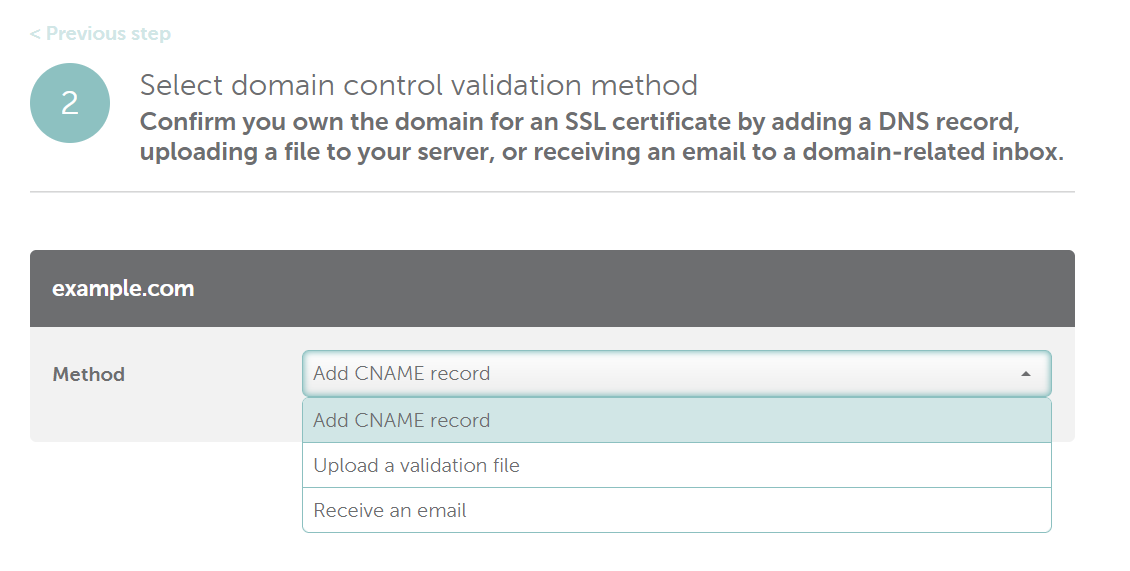
After your SSL purchase, activate your certificate in order to make it work for your website.
Before you start SSL activation, you'll first need to have a CSR code generated on your server by your hosting provider. You may also generate one yourself by following our guide to generating CSR code.
In either case, be sure to note the following tips before you begin:

Here is a how-to video:
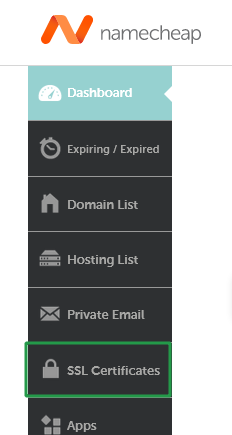

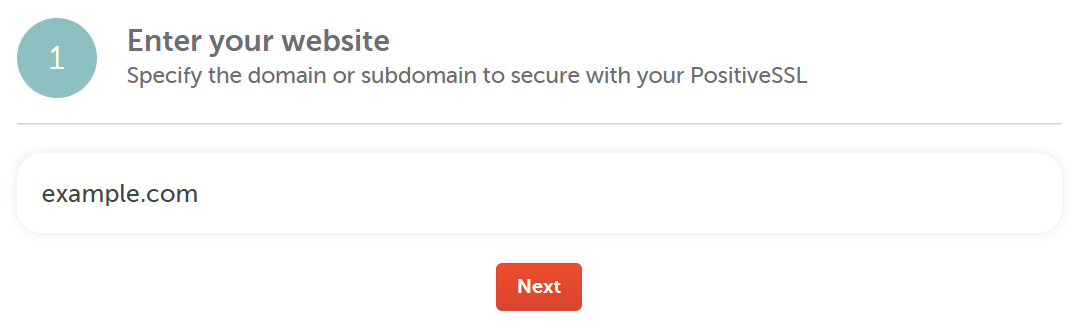
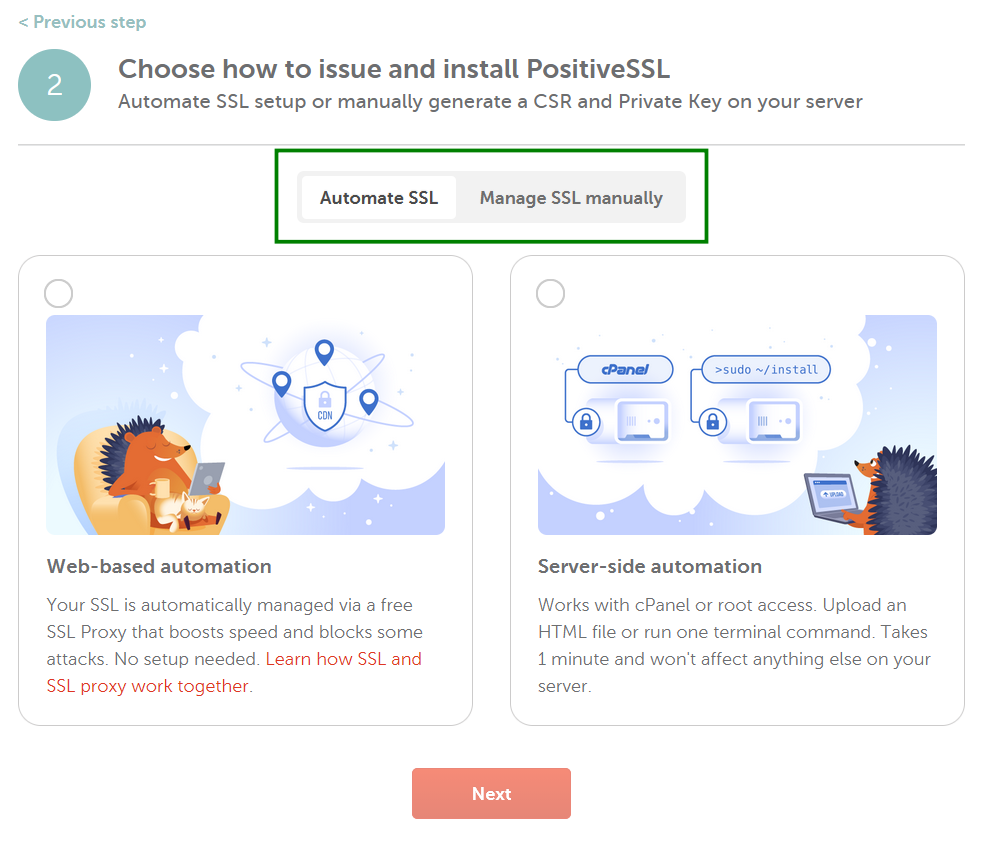
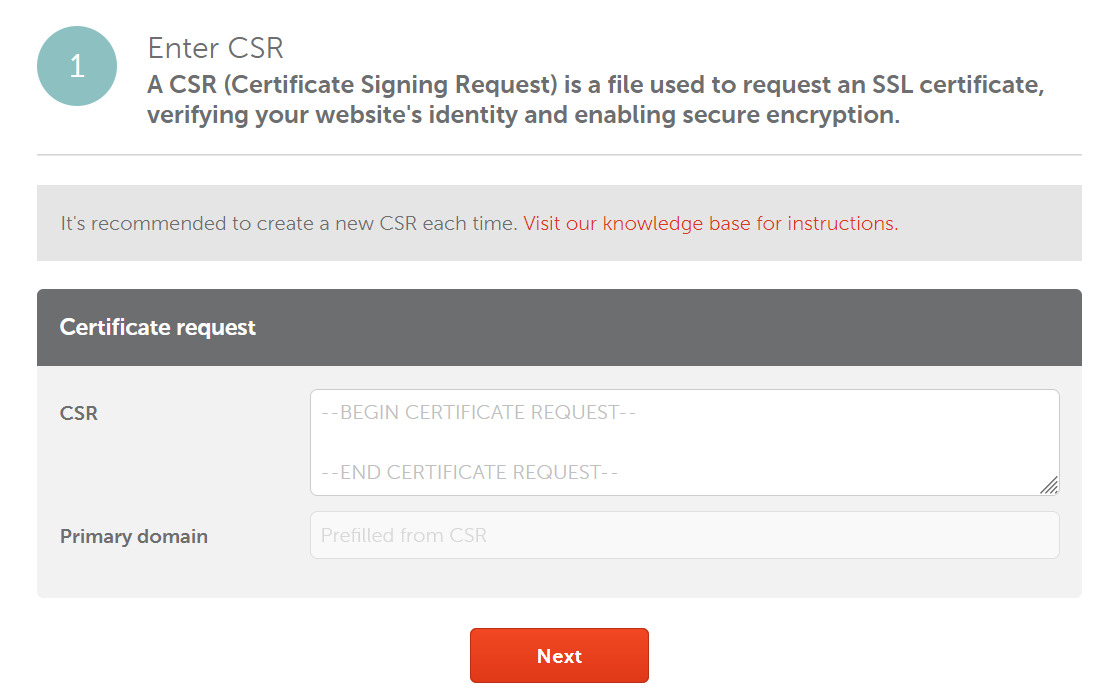
Note: SSL certificates cannot be issued for domains considered unsafe by Google Safe Browsing. All unsafe domains will automatically be removed from Multi-Domain SSL Certificates by the Certificate Authority (CA). Check the Safe Browsing site status here.
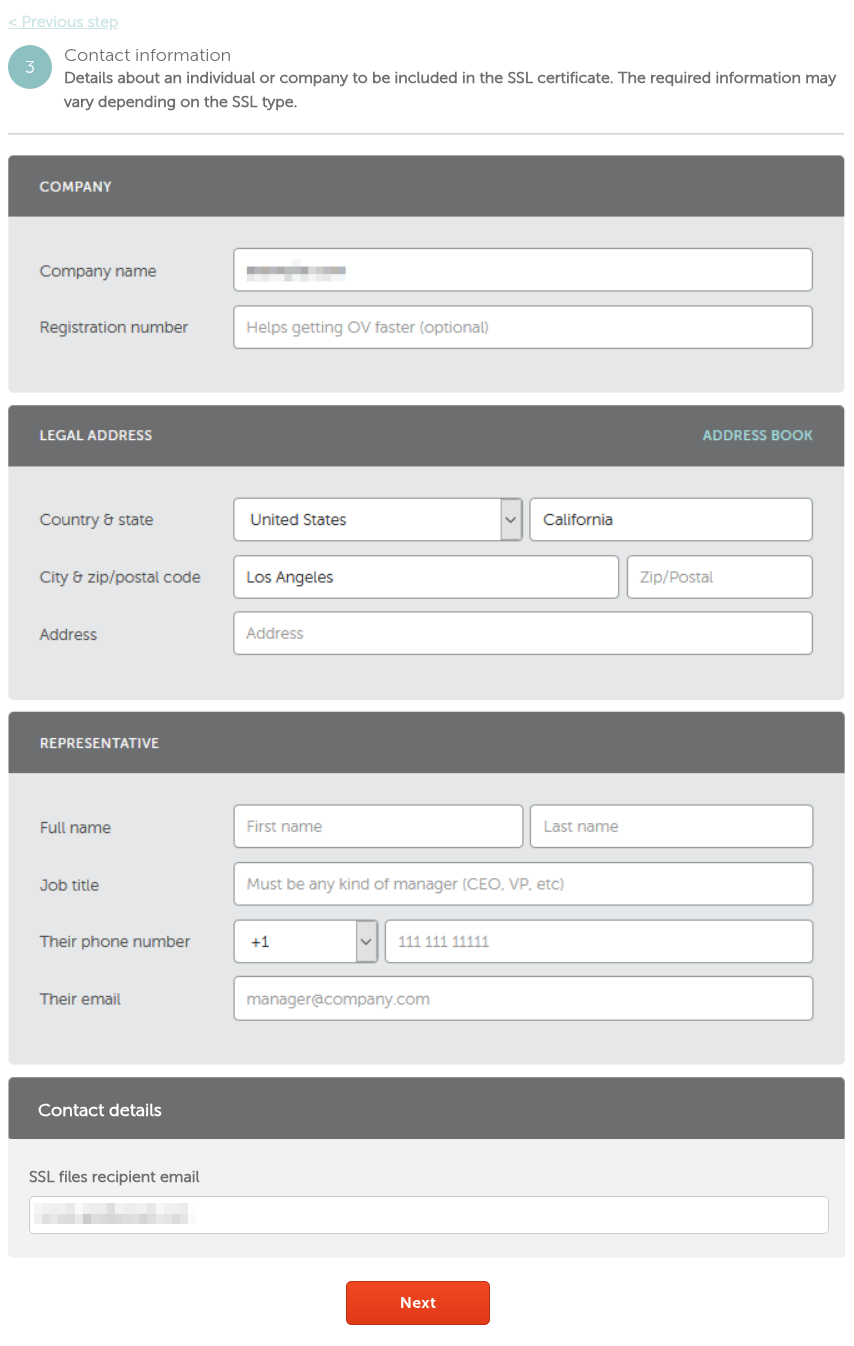
Note: The "Representative" section is required only for OV certificates.
Note: Please keep in mind that changes to the company details
for OV/EV certificates can be made during reissue, but only within the
first 45 days of certificate issuance.
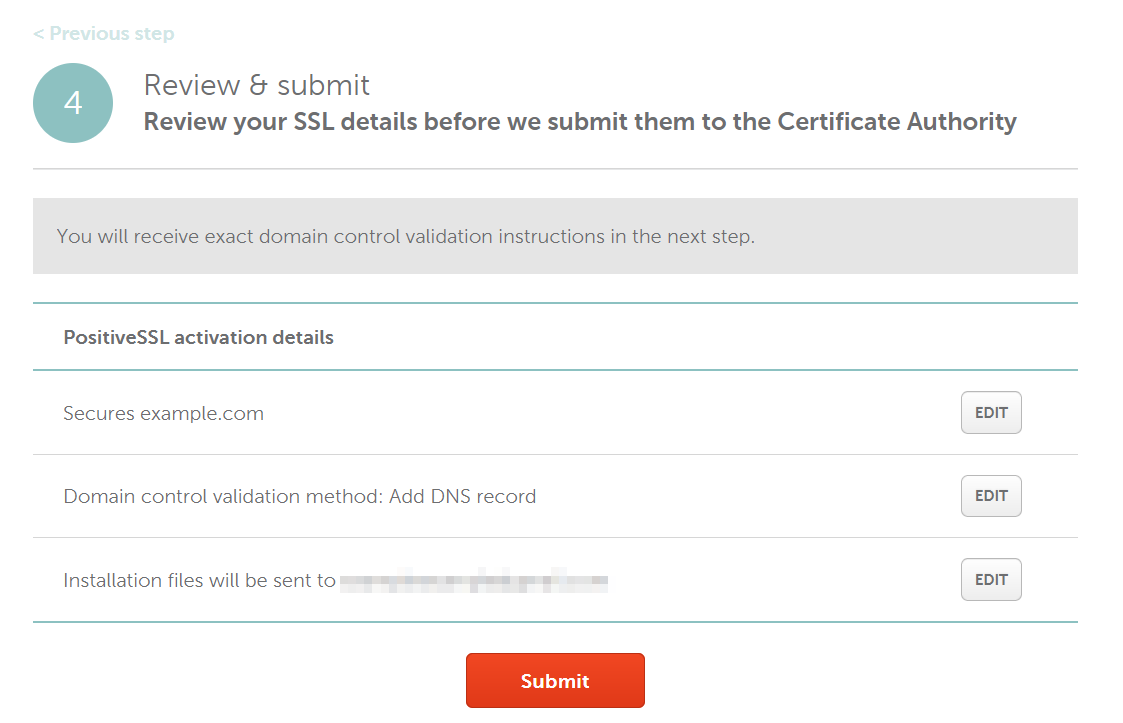
Once done, you will be taken to the certificate Management page where you can view the Order ID, Certificate Authority order ID ('CA order ID'), and other details of the certificate.
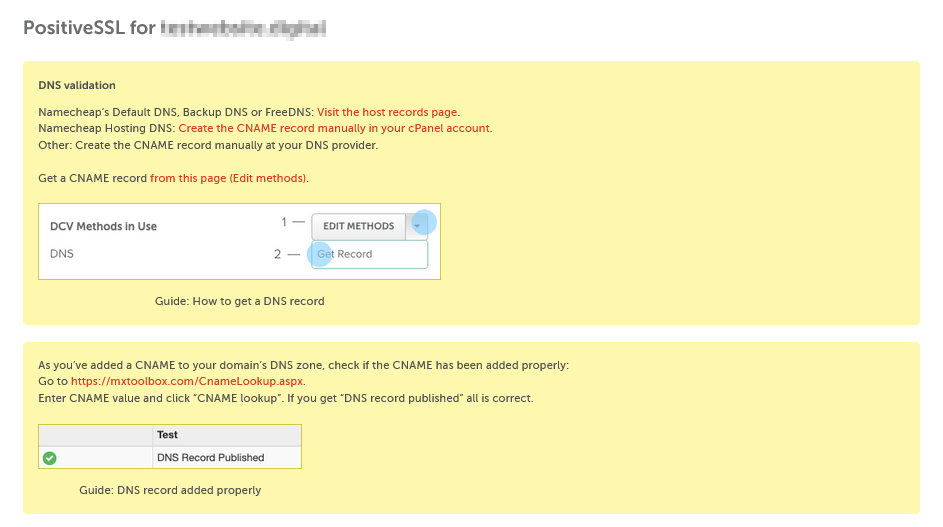
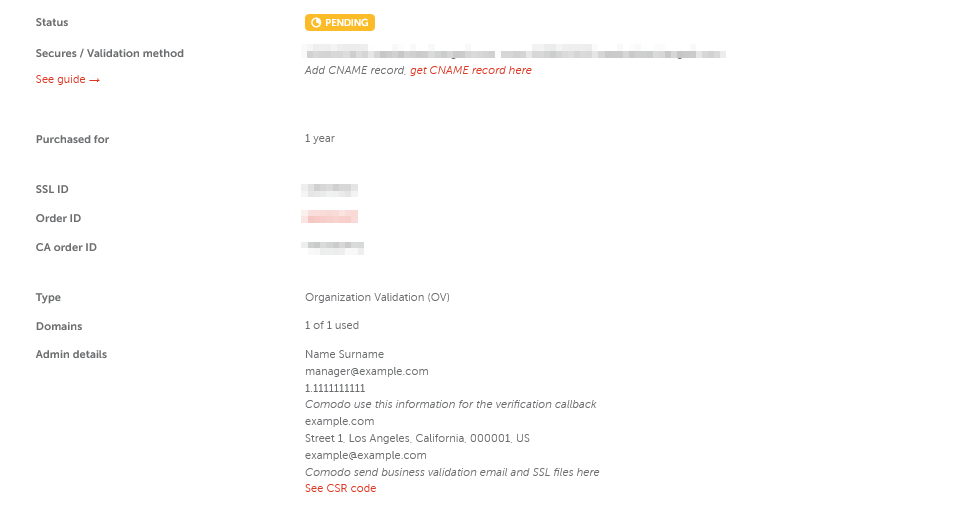
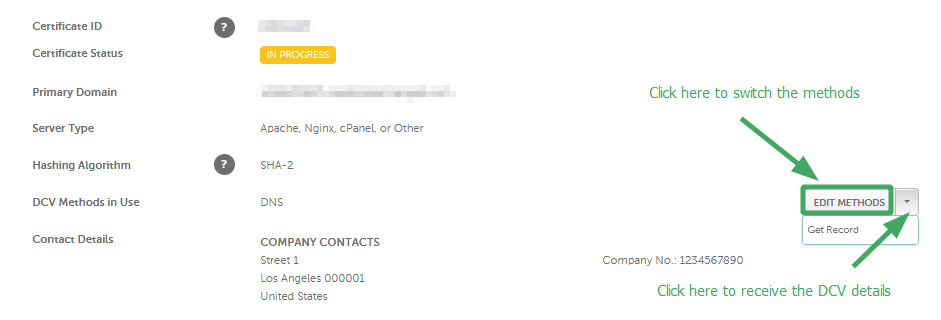
Note: You'll see the instructions on how to switch between the DCV options on the yellow panel at the top of the page. Use the corresponding link to go to the 'Edit methods' page.
By clicking the from this page (Edit methods) link, you'll be redirected to the page where you can review certificate-related information and switch the DCV options.
Confirmation emails are delivered to the approval address within 10 minutes after activation. You must confirm the issuance by clicking the link included in the approval email. The validated certificate will then be sent to the administrative email address selected during activation.
HTTP-based and CNAME-based validation may take longer, as the Certificate Authority will need to locate the file or record. Please make sure that the file is publicly accessible and that there is no firewall blocking the requests behind your server.
The validation system used by a Certificate Authority performs automatic checks of the validation file/record over a certain period of time. If validation fails, double-check that the file/record data is correct and accessible and make the necessary edits. Once the information is correct and accessible, the file/record should be validated when the CA validation system runs its next check.
Sectigo OV/EV certificates will still send a domain validation email prior to the CA's document submission request. If you order an OV/EV certificate, Certificate Authority will send you a list of documents required to verify your business, depending on the type of the certificate. To expedite the certificate issuance, make also sure that Whois for your domain contains the correct contact information. Order processing by Certification Authority may take up to an hour. If you do not receive an approval email within the specified time frame or the certificate has not been issued after one hour, and you have confirmed that the file or record is publicly accessible, please contact our SSL Support Team via Live Chat or email us to sslsupport@namecheap.com.
Need help? We're always here for you.