
Who gets the domain when a business partnership ends?
Most partnerships start with a flurry of careful paperwork. Equity gets split, the bank account gets dual signatures, someone drafts an operating agreement that both founders skim and sign. The domain got bought at 1 a.m. three years earlier by whichever founder had a card handy, and it has been quietly renewing on that card ever since.
That arrangement costs nothing until the partnership ends. At that point the website, the business email, and every service wired to the name depend on an account that belongs to one person. The company’s ability to own its web presence suddenly hinges on who remembers a password. Access and entitlement start looking like different things. They always were.
The way through is mostly sequencing. Map who controls what, get the decision in writing, then move the name in an order that keeps the site up. The lawyers come in exactly once, and this guide marks where.
First, separate the five kinds of control
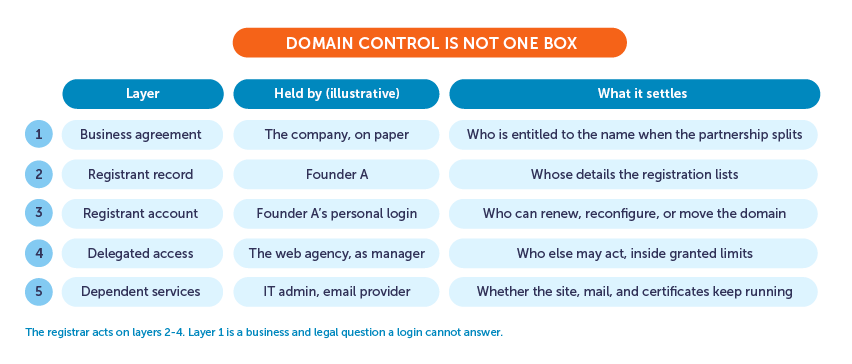
A domain has five layers of control, and they don’t have to point to the same person.
Start with the paperwork. Partnership agreements, formation documents, and IP schedules establish what belongs to the venture, and that layer exists even if nobody has read it since signing day. The registration itself lists a registered name holder, the person or entity in the domain’s contact records. Behind that sits the registrar account, and this login is what actually renews the domain, changes its settings, or moves it. Some accounts also include invited managers with their own permissions. Hanging off the name is the layer readers experience: DNS, hosting, business email, SSL certificates, connected apps.
A registrar acts on its own records, which cover the middle layers. The account, registrant data, and granted permissions determine who can perform registrar actions. The first layer is different. Whether a departing co-founder is entitled to keep the name is a question for the partners’ agreements and, where those run out, for the law of wherever the business lives. A login settles none of that.
Audit the domain before anyone loses access
Start with the question that exposes most of the gaps: if the renewal email arrived today, who would receive it?
Answer that in writing, then keep going while both partners still have their access. For each item, record the answer and note where the proof lives, because an audit with evidence attached survives the awkward conversations that follow. Record and verify the exact domain and registrar. The account username it sits in. The registrant name or entity and its contact email. The expiry date, the auto-renew setting, and the card behind it. The recovery email and the phone holding two-factor codes. Every person with shared or delegated access, and what each can do. The nameservers and DNS host. The hosting provider, the email service, the SSL setup, the latest backup, and the folder of invoices and agreements that shows who paid for what.
One caution on proof: a public domain lookup may show a pseudonymized address or a contact form these days, so it cannot serve as an ownership certificate. Registrar account records, invoices, and contracts carry that weight together. While you’re in there, confirm the registrant data is accurate and current, since registrars must act on stale contact information, and an outdated email is how domains get lost in transitions.
Decide the outcome in writing
Only four things can happen to the domain, and naming which one is the whole negotiation. The company keeps it, with the account moved under company control. One partner keeps it or buys the other out. The partners can also sell it and split the money. And sometimes the business simply walks: a new name going forward, with the old domain parked, sold, or left to lapse on purpose.
Whichever path wins, write it down with specifics: the exact domain, who receives it and into which account or entity, the price (if any), and the deadline. Renewals need a named owner from that day forward. So does each step of the move, including the cooperation the other partner owes while it happens, which dependent services travel versus get rebuilt, and a fallback for the step that stalls at the worst possible moment, as transfer steps can.
A domain that carries the brand, serious money, or an active argument deserves a lawyer’s read of the separation language before anyone touches an account. Cheaper than the dispute, every time.
Transfer control without taking the website down
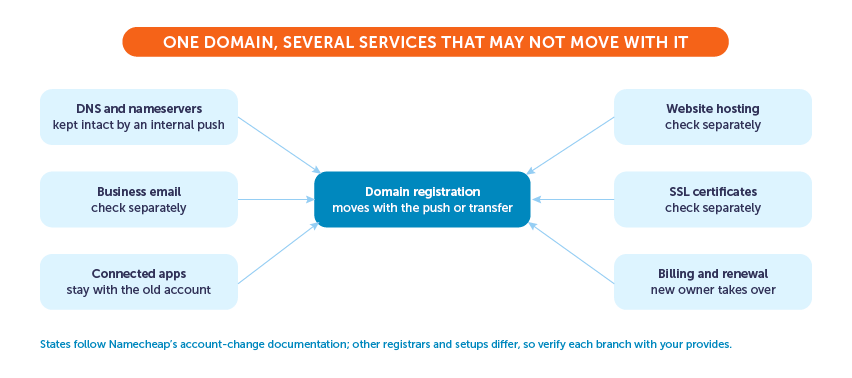
Two different operations get confused at this stage, and the confusion causes most of the avoidable pain. Moving a domain between two Namecheap accounts is an internal ownership change. No 60-day wait applies, DNS settings ride along untouched so the site and email keep working, and once the new owner accepts, that’s that; Namecheap won’t reverse it. An inter-registrar transfer is the bigger production, with unlocking, an authorization code, and 60-day locks after registration, a prior transfer, or certain registrant changes.
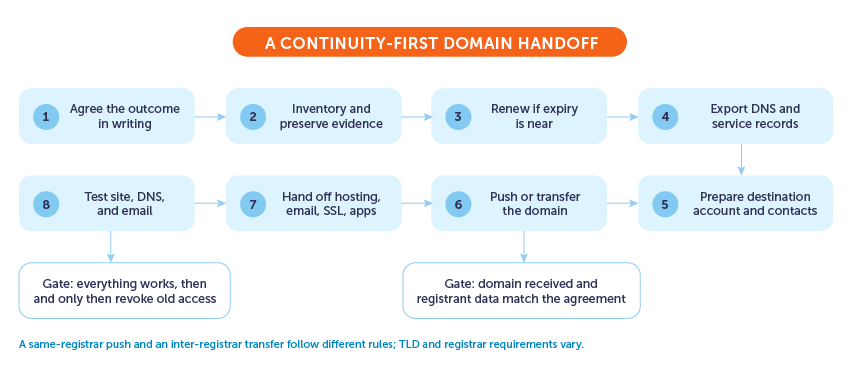
- Freeze nonessential changes on both sides, so the thing being handed over stays in a known state.
- Renew first if expiry is near. An expired domain cannot be pushed between accounts at all, and a mid-transfer expiry is a mess nobody enjoys.
- Export the DNS zone and note every service configuration, because this record is what rebuilds the setup if anything gets dropped.
- Prepare the destination: the receiving account exists, its profile details are complete, and its contact data is accurate.
- Check the receiving person isn’t listed as a shared-access manager on the domain. Namecheap requires removing the manager role before you can change ownership between Namecheap accounts.
- Complete the agreed push or transfer, then verify: the domain shows in the destination account and the registrant details read the way the agreement says. For some country TLDs, contacts must stay unchanged during the move, which is worth knowing before a support ticket gets confusing.
- Hand off the dependent services separately. Hosting, business email, SSL, and app subscriptions do not all follow the domain automatically; each needs its own move or rebuild.
- Test the website, DNS, and email end to end. Revoke the old access only after that, because switching it off before testing turns small mistakes into outages.
When agreement breaks down
Sometimes there is no agreed outcome, and one partner is holding the login while the other is holding the operating agreement. What happens next matters more than who moves first, because the instinct to act unilaterally is precisely what turns a business dispute into a website outage with legal exposure attached.
Preserve everything before arguing anything. The contracts and invoices, the renewal receipts, the registrant notices, the support tickets, the logs showing who changed what and when: these documents establish the history that a password cannot. Possession of the login is a fact about operational access, and a court or arbitrator is free to find that the entitled party is someone else entirely, which is why locking a partner out or moving the domain mid-dispute tends to age badly.
Know what each venue is for. The registrar’s support team can help with account security and process questions, and that is the extent of it; ICANN is explicit that neither it nor registrars adjudicate ownership disputes between parties. The UDRP, the expedited dispute policy people find when they search for “domain dispute,” exists for trademark-based abusive registrations such as cybersquatting. A co-founder breakup over a legitimately registered business domain is not that, and filing one anyway wastes months. Contested entitlement belongs with a qualified lawyer who can read the partnership documents.
Put the breakup clause in the launch checklist
Every painful step above has a cheap preventive version, and the next venture deserves them from day one.
Register through an account the company controls, with a role-based contact address rather than a founder’s personal inbox. Keep the registrant data current as people and addresses change. When someone needs to manage the domain, grant named access with its own permissions instead of sharing the main password, which also means access can be revoked without changing every credential the company owns. Put a name next to renewals and recovery. List the domain, and the services hanging off it, in the founder agreement and the IP schedule alongside the trademarks. Then look at the access list quarterly, and again whenever someone changes roles or leaves.
None of that takes an afternoon. Decide who controls the domain while everyone still agrees.