Stop hidden threats on WordPress with MalwareGuardian
Malware never announces itself. But it can slow your site down, inject spam links, redirect visitors, and put your reputation at risk before you even realize something is wrong. When you run a small business website on WordPress, you already have enough to think about without wondering whether a hidden infection is silently damaging your site behind the scenes.
The basic version of our security tool, MalwareGuardian, is designed to take a lot of that stress off your plate. It is a free feature built for Namecheap managed hosting for WordPress users that continuously scans your WordPress site for threats and helps make WordPress malware removal more manageable before infections turn into bigger problems. Let’s explore how.
What is MalwareGuardian?
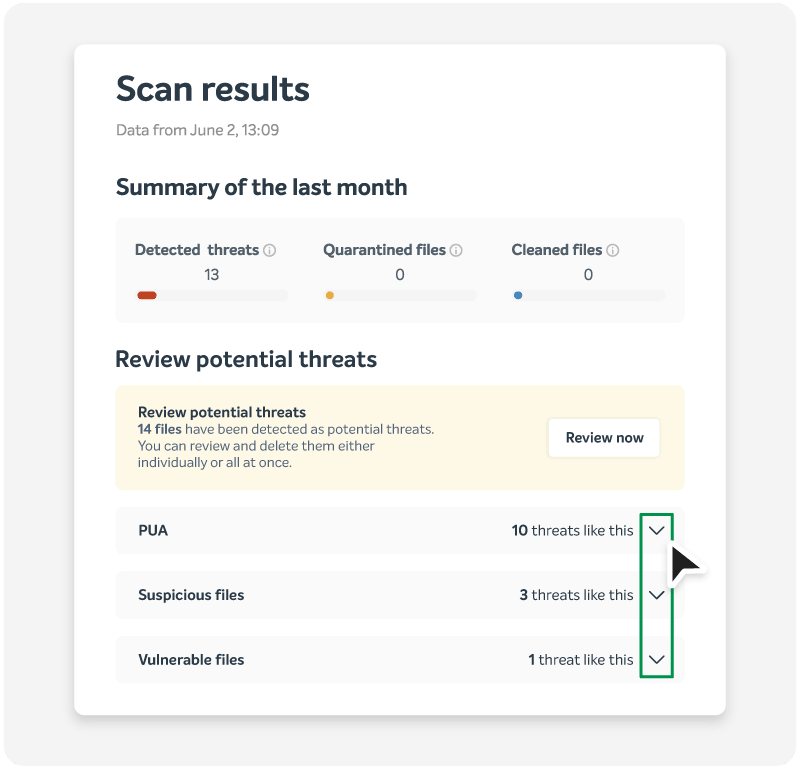
MalwareGuardian is an automated WordPress malware scanner built into the Namecheap platform. It continuously monitors your website for a wide range of threats, including web shells, adware, phishing attacks, mailers, uploaders, and other suspicious activity.
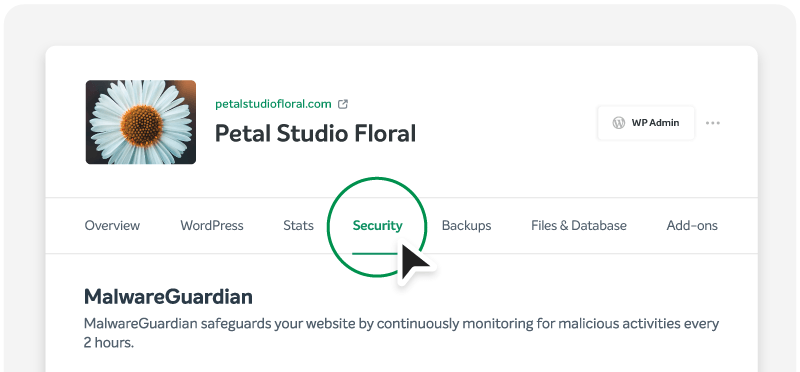
Instead of asking you to install yet another security plugin and figure out how to configure it, MalwareGuardian is already part of your Namecheap cloud hosting environment. That means it works from inside the platform itself, giving you an extra layer of protection without adding more clutter to your WordPress dashboard.
Because it is built directly into Namecheap managed WordPress hosting, MalwareGuardian runs quietly in the background, scans automatically every two hours, and helps you stay aware of threats without turning website security into a full-time task.
Who MalwareGuardian is for
MalwareGuardian is made for WordPress users who want stronger security without becoming security experts.
- You run a business website and don’t have time to manually check for spam links or phishing pages.
- You manage a blog, portfolio site, or e-commerce store and want help catching threats before they turn into lost visitors and sales.
- You look after client websites and want built-in malware monitoring without buying extra plugin licenses.
When you understand that website security matters, but don’t want to spend your week manually scanning files, MalwareGuardian is for you.
When you should use MalwareGuardian for security
The short answer is as early as possible. Malware is much easier to deal with when it is detected quickly, before it has time to spread through your files, inject bad code, or trigger search engine warnings.
That is why MalwareGuardian should be treated as part of your standard setup from the beginning, right alongside SSL, backups, and sensible plugin choices. If you wait until your website is already acting buggy, the damage is done, and your WordPress malware removal job may be much larger than it needed to be.
There are also a few moments where MalwareGuardian becomes especially valuable:
- After installing new plugins or themes, especially from sources you have not used before.
- During busy marketing periods, when more visitors and more moving parts can make problems harder to spot.
- If your site has ever been infected before and you want another set of eyes on it in the background.
- When you manage several websites and need a more practical way to monitor them.
The key benefit is not just removal. It’s getting a faster heads-up to potential trouble. The sooner you spot malware, the smaller the mess tends to be.
How MalwareGuardian helps with common malware problems
MalwareGuardian doesn’t just scan for generic, potential threats. It is looking for real problems that can hurt a WordPress site in ways owners feel almost immediately. Here are four common malware scenarios it helps you deal with.
Spam and SEO injections
One of the most frustrating WordPress infections quietly adds spammy links, junk pages, or strange keywords to your site. You might not notice it right away, but search engines can, and so can visitors who land on the wrong page.
MalwareGuardian helps catch malicious files and suspicious activity tied to these injections before they do long-term damage to your rankings or credibility. This matters because a site can look normal on the front end while still being used to push unwanted content behind the scenes.
Phishing pages hidden on your domain
Some attackers use compromised WordPress sites to host fake login pages, payment forms, or brand impersonation pages. To a visitor, it may look like the scam is coming directly from your business, which can quickly damage trust.
MalwareGuardian scans for phishing-related threats and helps identify files or behavior that should not be there. Catching these early matters because phishing pages can trigger browser warnings, blacklisting, and a serious hit to your reputation.
Malicious scripts that send spam or abuse server resources
Not all malware is trying to steal data. Some infections turn your site into a tool for sending spam emails, launching scripts, or running background processes you never approved. That can hurt performance, create deliverability problems, and make your site feel unreliable.
MalwareGuardian watches for threats like mailers and other malicious payloads that can abuse your hosting environment. By surfacing these issues sooner, it gives you a better chance to contain them before they create wider problems.
Hidden backdoors and web shells
Some of the most dangerous malware is designed to stay hidden. Web shells and backdoors can give attackers repeat access to your site, even after you think the original problem is gone. That is one reason hacked sites sometimes get reinfected so quickly.
MalwareGuardian continuously scans for this kind of malicious behavior, helping uncover files that do not belong or actions that point to a deeper compromise. It is especially useful here because hidden access points are the kind of cyber threat most ordinary site owners would never find by hand.
“Malware Guardian is not just a malware scanning plugin. It’s a full tool. It helps you detect malware on your system, but at the same time, it categorizes it, cleans your website whenever possible, and tracks the statistics compared to the previous months. As a developer who worked on the implementation, I’m really happy to be able to provide such a set of features to our customers.”
—Jelena Dokic, DevOps Engineer, Namecheap Cloud
Working together with other security tools
MalwareGuardian is strongest when it works as part of a wider security setup, a portfolio of tools we created to protect our customers’ websites.
Namecheap managed WordPress hosting also includes tools like HackGuardian, which helps lock down sensitive WordPress files, and WordPress Automatic Updates, which help reduce exposure to known vulnerabilities. Free SSL, CDN, backups, and other platform protections add even more layers around your site.
Together, these features create a more complete safety net. MalwareGuardian helps you spot and clean threats, while other tools help reduce the chances of those threats getting established in the first place.
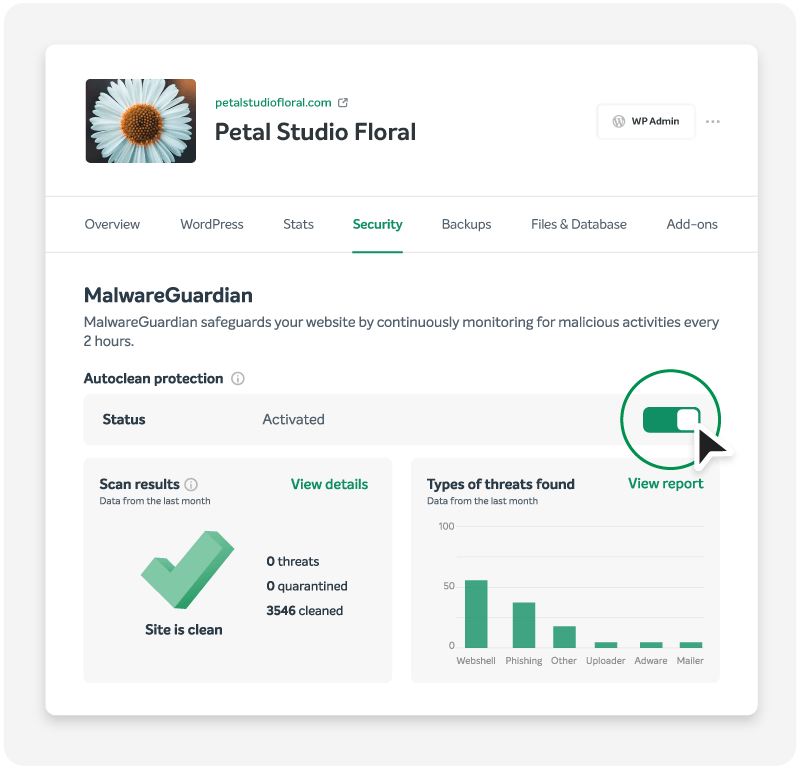
How Autoclean works across all managed WordPress plans
MalwareGuardian is included with every managed WordPress plan, but the experience differs by tier.
On the Starter plan, MalwareGuardian scans every two hours and notifies you if it detects malware. However, you won’t see the full list of detected files directly in the dashboard on the Starter tier. If malware is found, you’ll get an alert and can contact support to request the list of detected files, or use a separate WordPress malware removal plugin to detect and remove malicious files. For more automation, you can purchase Autoclean as an add-on.
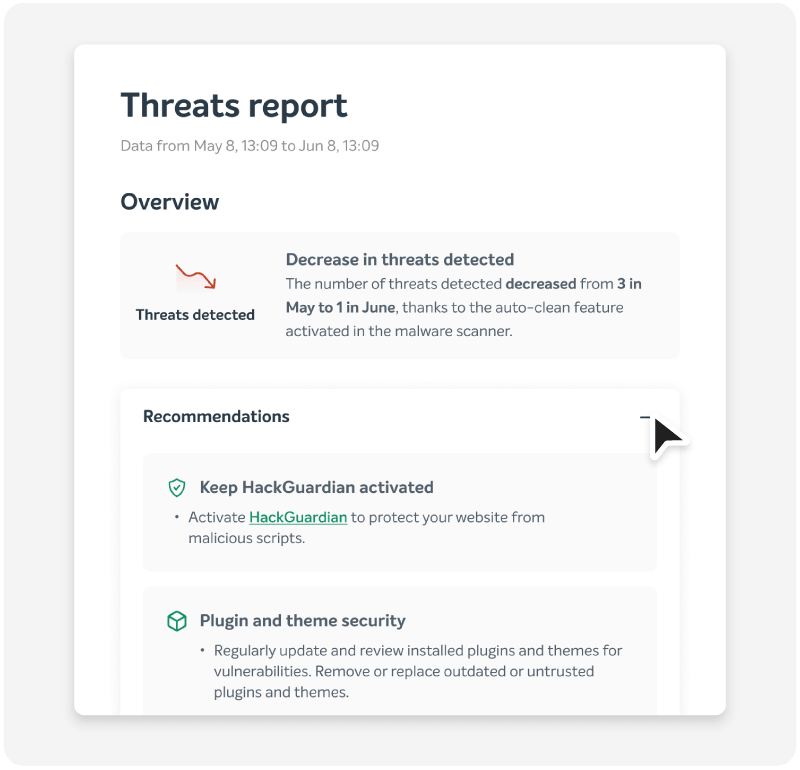
On Turbo and Supersonic plans, Autoclean is included automatically at no extra charge. That means higher-tier users get a more advanced WordPress malware scanner experience, with automatic quarantine of malicious files and cleanup of compromised files by removing bad code and restoring safe content where possible.
But keep in mind, even with automated protection, it is smart to review flagged issues, pay attention to alerts, and keep your themes and plugins in good shape. Security works best when you stay engaged with what’s going on inside your site. Much of the heavy lifting is done for you, but it’s always wise to pay attention to alerts.
Why MalwareGuardian makes managed WordPress security stand out
Many WordPress users end up stitching together a security stack themselves. One plugin for scanning, another for cleanup, another for updates, and maybe a separate service for reports.
MalwareGuardian gives managed WordPress hosting customers a simpler path, and for many WordPress users, that matters. It means security concerns are minimized, and you can go about your daily business, knowing that Namecheap is looking out for you.
If you want to go even further in hardening your site, take a look at our ultimate website security checklist for growing businesses for more practical steps that can make your site even safer.
FAQ: MalwareGuardian on managed WordPress
Does MalwareGuardian slow down your WordPress site while it scans?
MalwareGuardian runs quietly in the background without disrupting your normal site operations. Because it is built into the managed WordPress platform, it doesn’t behave like a bulky front-end plugin that adds dashboard clutter or site overhead. That means you can keep working on your site while scans happen behind the scenes.
What should Starter plan users do if MalwareGuardian finds malware?
On Starter, MalwareGuardian will notify you if it detects malware, but it doesn’t clean infected files by itself and doesn’t show the full detected file list directly in the dashboard. If you need that file list, you can use a WordPress malware-removal plugin to scan and clean the infected files yourself. If you want more built-in automation, you can add Autoclean to Starter or move to Turbo or Supersonic, where it is already included.
Can MalwareGuardian help if my site was infected before I turned it on?
Yes, it can still help by scanning your current files and identifying threats that are already present. That is especially useful for site owners who suspect something is off but are not sure where to start. It may not undo every consequence of an earlier infection on its own, but it can give you a much clearer picture of what needs attention and help prevent the problem from staying hidden any longer.
Which managed WordPress plan includes automatic malware cleanup?
Automatic malware cleanup is included with Turbo and Supersonic plans at no extra charge. Starter plan users can add it as an optional add-on. Beyond convenient Autoclean malware protection, these plans also offer significant performance boosts, including more CPU and RAM.