
Private Email Updates
Come here to find out what’s new in Private Email. Get updates on new email features, how they work, and how you can start using them right now, in a short, easy-to-read breakdown. And to see what’s on the way, explore our roadmap of features we’re building based on your feedback.
October 2026
Change the subject line in replies
Update the subject line when you reply, without losing the connection to the original email.
How it works:
- Start a reply or use Reply All.
- Rewrite the subject line before you hit send.
To keep the original subject line, simply send your reply without changing it.
Use multiple accounts at once in webmail
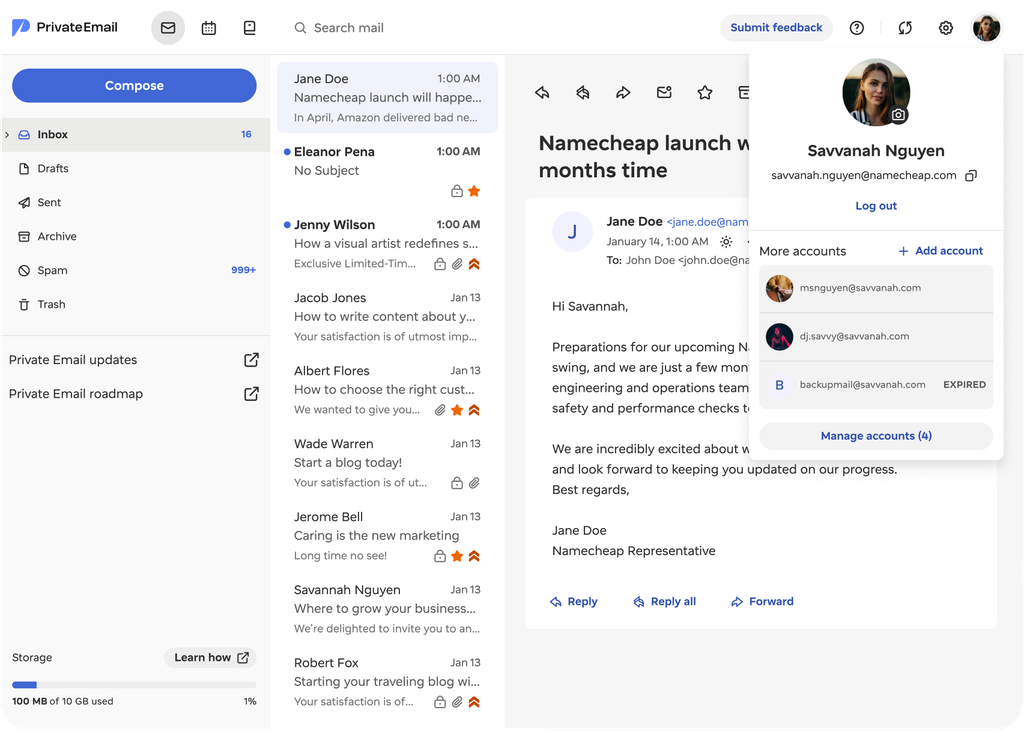
Work across several mailboxes in one browser and move between them without repeated sign-ins.
How it works:
- Select your profile picture and choose Add account to stay signed in to up to 10 accounts in one browser.
- Choose any account to switch to it, or use Manage accounts to sign out of one.
When a session expires, your password is all it takes to get back in.
View sender avatars in your inbox
Recognize senders faster, with avatars now shown in the email list. Check beside any email to view the sender’s profile picture or their initials.
Drag images inline or as attachments
Choose to add an image as an attachment or inline when you drag it into Compose.
How it works:
- Drag an image into Compose, and two drop zones appear: Insert inline and Attach.
- Drop it into Insert inline for formats like PNG, JPEG, GIF, and WebP, or into Attach to add it as a file instead.
If a format isn’t supported for inline use, Private Email will let you know.
September 2026
Search your entire mailbox
Search your whole mailbox in one go instead of checking folders one by one.
How it works:
- Enter your search query to search your whole mailbox at once.
- Tap Inbox, Drafts, Sent, or Other to narrow your results to one folder.
To search everywhere again, switch back to All mail at any time.
Edit events when you’re a participant
Event participants can now update event details, making it easier to keep plans up to date without the back-and-forth.
How it works:
- Open an event where the organizer has allowed participant editing to update the title, description, location, date, and time, all-day settings, or recurrence.
- Add or remove participants while keeping the original organizer unchanged.
Editing a recurring event? Update the entire series or make changes to a specific occurrence. Only the organizer can cancel or delete the event for everyone.
Open an event in the Private Email Calendar to view the available editing options.
Find saved contacts faster when writing emails
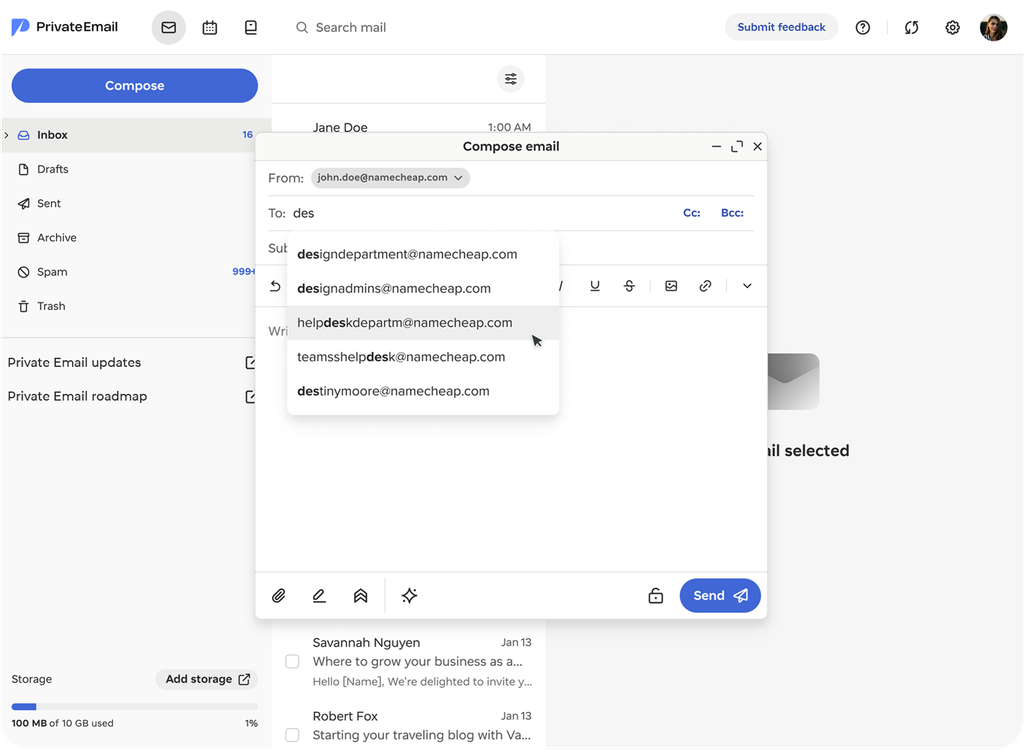
Recipient suggestions now include email addresses from your Contacts tab, even if you’ve never exchanged emails with them before.
How it works:
- Start typing a recipient’s email address when composing an email to get matching addresses from your saved contacts.
- Update a contact’s email address, and the new address will appear in future suggestions.
- Saved multiple email addresses for one contact? Each one can appear as a suggestion when you compose an email.
Filter your Calendar to just workdays
Calendar now includes a new Workdays view alongside Daily, Weekly, and Monthly. It shows Monday through Friday, removing the weekend columns so the five weekdays expand to fill the available width.
How it works:
- Open Calendar and find the view selector in the top-right corner.
- Choose Workdays to display Monday through Friday for your calendar.
Need the full week back? Switch to Weekly anytime to bring back Saturday and Sunday.
Search in the responsive view
Search is now available in responsive webmail, making it easy to find any email from your phone or tablet, not just on desktop.
Open your webmail on a phone or tablet and tap the search icon in the header. The search field expands right where you need it.
Preview attachments before downloading
Take a quick look at an attachment before downloading it.
How it works:
- Open an email to preview any supported attachment in the reading pane.
- Works with PDFs and image files like JPEG, PNG, GIF, BMP, and WEBP.
- Flip through every page of a multi-page PDF without leaving the preview.
- Save a copy to your device by downloading the attachment whenever you need it.
Move emails to folder with right-click
Move any email into a folder straight from the message list using the right-click menu.
How it works:
- Right-click one or several selected emails and select Move to folder.
- Use the search box or browse folders and subfolders in the picker.
- Need a new folder? Create one right inside the picker.
- Choose a folder and your email moves there instantly, with a confirmation message.
- Drag-and-drop still works exactly as before, if you’d rather use that.
Attachments moved to top of emails
Find and download your attachments faster from a new section at the top of every email.
How it works:
- Find attachments right at the top of the email, with no scrolling required.
- Easily expand the attachments list to view how many files are attached.
- Download attachments one at a time, or use Save all for every file in the email.
August 2026
Pinned email actions
Reach key actions faster with a toolbar that stays pinned to the top as you scroll.
How it works:
- Use Reply, Reply all, Forward, Archive, Delete, or other actions from wherever you are in the email.
More ways to archive
Archive emails faster from more places across your inbox.
How it works:
- Archive individual or multiple emails from your message list, an open email, or a bulk selection.
- Move all emails in a folder to Archive, or a supported custom folder.
- Press E to archive the email that’s open or selected.
New filter and sort options
Get to the emails you want quicker with the new Filter and Sort menu.
How it works:
- Combine filters and sorting together to get more refined results.
- Show only unread emails or the ones you’ve favorited.
- Order your messages by newest, oldest, largest, or smallest.
- Quickly spot how many filters and sort options are active, and tap Reset to return to default.
Reply and forward markers
Quickly view which emails you’ve replied to or forwarded without opening emails.
How it works:
- Find an arrow pointing left next to any email you’ve replied to.
- Spot an arrow pointing right next to any email you’ve forwarded.
Save and print emails
Save and print any email right from your inbox, so you always have a second copy.
How it works:
- Find the download and print icons in the toolbar, or right-click an email when you open it.
- Download a complete email as an .eml file for offline access, backup, or use in another email app.
- Switch to a print-friendly view to print an email, or save it as a PDF.
Select multiple emails in webmail
Handle several emails at once with a new bulk selection option in webmail.
How it works:
- Tick the checkboxes next to your emails to select multiple emails at once.
- Delete, archive, or mark all selected emails as read, unread, favorite, or spam at once.
- Chosen emails get a highlight so you can easily spot which emails you’ve selected.
Alphabetical folder sorting
Find folders faster with a new option to organise folders and subfolders from A to Z.
How it works:
- Select Sort alphabetically in the folder menu to put everything in A to Z order.
- Switch it off whenever you want to use your own order instead.
Easier event scheduling
Book meetings faster, avoid schedule conflicts, and save time coordinating meetings.
How it works:
- View each attendee’s availability before you send an invite.
- Spot double-bookings before they happen.
- Quickly add or remove participants from your event.
July 2026
Manage contacts in webmail
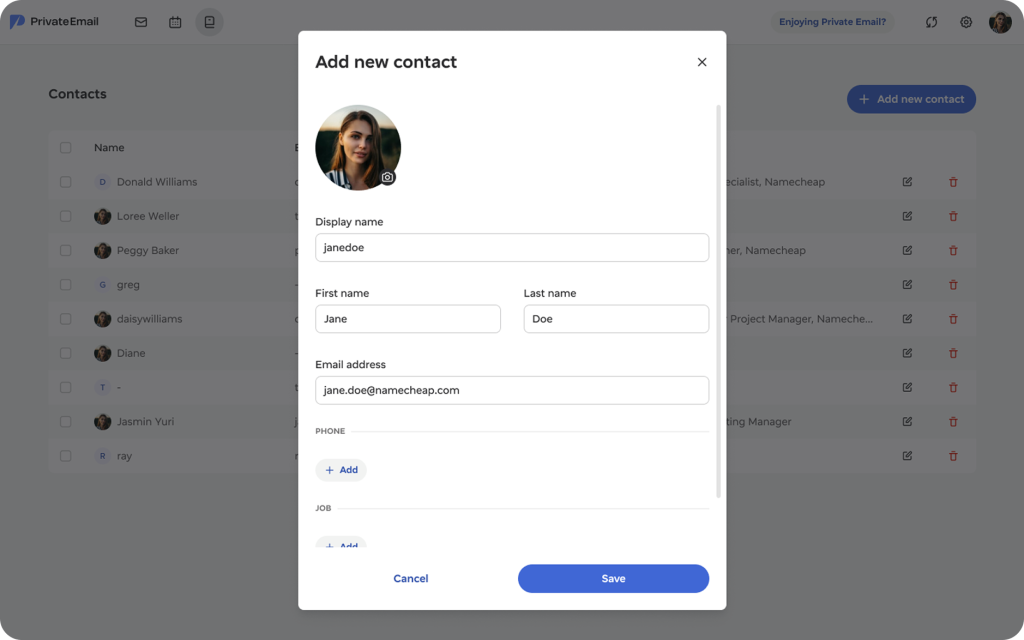
Store and edit your contacts in Webmail and access their details without switching windows.
How it works:
- Save and manage names, emails, phone numbers, companies, birthdays, and more for any contact.
- Add a profile picture to any contact, or show their initials if there isn’t one.
- Tap the new button in the header next to Calendar to see your contacts.
New webmail for existing Private Email customers
Earlier this year, we launched a new webmail for Private Email. New customers have used it since June, and starting August 3rd, we’re rolling it out to all existing customers. Your mailbox, your data, and the way you log in all stay the same. The main change is the webmail interface – with a couple of exceptions we’ll flag below.
When will the rollout start?
The rollout starts on August 3rd, 2026, covering all customers who joined before June 2, 2026. Not every account’s webmail updates on the first day, they will be updated in stages throughout August.
You don’t need to do anything. The update is processed automatically, and you’ll keep using your mailbox exactly as before.
What changes and what doesn’t?
The thing that changes is how your webmail looks. The interface is more modern, cleaner, and easier to navigate. You can preview the new interface and its features here: New Namecheap Private Email webmail features
Your email address, login flow, and credentials stay the same. You’ll also use the same Namecheap account to manage your Private Email subscription, including billing and mailbox settings.
All your existing data comes with you too:
- Emails
- Folders
- Contacts
- Calendars
- Filter rules
Your email delivery is unaffected too – it runs on the same infrastructure, and only the interface changes.
A note on legacy features: As we move off the Open-Xchange platform, associated features are being sunset. These are separate from your core mailbox data – if you use Open-Xchange Drive, collaboration tools (Docs/Sheets/Presentations), ActiveSync, or Unified Mail, those features are being retired and require a few steps before your migration. See the KB article for details.
The bottom line
If you haven’t read our previous update explaining why we’re making this transition to a new webmail and what’s changing, you can find it below this article.
New filter rule actions
Stack multiple new and upgraded actions on a single filter rule, with more options for where filtered mail lands.
How it works:
- Add new filter actions, including Discard, Copy to, Forward to, Keep, Mark as read, and Mark as favorite.
- Select more than one action for the same rule.
Filter by sent date
Easily filter emails from a specific date or time period with a new Sent date filter option.
How it works:
- Tap the new Sent date option under filter conditions.
- Filter emails sent after, before, on, not on, on or after, and on or before a specific date.
- Enter a date, or tap the calendar icon to pick one.
Improved filter rules
Create more powerful email filters and sort incoming mail into new folders fast.
Here’s what’s new:
- Filter emails by header or size.
- Create new subfolders right in the filter setup screen.
- Find folders fast with a new search bar, a better folder picker, and a tidier layout.
Head to Private Email to try out your upgraded filter rules.
A new chapter for Private Email
As Private Email continues to evolve, we want to make it easier for customers to stay informed about what’s changing, what’s improving, and what’s coming next. This new Product Updates series will serve as an ongoing hub for major improvements, new features, and important service updates.
And today, we’re starting with one of the biggest milestones in the history of Private Email.
Private Email is entering a new era
Beginning June 2, 2026, all new Private Email subscriptions started using an updated email experience powered by our own platform.
This is more than a visual refresh or a routine upgrade.
It marks the beginning of a long-term evolution of Private Email designed to give customers a more modern, reliable, secure, and continuously improving business email solution.
For many years, Private Email has helped customers manage business communication through a trusted email solution. As customer expectations and modern workflows continue to evolve, the future of business email requires faster innovation, greater flexibility, stronger security foundations, and a platform we can continuously improve without limitations.
Why we’re making this change
The updated Private Email experience now runs on our own platform infrastructure.
By operating and developing the platform ourselves, we now have direct control over:
- Product improvements and release cycles
- User experience and interface evolution
- Security enhancements
- Feature development priorities
- Long-term platform reliability and scalability
Most importantly, this allows us to move significantly faster.
Previously, large feature releases often required long scheduled maintenance windows. With the new architecture, improvements and fixes can now be delivered more seamlessly and continuously, helping to minimize interruptions and allowing us to iterate faster based on customer feedback.
This shift also gives us the flexibility to build Private Email around how modern business communication actually works today — and where it’s heading tomorrow.
What changes, and what stays the same
While the webmail experience is evolving, many core aspects of Private Email remain familiar.
What stays the same
Customers will continue using:
- The Private Email product name
- The privateemail.com webmail link and login flow
- Existing DNS settings
- Existing mail server configuration
- IMAP, POP3, and SMTP connectivity
- Subscription and billing management through the Namecheap Account panel
- Core admin management functionality
What changes
The biggest change is the webmail experience itself.
The updated platform introduces a redesigned interface, a different feature structure, modernized workflows, and new functionality built directly into the platform.
Customers who purchase new subscriptions after June 2, 2026, will automatically receive the updated experience. Existing Private Email subscriptions using the previous platform will transition gradually later in 2026 as part of the next migration stage.
Stay tuned — we’ll keep you informed and share everything you need to know before the transition begins.
Understanding the transition timeline
To make the rollout as smooth as possible, the transition will happen in stages.
Stage 1. New subscriptions onboarded to the updated platform
Starting June 2, 2026:
- New Private Email subscriptions use the updated experience
- New customers are automatically onboarded onto the new platform
- Existing customers may temporarily have both old and new subscription types depending on their purchase dates, which means they may notice different webmail interfaces between subscriptions during the transition period.
Stage 2. Existing subscriptions transition
Later this year, existing subscriptions on the previous platform will gradually transition to the updated experience.
We know any platform change can feel significant, especially for long-time users. We are designing the migration process to preserve your existing mailbox data, including emails, contacts, and calendars. If you already use email clients such as Outlook, Apple Mail, or Thunderbird, your existing setup will continue to work.
We will share more information, migration details, and transition guidance before rollout begins.
Key features available in the updated experience
The updated Private Email experience is designed to bring together communication, productivity, flexibility, and security in a more modern and streamlined way.
At the center of the experience is secure webmail access, allowing customers to manage both email and calendars through a modern, browser-based interface built for everyday productivity. The built-in calendar makes it easy to organize schedules, create events, respond to invitations, and keep track of meetings directly from the inbox.
To help customers communicate faster and more efficiently, the new platform also includes the AI Email Assistant directly inside the compose window. Whether drafting a quick reply or polishing a professional message, AI-powered assistance helps turn short notes into more complete emails with less effort.
The updated experience is also designed to support flexible workflows across devices and applications. Customers can continue using their preferred email clients via IMAP, SMTP, and POP3, while CalDAV and CardDAV support enables syncing calendars and contacts across compatible applications and devices.
Everyday mailbox management tools such as auto-reply and email forwarding remain available as part of the experience, helping customers stay responsive and organized even while away from their inbox.
Security continues to play a central role throughout the platform. Stored mailbox data is encrypted on our servers, Jellyfish’s machine-learning-based spam protection helps filter unwanted and malicious emails, and two-factor authentication (2FA) adds an additional layer of account protection. Customers can also generate dedicated application passwords for external email apps and devices without exposing their primary account credentials.
To make the experience more personal and comfortable to use daily, customers can customize system preferences, including language settings and light and dark modes.
Together, these features create a more modern, productivity-focused Private Email experience built to evolve alongside customer needs.
And this is only the beginning.
Let’s talk about some common questions
We know that for many long-time customers, Private Email is part of their daily workflow.
And whenever a familiar product experience changes, it’s completely natural to wonder what this means for your mailbox, your setup, your data, and the way you work every day.
At the moment, existing subscriptions on the previous platform cannot be manually switched to the updated experience before the planned migration rollout. More information about migration timing and rollout details will be shared later.
We also know some customers may be asking why these changes are happening in the first place — especially if they were already satisfied with the previous experience.
The transition to the updated platform is ultimately about creating a more modern, reliable, and continuously evolving Private Email experience for the future. By operating the platform ourselves, we’re able to improve features faster, resolve issues more efficiently, strengthen security, and respond more directly to customer feedback over time.
Some parts of the experience and feature structure will naturally differ from the previous platform.
Some existing features, including certain collaboration tools such as Docs, Sheets, and Presentations, will not be available on the new platform.
At the same time, the new experience introduces modern additions such as the AI Email Assistant, application passwords for IMAP/POP3/SMTP, enhanced security controls, a cleaner interface, dark mode support, mobile-responsive design, and a more focused productivity-oriented workflow.
We are also actively working on additional improvements and features planned for the near future, including a migration tool and dedicated mobile applications for iOS and Android.
Customer feedback will also play an important role in shaping future development.
Inside the updated webmail experience, you can use the “Enjoying Private Email?” button available in the top-right corner to share feedback directly with our team.
Built for continuous improvement
This transition is not about replacing something broken. It’s about creating a stronger foundation for the future of Private Email.
The updated platform gives us the flexibility to improve faster, respond to customer needs more directly, deliver updates more seamlessly, and continue evolving the experience over time.
As Private Email continues evolving, we’ll keep sharing important updates, improvements, feature launches, and future developments right here in the Product Updates series.
Thank you for being part of the next chapter of Private Email!




Stoked to see these changes come to the platform!
Thanks so much! We’re really excited about these changes too, and it’s great to hear they resonate.
Excited for this. Could we get a hotkey for archiving email tho? TYSM!
Thanks for the suggestion! We really appreciate your feedback. We’re planning to improve the Archive feature in the future, and we’ll definitely take your suggestion for an archive hotkey into consideration.
how to add outlook
Hello! If you’d like to set up your Private Email account in Outlook, please follow this guide: https://www.namecheap.com/support/knowledgebase/article.aspx/10687/2175/private-email-account-setup-in-new-outlook-client/ If you run into any issues, feel free to contact pesupport@namecheap.com
Where is the distribution lists feature, is it gone?
Thanks for reaching out! Distribution Lists aren’t available in the new Private Email webmail yet. We have many improvements planned, and this feature is on our backlog for a future release. We recommend keeping an eye on this article to stay up to date with the latest improvements.
my inboxes have disappeared and i’m just left with one, i cannot find how to change this?
Hi there! I am sorry to hear you are having difficulties. You can check our Knowledgebase for more information at https://www.namecheap.com/support/knowledgebase/category/93/email-service/
Or if you want to contact our Support Team, you can find more information here:
https://www.namecheap.com/help-center/
Where did the Flags go in the new App?
Hi! At the moment, the new webmail only supports Mark as Favorite. We really appreciate your feedback about Flags—we’ve shared it with the team and will be working on improvements. Thanks for taking the time to let us know! Be sure to keep an eye on our Spacemail Updates blog for future updates.
Sad to see AI being forced to users in private email, being opt-in by default. We are starting the process to go with another hosting service that value privacy more than implementing invasive AI features.
The AI Email Assistant is optional. When enabled, it works with the single email you’re actively composing. It has no access to your mailbox, folders, or other messages. Your email is never used to train AI models and is never shared with third parties. Everything stays on our own infrastructure.
Please add dark mode. Nice ui.
Thanks! We’re glad you like the new UI. Dark Mode is already available. You can enable it by going to Webmail → Settings → System Preferences and selecting the dark theme.
And what about the “unread” folder or the filter to find flagged/starred emails? Everything is gone. What a disgrace!
We understand the frustration. The good news is that filtering emails by unread status and finding flagged/starred emails are both available in the current Private Email webmail. We appreciate you sharing your concerns with us.
On emails in my inbox, I cannot see if I have already replied to them or not. Is this on purpose, or will you implement this in the future?
Also – in the previous version, I could click on the sender and immediately see our previous conversations. This is now gone too.
Thanks for your feedback! Reply indicators are available in the current Private Email experience, so you can see which messages you’ve already replied to. As for viewing your previous conversations by clicking on a sender, we’ve noted your request to bring this functionality back. You can follow our Private Email roadmap – https://privateemail.com/roadmap/ – for updates on upcoming improvements.
How to set inbox in conversation mode
Conversation mode isn’t available in Private Email at the moment, but email threads are already in progress. You can follow our Private Email roadmap – https://privateemail.com/roadmap/ – to keep up with the latest updates.
I can’t click on links, have to copy and paste.
This is an improvement? Don’t think so,.
In order to delete spam, I have to open it.
Why are emails truncated into small column at left of page? Why can’t I click on boxes and delete numerous emails at once?
Thanks for sharing your concerns. We’ve noted your feedback about making links in plain-text emails clickable and allowing more email actions without opening a message. Bulk selection and deletion are already available and you can select multiple emails using the checkboxes and delete them together. We’re continuing to improve Private Email based on customer feedback, and you can follow our roadmap – https://privateemail.com/roadmap/ – for updates.
oh hey, lets shove AI onto everyone, lets remove the address book, lets remove attachment previews, gah – why change things if they weren’t broken? I used privateemail on at least 6 domains, and now I’ll have to find an alternative, what a shame
We’re sorry to hear the changes have been frustrating, and we appreciate you sharing your concerns. Address Book and attachment previews are available in the current Private Email experience. Auto-suggestions for Contacts aren’t available yet, but they’re in progress. We’re continuing to improve Private Email based on customer feedback, and you can follow our roadmap – https://privateemail.com/roadmap/ – for upcoming updates.
Please bring back the feature where clicking an email address instantly shows the full conversation history. Manually copying and pasting emails into the search bar is too slow for my customer support workflow. I really need that one-click functionality restored!
Thanks for sharing this with us! We understand how useful quick access to the full conversation history can be, especially for customer support workflows. We’ve noted your feedback and shared it with our team. You can follow our Private Email roadmap – https://privateemail.com/roadmap/ – for updates on the improvements we’re working on.
I want to be able to see the total number of emails in my inbox that function seems to be gone.
Thanks for letting us know! The total email count isn’t currently displayed. We’ve noted your feedback and shared it with our team. You can also follow our Private Email roadmap – https://privateemail.com/roadmap/ – for the latest updates.
Hi, we used the email distribution lists to simplify bailouts to volunteers in different roles with our organisation. It was a super helpful feature but I can’t see it in the updated version. Is it something Im missing or is it something that will be included (soon)? thanks
Hi, thanks for reaching out! Distribution Lists aren’t currently available in the updated Private Email experience. We know this feature is valuable for communicating with groups, and we’ve noted your feedback about bringing it back. You can follow our Private Email roadmap – https://privateemail.com/roadmap/ – for updates on upcoming improvements.
I may have missed this, but none of my distribution lists migrated. How do I create a distribution list now?
At the moment, Distribution Lists aren’t supported in the new Private Email experience, which is why you won’t see an option to create one. We’ve received your feedback about restoring this functionality and have passed it along to the team. Please keep an eye on our Private Email roadmap – https://privateemail.com/roadmap/ – for the latest updates.
We need Distribution Lists back in the email system. This is a basic feature that even the simplest of email clients have. Removing this feature, without letting us know it was going away, has hindered our business communication with our guests and clients. Please bring it back.
Thanks for sharing your feedback. We understand how important Distribution Lists are for managing business communication, and we’ve noted your request to bring this functionality back. You can follow our Private Email roadmap – https://privateemail.com/roadmap/ – to stay updated on the features and improvements we’re working on.
Unified Email experience – why can I no longer add more accounts for unified experience?
Thanks for your feedback. Unified Mail is not currently available in the new Private Email experience. We’ve noted the need for this functionality and are working on ways to make managing multiple mailboxes at once easier. You can follow our Private Email roadmap – https://privateemail.com/roadmap/ – to stay updated on the improvements we’re working on.
distribution lists from before is now all empty. I see the list. but nothing inside.
Please fix, hundreds of emails gone
Thanks for sharing your feedback. Distribution lists are not currently available in the new Private Email experience, but we’ve noted your request to bring this functionality back. You can follow our Private Email roadmap – https://privateemail.com/roadmap/ – to keep up with the improvements and features we’re working on.
do you have mobile app?
Thanks for asking! A mobile app for Private Email is in our near-term plans. We appreciate your feedback and will share more updates as they become available.
It seems that since the upgrade, I have lost all of my distribution lists and now will have to spend a great deal of time reinstating them. The system does not allow me to copy email addresses from messages to create new contacts either. Please can you assist!
Hello! Thanks for sharing your feedback. Distribution lists are currently under investigation as we explore ways to implement this feature. We’ve also added the ability to save contacts from emails to our backlog. Follow the progress on our roadmap: https://privateemail.com/roadmap/
My contacts don’t populate when I start an email. I have to type in the person’s full email to send. This is taking too much time. How do I get my contacts to show up by typing in the person’s name in Send instead of typing their full email? I do not have Outlook.
Hello! Thanks for letting us know. Email address suggestions are available when typing part of an email address. We’ve also added the ability to find recipients by their contact name when composing an email to our backlog. Follow our roadmap for updates: https://privateemail.com/roadmap/
Hola buenas tardes, anteriormente podía tener mis 5 direcciones de correo en uno solo, lo cual me permitía estar al pendiente de todos los correos entrantes, ahora solo tengo uno, me puede indicar por favor como hago para agregar las otras cuentas?
Hello! We appreciate your feedback. Support for multiple mailboxes is already in progress and is planned for a future release. You can follow its progress and other upcoming updates on our Private Email roadmap: https://privateemail.com/roadmap/
The new update has significantly impacted my ability to perform my job efficiently. I am no longer able to search by subject, date, or across all inboxes the way I previously could. These features were essential to my daily workflow.
Hello Mark! Thanks for your feedback. You can already search emails by subject. We’ve added search by date to our backlog, while search across all folders is in progress. You can follow the latest updates on our roadmap: https://privateemail.com/roadmap/
Has this been fixed?
Hello! Yes, search across all folders is now available. You can search your entire mailbox or limit the search to a specific folder.
The new look and functions of the email is very annoying. In my business it was very important for me to reply to emails and be able to change the subject line. I’m not able to do so anymore. Also, I can’t send an accidentally deleted email back to the inbox.
Hello Anna! Thanks for your feedback. We’ve added your request to edit the subject line when replying to our backlog. To return a deleted email to Inbox, drag it from Trash to Inbox or use “Move to” option. Follow our roadmap for updates: https://privateemail.com/roadmap/
The color coding feature is gone.The copy/pasting of emails is gone, where you can copy the entire email template & copy it to the draft folder. I want the old version back if this is going to be rolled out piecemeal. It’s clunky,
Hello Andrew! Thanks for sharing your feedback. Color flags for emails are already in progress, while the option to copy an email to Drafts has been added to our backlog. You can follow the progress and upcoming updates on our roadmap: https://privateemail.com/roadmap/
How can I add multiple mailboxes? We use a shared mailbox and I can’t add it to the new webmail. It forces me to open up a new window in incognito mode to view my second mailbox.
Hello! Thanks for your feedback. Support for multiple mailboxes is already in progress and is planned for a future release. You can follow its progress and other upcoming updates on our Private Email roadmap: https://privateemail.com/roadmap/
I’m disappointed that I cannot Search my emails when I’m using the mobile email platform. Also the embedded image option is gone too. I use both features frequently for me business. Very disappointed.
Hello Jessica! Thanks for your feedback. Search is now available on mobile webmail, so you can find emails directly from your phone or tablet. We’ve also added your request for embedded images to our backlog. Follow our roadmap for updates: https://privateemail.com/roadmap/
Guys excited abput the new updates but missing somethings, Theres no notification sound for new emails on my PC. And while on my iphone through the webmail there isnt a search button to find emails, quite frustrating
Hello! Thanks for your feedback! We’ve added your request for desktop notification sounds to our backlog. Search on mobile webmail has recently been released, so you can now find emails on the go. Follow our roadmap for updates: https://privateemail.com/roadmap/
could you please add again the feature of create new email (Copied Existing email with email address auto refilled sent email and cc and subject and Topic text of the email ??
2-add colors of fonts and custom colors and High Contrast Colors like Microsoft Office 365 on Excel or Word
Hello! Thank you for sharing your feedback with us. We’ve added your suggestions to our backlog for future consideration. You can follow our Private Email roadmap – https://privateemail.com/roadmap/ to see which features are planned, currently in progress, or have already been released.