

How HackGuardian keeps your WordPress site safe on EasyWP
If you run a small business, your WordPress site is more than just a collection of pages and posts. It is how customers find you, contact you, and decide whether to do business with you. That is exactly why a single hacked file can feel so stressful. One bad plugin update or hidden backdoor can undo years of work, even if you are not doing anything “risky” online.
HackGuardian is designed to take a lot of that anxiety off your plate. It is a free, proprietary site tool built for EasyWP users that locks down sensitive parts of your WordPress installation and makes it much harder for attackers to break in and modify important files.
HackGuardian is a unique solution that provides daily support for your site. Let’s explore how.
What is HackGuardian
HackGuardian is a security feature that protects your WordPress file system by switching it into a more restricted, read-only mode in key areas. In practical terms, this means it limits what can be written to your core WordPress files, themes, and plugins, especially from the outside world.
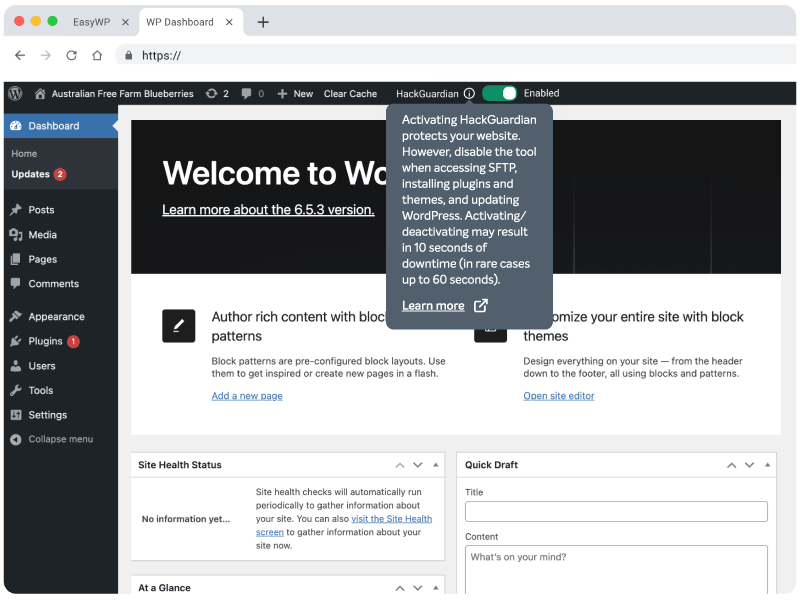
Instead of relying on yet another plugin inside WordPress, HackGuardian lives on the EasyWP platform. It is tightly integrated with the same cloud infrastructure that runs your site, so it can enforce file protection rules even if a plugin or theme is compromised. That is what makes it different from many “all-in-one” security plugins.
Because it is part of the EasyWP platform, you do not have to upload files, edit wp-config, or tweak advanced settings. HackGuardian is included with every EasyWP plan and can be switched on from the Security tab in your hosting dashboard.
Why we built HackGuardian
When Namecheap’s engineering team set out to build HackGuardian, they found that no existing security solution checked every box. Oleg Neychev, Cloud Engineer at Namecheap, explains that the team needed a tool offering partial read-only protection, instant toggling between modes with zero downtime, and full integration with existing tools like MalwareGuardian.
A standard WordPress plugin couldn’t meet those needs. Plugins typically only block requests at the HTTP level or change local file permissions, and neither approach guarantees real protection without creating new problems, such as breaking site functionality or requiring the plugin itself to retain risky filesystem access. That gap is precisely why HackGuardian was built as a platform-level feature rather than another plugin.
Who HackGuardian is for
HackGuardian is built for the people who actually use WordPress every day, not just for developers.
- You run a small business site, blog, or portfolio, and you update content regularly, but do not want to touch server settings.
- You manage one or more client sites and want an extra layer of file protection without adding more plugins to maintain.
- You know you should care about security, but feel overwhelmed by the number of options and technical jargon in traditional security plugins.
In other words, HackGuardian fits right into that middle ground where you want strong protection but still need your WordPress setup to stay simple.
“Because no existing solution gave us both partial read-only mode and zero-downtime toggling, we built HackGuardian from the ground up. Now, users can switch modes instantly while keeping the site fully protected.” — Oleg Neychev, Cloud Engineer at Namecheap
When you should use HackGuardian
From EasyWP’s perspective, the best time to use HackGuardian is from day one. Once your WordPress site is up and running, enabling HackGuardian should be part of the same basic checklist as turning on SSL, creating backups, and installing only the plugins you really need.
There are a few specific moments where HackGuardian is especially helpful:
- After you finish your main design and plugin setup, and want to “lock in” the stable version of your site.
- When you start getting more traffic or launch a new marketing campaign and want to reduce the risk of downtime from a surprise attack.
- If you have experienced hacks or malware infections in the past and want to lower the chances of repeat incidents.
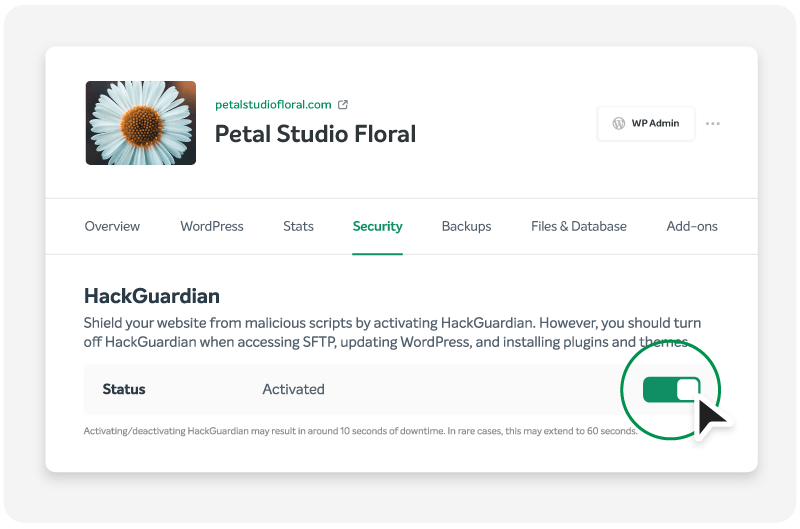
Turn on HackGuardian in your EasyWP dashboard
For existing EasyWP users, HackGuardian is waiting for you. There is no extra fee and no add-on to buy. Simply log in to your EasyWP dashboard, open the Security tab for your site, and activate HackGuardian to start locking down your file system.
It only takes a moment, but it can quickly reduce the risk of some of the most common WordPress hacks. Once it is on, you can get back to focusing on your content, your customers, and your business.
If you ever need to make heavy structural changes, such as switching themes or installing a complex new plugin, you can temporarily relax protection, make your changes, then reactivate HackGuardian once everything is tested. The key idea is that your site should spend most of its life in the safest possible state.
How HackGuardian & EasyWP keep your website reliable and secure
HackGuardian is not a magic shield that can block every possible attack on the internet, but it does a very good job of stopping some of the most common ways hackers damage WordPress sites. Here is how it helps with four real-world threats.

Malicious changes to core WordPress files
Many serious attacks work by sneaking changes into important WordPress files, like those in the wp-admin or wp-includes folders. Once those files are altered, attackers can add hidden admin users, log passwords, or redirect your traffic somewhere else.
HackGuardian blocks write access to core areas, so no vulnerable plugin can overwrite critical files. By keeping the “engine room” of WordPress in a more read-only state, your site is better protected against silent modifications that are hard to spot.

Unauthorized uploads through vulnerable plugins and themes
Many hacks start with file uploads. It might be a malicious script disguised as an image, or a backdoor dropped into your theme or uploads directory through an insecure plugin. Once that file is on your server, an attacker can trigger it to take over parts of your site.
HackGuardian reduces the attack surface by preventing write operations in plugin and theme directories. “The uploads directory remains writable so WordPress can handle media normally, while PHP execution is disabled there. This prevents uploaded PHP files from running and being used to compromise the website,” Neychev explained.

Hidden backdoors in plugin and theme folders
Even after you clean a hacked site, lingering backdoors hidden in plugin or theme code can let attackers back in again. These often masquerade as random PHP files or are injected into existing files where you would not normally look.
HackGuardian helps by locking down plugin and theme directories so that unauthorized edits are impossible in the first place. When your most sensitive folders are under stricter control at the hosting level, it is tougher for malicious code to sneak in or quietly modify what is already there. This is especially useful in combination with MalwareGuardian, which scans for malware patterns and can alert you to suspicious activity that needs attention.

Defacement attacks that alter visible site content
Some attackers are not interested in stealing data. They just want to damage your reputation by replacing your home page, adding spam banners, or injecting unwanted links into your visible content. These changes usually require write access to your theme files or templates.
By putting your key files into a more limited mode, HackGuardian makes these defacement attempts much harder to pull off. Even if someone finds a way to interact with your site, they are more likely to be blocked when they try to actually change the underlying code that controls how your pages look. That means fewer late-night surprises and less time spent undoing visible damage
“We didn’t want HackGuardian to be another standalone tool competing for attention. It works alongside MalwareGuardian and our other security tools from the very instant you turn it on.” — Oleg Neychev, Cloud Engineer at Namecheap
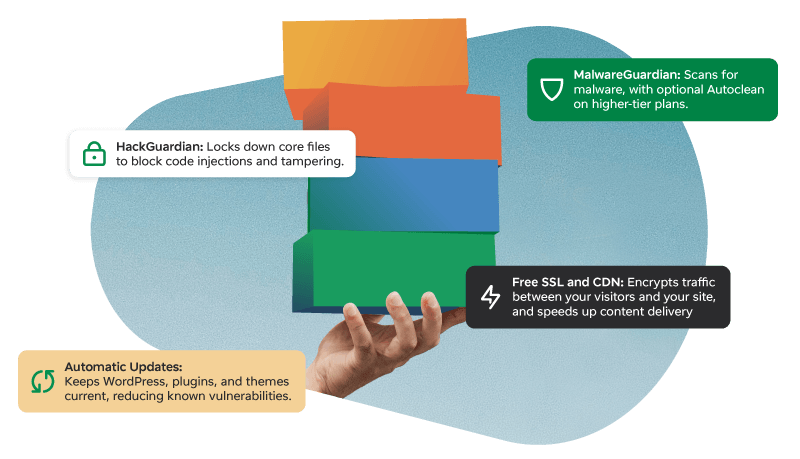
How HackGuardian works with the rest of EasyWP security
HackGuardian does not exist on an island. It is part of EasyWP’s broader Guardian suite, which combines several tools to protect your site from different angles.
Some of the key partners in that stack include:
- MalwareGuardian. Scans your site for known threats and alerts you to any malware issues, so you can take action accordingly.
- WordPress Automatic Updates. Keeps your core, themes, and plugins up to date, reducing the number of vulnerabilities attackers can target in the first place.
- Free SSL and CDN. Encrypts traffic between your visitors and your site and speeds up content delivery, improving both security and user experience.
- Backups and restore tools. Give you an easy way to roll back to a clean version of your site if something slips through.
Together, these features create a layered defense. Automatic updates and MalwareGuardian help prevent and detect problems, while HackGuardian makes file system-level attacks much harder to pull off. SSL, CDN, and backups round out the picture so you can recover quickly and keep visitors safe, even if an issue arises.
Why HackGuardian is unique to EasyWP
Many WordPress security solutions come as plugins you install inside your site. They can be powerful, but they also add more code, more settings, and more things to update and troubleshoot. HackGuardian takes a different approach. It is a proprietary site tool available only to EasyWP users, built directly into the Namecheap Cloud platform that runs your site.
That tight integration means:
- No extra plugin to install, configure, or keep updated.
- Protection that lives at the hosting layer, not just inside WordPress.
- A simple on/off toggle in your EasyWP dashboard instead of pages of settings.
For small business owners and everyday WordPress users, that matters. You get enterprise-style file protection, but the setup is as simple as flipping a switch.
Frequently Asked Questions
Does HackGuardian work with EasyWP’s free SSL, or are they separate?
They work together to protect different parts of the puzzle. EasyWP’s free SSL encrypts the connection between your visitors and your site so data like logins and form submissions cannot be easily intercepted in transit. HackGuardian focuses on the file system itself, locking down core WordPress, theme, and plugin files. When you use both, you are protecting how data moves, as well as where it lives.
Is there an extra hosting cost for HackGuardian, or is it included in the regular EasyWP price?
HackGuardian is included with every EasyWP hosting subscription at no additional cost. It is a proprietary tool built directly into the Namecheap Cloud platform, so you are not buying a separate security add-on or premium plugin license. For small business owners and creators, that means you can expect file protection bundled with your regular managed WordPress hosting fee, instead of paying separately for hosting and a high-end security suite.
If something still goes wrong, how do backups work and fit in with HackGuardian?
HackGuardian dramatically reduces the risk of common file-based attacks, but backups are still your safety net if anything unexpected happens, such as a bad plugin update or a mistake during manual changes. EasyWP’s backup and restore tools let you capture restore points and roll your site back to a known good state from the dashboard, without needing to dig into databases or FTP. HackGuardian helps prevent many problems, while backups give you a quick way to recover if you ever need to undo a change or clean up after an issue.




I love that this feature doesn’t have to be a plugin or anything extra to maintain. I can use it whenever and it always works.
I love that this feature doesn’t have to be a folder or everything large to maintain.