

Email tracking protection
Email tracking protection stops senders from seeing when, where, and how you open an email. It does this by blocking sneaky email tracking links embedded in your email that report back on your actions.
In this guide you’ll learn:
– What email tracking is
– How tracking links work
– Why email tracking can be a privacy risk
– How email tracking protection works
– How to stop email tracking
What is email tracking?
Email tracking allows the sender to see exactly what you do with their emails. Email trackers hide secret tracking links inside the clickable parts of an email. Clicking those links sends your device on a sneaky trip through the sender’s server before you reach the actual destination. At this point, the links you click, when, on what device, and roughly where you were, are all recorded.
Understanding tracking links in emails
Tracking links basically work like a silent detour. On first glance, they look normal. You assume they point to a normal website, but once you click, you’re first sent to the sender’s tracking server. This server quickly records your click and then redirects you to the real destination in a fraction of a second. The redirect is usually too fast to notice, but if you’re quick, you can sometimes catch it.
At this point, a few things are recorded:
- Link clicks — Senders see every link you click, how many times, and when.
- Rough location — When you click, your click carries your IP address. That gives away the area you’re in, and the sender’s server makes a note of it.
- Device and browser — Your click also tells them what browser you’re using, and the time.
- What you’re into — Once you click a link, you’re showing interest. They notice, sort you into groups, and send you more emails based on what you tapped.
Why email tracking can be a privacy concern
Email tracking is a real invasion of your privacy. It means someone is watching what you do with your mail. Marketers often say that when you signed up and ticked the box for “yes, send me offers,” you agreed to be tracked. But agreeing to get emails and agreeing to be tracked should be two separate yeses.
The main pushback on this comes from the EU. They say that confirming your sign-up only proves you wanted the emails, not the tracking. But outside the EU, in the eyes of marketers, your private info is still fair game.
Location information might be exposed
When you click a link, your IP address is usually shared along with information about your location. It doesn’t mean that those who created the link can work out the exact couch you’re sitting on, but they should have an accurate picture of the country and time zone you’re currently in.
Why a sender wants it:
- Targeting by place — They can send you local offers, point you to the nearest store, and show you the right language and currency.
- Timing — Your location reveals your timezone, so the next email lands when you’re most likely to open it.
- Fraud checks — A click from an odd location is a red flag, so location helps spot bots and scams.
- Profiling — Even rough location becomes one more line about you. Based on your region, marketers can understand certain interests you may have.
Profiling and behavioral tracking
| Activity | Without Protection | With Tracking Protection |
| Open detection | Yes | No |
| IP collection | Yes | Blocked |
| Location estimation | Yes | Blocked |
| Device tracking | Yes | Limited |
| Remote content requests | Allowed | Blocked |
There’s usually one reason senders are looking to track your email behavior. They’re hoping to turn you into a customer. And one of the best ways they can do that is by working out whether you are interested or not, and if not, what they need to do to grab your interest.
That means when you interact with an email, or a series of emails, the sender is sorting you into a hot or cold pile. They’re trying to work out what topics you’re interested in and how close you are to buying. Once they know, they hand you over to sales to seal the deal. This is all well and good if you’re actually interested, but if you’re not, then it means more unwanted emails flooding your account.
How email tracking protection works
To prevent email tracking, the key is to find and remove the tracking tags hidden in email links. Senders often add extra bits to the end of the links in their emails. These don’t change where the link goes. Instead, they carry a hidden code that points back to you. So when you click the link, the sender’s system registers it first, and in that moment it learns which email you came from and what you were interested in.
An email tracker blocker keeps a list of these known tags, like UTM tags and click IDs, and the list is updated as new ones appear. When an email lands, it checks every link and quietly peels the tag off before you click. The link still works and takes you exactly where it was meant to. The only difference is that the sender never finds out it was you.
Choose a provider that does this for you
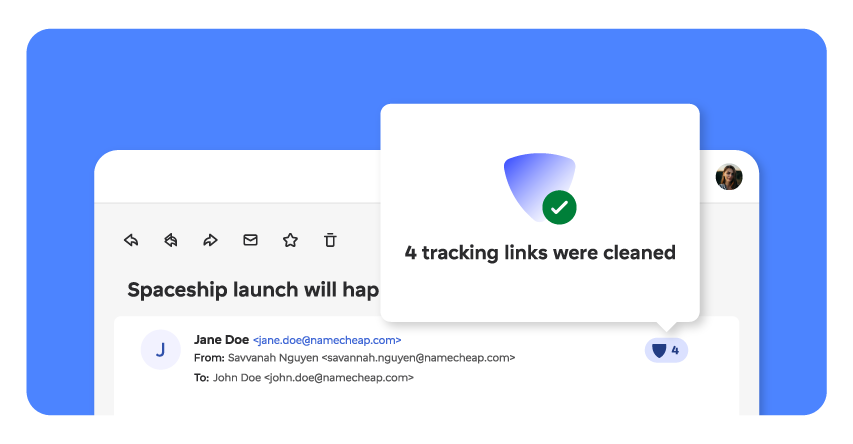
Trustworthy email providers will have tracking protection and removal as a built-in feature. Private Email, for example, gives you a running count so you can see just how many tracking links it has removed from your emails.
Here’s how you’ll see it working:
- Look for the blue shield. It’s the sign that tracking protection has checked the message.
- A number is displayed beside the shield. That’s how many links it cleaned in that email.
- Tap the shield, and a tooltip opens up, showing you exactly which tracking links were removed.
Frequently asked questions
What is email tracking protection?
It’s a feature that helps block email tracking by stopping senders from watching what you do with their emails. It finds the hidden tracking tags inside email links and removes them before you click. The links still work as normal, but the sender can no longer see that you clicked or learn anything about you.
Does Gmail have email tracking protection?
Not for tracking links. Gmail loads images through its own servers, which hides your IP address and helps a little with your location. But it does nothing about the tracking tags in links, so senders can still see every link you click. To stop that, you need protection that actually cleans links, as Private Email does.
Does email tracking protection affect email functionality?
No. Your links still work and take you exactly where you meant to go. Email tracking blockers only peel off the hidden tracking tag, not the link itself. You won’t notice any difference. The only change is that the sender never finds out it was you.
Is email tracking legal?
In most places, yes, but it depends on where you live and whether you agreed to it. The EU has the strictest rules: signing up for emails is not the same as agreeing to be tracked, so senders need your clear permission. Outside the EU, the rules are looser, and a lot of tracking happens without you really agreeing to it. Either way, tracking protection puts the choice back in your hands.
Should I enable email tracking protection?
If you’d rather senders didn’t watch what you do with your mail, then yes. It stops them seeing when you open an email, where you are, and what you click, and it does this without breaking anything. There’s no real downside. Your emails keep working as normal, and you get email privacy protection.




That’s a simple no-fuss and convenient way to stop someone from prying in on you.