
Best WordPress site builders for your next site
Every WordPress user has a slightly different definition of “easy.” Some people want a fast way to get a simple site online, while others need sweeping control or a layout system that can handle complex marketing funnels. So we wanted to take a look at some of the best WordPress site builders and explore what each of them brings to the web design table.
There is no single best WordPress page builder for everyone. Different tools are created by different teams, each with a variety of design goals and varying target audiences. So we will look at several leading options and recommend where each one shines.
What is a WordPress site builder?
When you see terms like “WordPress site builder,” “page builder,” or “WordPress design plugin,” you are essentially looking at the same kind of tool. All of these plugins hook into the WordPress core and theme system to add a drag-and-drop editor on top, making it easier to arrange columns, rows, and groups of mixed content like text, images, buttons, and forms.
In other words, these builders do not replace WordPress. They extend it with more intuitive design controls so you can create custom pages and full websites without needing to write code.
What to look for in a great WordPress page builder
Not all WordPress design plugins are built the same way, and a few key qualities separate the tools that make your life easier from the ones that just add more complexity.
- Visual, real-time editing. The best builders show you exactly what your page looks like as you go. Visual editing removes the guesswork that comes with toggling back and forth between an editor and a preview window.
- A solid block and template library. Starting from scratch every time is slow. Look for a builder that comes with enough pre-designed sections and layouts to get the basic page up quickly, so you can spend more time fine-tuning.
- Responsive design controls. Your site needs to look great on phones and tablets, not just desktops. A strong WordPress site builder gives you meaningful control over how your layouts adapt to smaller screens.
- Performance awareness. Page builders can bog down your page load speed, so look for tools that output clean code and don’t load a mountain of scripts your pages don’t need.
- Reasonable pricing. Free tiers are great for exploring, but the real question is what you get when you upgrade. Look for a pro plan that offers real value without having you jump to an expensive tier just for basic features.
Now that we’ve explored what separates the good from the not-so-good, let’s take a look at our top 7 site-building tools for WordPress.
Brizy Website Builder
Brizy is a friendly WordPress page builder that puts editing front and center, so you can see what you are building as you go. Its design kit includes over 500 amazing WordPress blocks, and it’s a natural fit for getting a site live quickly with less technical knowledge.
We recommend Brizy as our top pick for most users, and here’s why at a glance:
- Clean, visual editing from day one. Brizy’s drag-and-drop interface is intuitive enough for complete beginners, yet flexible enough for experienced designers.
- AI-powered site generation. Brizy’s newer AI tools can generate full layouts and starter copy from a single prompt, cutting down on setup time significantly.
- No third-party add-on conflicts. Every tool in the Brizy ecosystem is built by the same team, so updates and upgrades stay smooth.
- Brizy Pro is free with EasyWP Turbo and Supersonic plans. If you’re hosting with Namecheap, you get Brizy Pro included at no extra charge, making it one of the best-value options in this roundup.
- Honest, focused feature set. Brizy doesn’t try to do everything, which means the things it does, it does really well.
Let’s expand a bit more on why it’s one of the best.
What makes it special is the balance of simplicity and flexibility. You get a visually intuitive dashboard and interface up and running without a lot of setup. This makes Brizy a strong WordPress design plugin for beginners, small businesses, and experienced WordPress pros.
Brizy is also rapidly evolving beyond just a drag-and-drop editor, thanks to its new AI-powered tools that can generate full WordPress site structures, layouts, and starter copy from a single business description or from the Google Business Profile integration. These new features are designed to make the startup process even faster, creating a first draft of a custom site that you can edit and work on, without hours of staring at a blank screen deciding what to do.
At first, it might seem like a limitation that Brizy doesn’t have a massive ecosystem of third-party add-ons. But over time, we realized it’s a true advantage, because each and every tool connected to Brizy is built by the same team, and there was never any conflict or upgrade issue.
To learn more about how it connects with managed WordPress hosting, check out our complete guide to making a website using EasyWP and Brizy together.
Brizy has a free version available with the basic plugin that includes the drag-and-drop editor, real-time editing, a mobile-responsive interface, and basic templates, and that’s a solid starting point for simple projects. Paid plans start at $60/year. When you’re hosting your site on Namecheap, EasyWP Turbo and Supersonic plans include Brizy Pro absolutely free, making it one of the most cost-effective ways to get a full-featured WordPress page builder from day one.
Extendify
Extendify is a newer kind of WordPress site builder that leans heavily on AI, but still stays fully grounded in the native block editor. Instead of replacing WordPress with its own proprietary layout system, Extendify works on top of core blocks, so anything you build remains compatible with your favorite themes, plugins, and WooCommerce features.
What makes Extendify special is its combination of intelligent onboarding and smart assistants. When you activate it on a new site, the Launch experience asks a few simple questions about your business and goals, then generates a complete starter website using the block editor, including structure, content, and design.
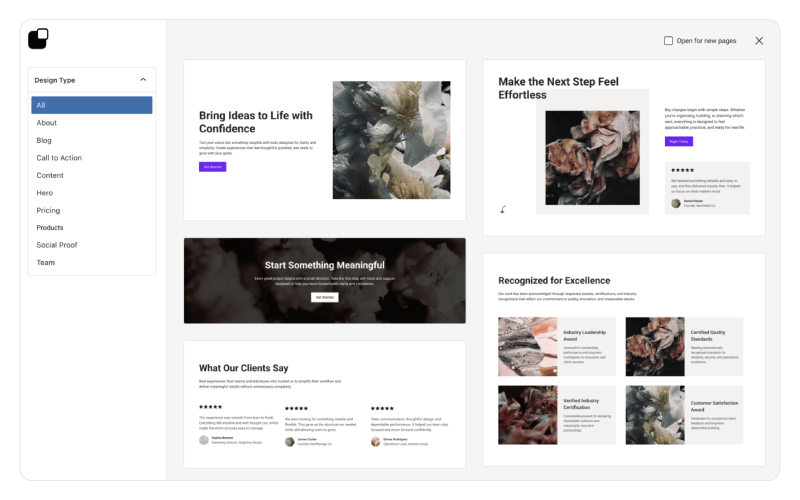
From there, you can use the AI Co‑Pilot, writing assistant, and image generator to rewrite sections, adjust layouts, and swap visuals without digging through every WordPress setting.
Extendify’s core plugin is available for free in the WordPress.org directory, giving you access to its pattern library and basic tools. Premium and partner tiers are typically bundled through hosting companies, unlocking features like the full Launch flow, advanced AI Agent capabilities, and deeper analytics — so in many cases, you will “pay” for Extendify as part of a higher-level hosting plan rather than as a standalone subscription.
Elementor
Elementor is one of the most popular WordPress site builders, with a large user base, broad feature set, and a robust no-code editor. It also emphasizes full-site creation and extended tools such as AI features, optimization, and accessibility support.
Its biggest strength is versatility. Elementor is a really common choice for both agencies and site owners who like access to a wide variety of widgets and niche tools. In fact, it’s one of the most popular plugins of the last decade.
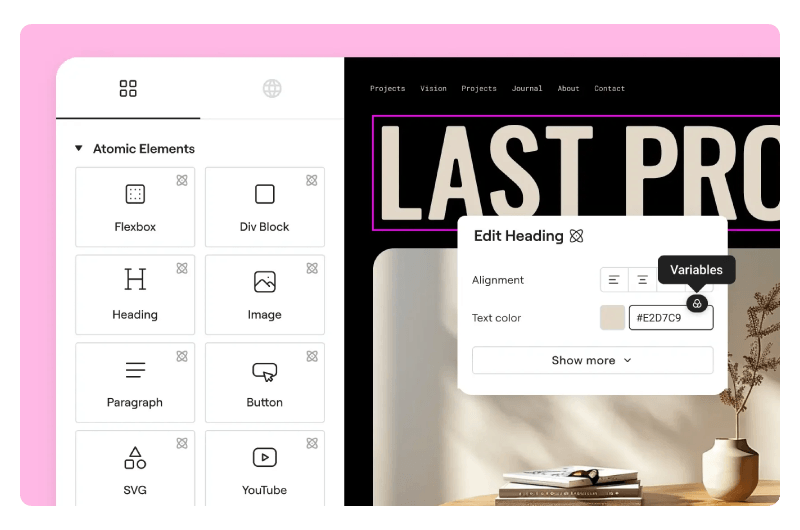
A key drawback is that it can become more complex than a simpler WordPress page builder, especially for users who just want to build quickly and move on. If you value depth and expandability over minimalism, Elementor is a solid candidate.
Elementor offers a free plugin version with core building functionality, and its paid plans are subscription-only, but there are no lifetime options. The Essential plan runs $59/year for one site, and the Advanced plan is $99/year for up to three sites. Each tier unlocks the full Pro editor, theme builder, popup builder, and WooCommerce tools. If you only need one site, Elementor is competitively priced, but the cost scales up quickly as your number of sites grows.
Beaver Builder
Beaver Builder is known for clean code, reliable performance, and a straightforward front-end editing experience. It works with existing themes and is widely used by agencies and developers who want stability over flash.
What makes it special is its reputation for consistency. If you need a dependable WordPress site builder for client work, maintenance-friendly projects, or long-term builds, Beaver Builder is a strong fit.

Its restriction is that it is less feature-heavy and less trendy than some newer builders. That can be a plus for some users, but it may feel too restrained if you want lots of built-in design extras.
Beaver Builder does not offer a free version of its page builder in the traditional sense, though it does have a limited free “Lite” version available on WordPress.org with basic layout functionality. Paid plans are priced at $99/year for Standard, which you can use on unlimited sites. The more expensive Pro plan at $199/year for Pro also gets you the Beaver Themer add-on for building custom headers, footers, and post templates. The unlimited site licensing at the entry-level tier is a key advantage for developers or agencies managing more than a handful of basic websites.
SiteOrigin
SiteOrigin is a classic WordPress page builder that focuses on responsive layouts, widget-based building, and clean output. It is also known for working with almost any theme and for keeping things lightweight.
Its special strength is familiarity for users who like WordPress widgets and structured layouts. It is a good option for budget-conscious site owners, content-heavy websites, and users who want a simpler builder that stays close to the WordPress core experience.
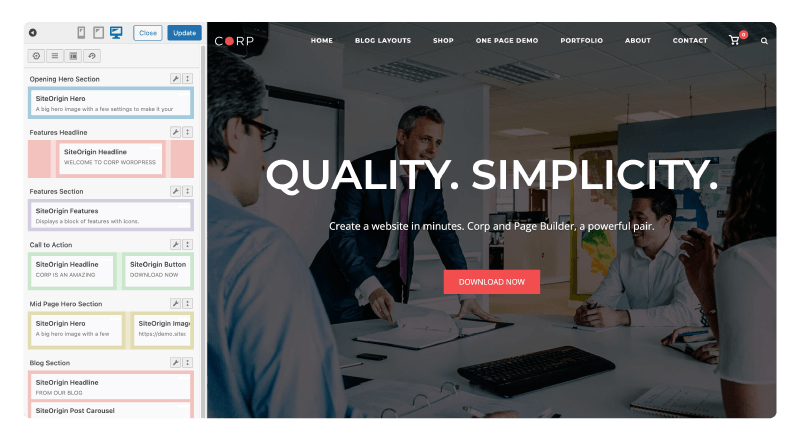
The obstacle is that it can feel less modern or less visually rich than tools like Brizy or Elementor. If you want a practical builder rather than a flashy one, SiteOrigin still deserves a look.
The core Page Builder by SiteOrigin plugin is completely free. An optional SiteOrigin Premium subscription adds a few dozen advanced add-ons like parallax backgrounds, video backgrounds, WooCommerce templates, custom 404 pages, and 1,600+ Google Fonts. Premium plans start at $29/year.
SeedProd
SeedProd began as a coming-soon and landing page tool, and it has grown into a full WordPress website theme builder. It focuses on no-code creation for headers, footers, blog layouts, archives, and WooCommerce pages.
What makes it special is speed for marketing pages and campaign-driven builds. It is a smart choice for founders, marketers, and anyone who needs landing pages, splash pages, or a focused site launch workflow. If you’re looking for a plugin to improve user experience, this is definitely one to try.
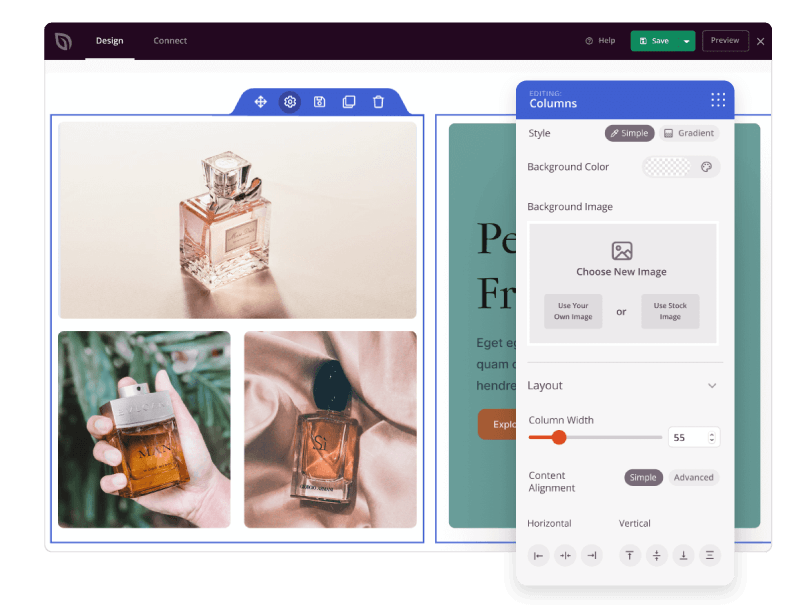
Its drawback is that its basic structure is still strongly tied to campaign and conversion uses, so it may not feel like the most natural all-purpose WordPress design plugin for every project. If your priority is launch pages and conversions, it is a strong contender.
Like some of the others, SeedProd has a free version called SeedProd Lite, which includes a basic drag-and-drop builder, coming-soon and maintenance mode pages, and essential landing page templates. Paid plans start at $39.50/year, but to get their ecommerce features you’ll need the $239.60/year Elite plan. That’s expensive, but possibly worth it if you want a full-featured, customizable online store.
Spectra
Spectra brings design power into the WordPress block editor instead of asking you to learn a separate interface. It adds a large set of Gutenberg blocks, which makes it appealing for users who prefer the native WordPress editing experience.
Its biggest advantage is simplicity for block editor fans. If you want to build with the default WordPress system and extend it with extra design controls, Spectra is a smart choice for content creators and users who want fewer moving parts.
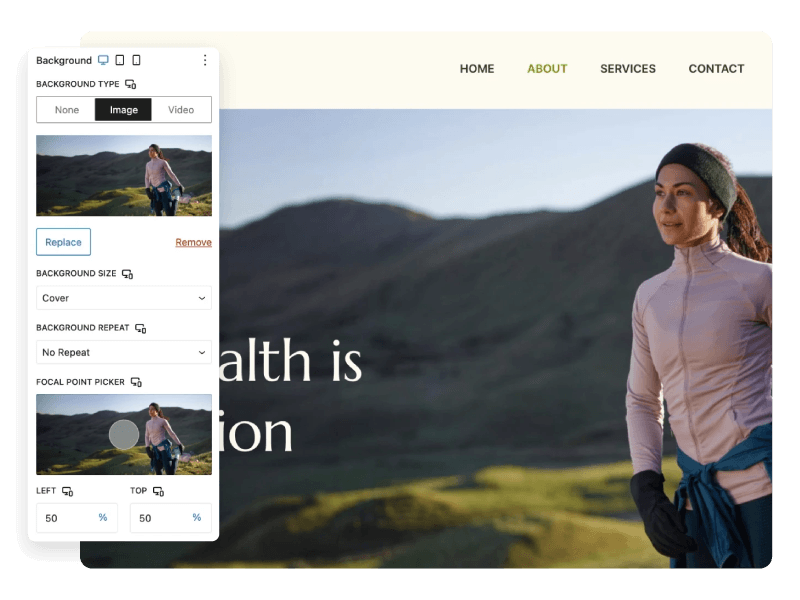
The limitation is that it depends on the block editor approach, so it may not satisfy users who want the more guided, all-in-one feel of a dedicated WordPress site builder. For block-first teams, though, it is a very useful option.
Spectra’s core plugin is free and super popular, with over 600,000 active installations. You get about 30 blocks that extend the native WordPress block editor with the free plan. The Pro version unlocks an additional 35 blocks, dynamic content, loop builders, and advanced design controls, starting at $49/year for a single site, and going up incrementally when you want to use it on more than one site.
Which WordPress site builder fits you?
All of these site builders will help you create pages that look great and perform well, but which one is best for you depends on your hopes and needs. Brizy is the best all-around pick for most people; Elementor is usually best for users who want depth and community; Beaver Builder suits agencies and developers; SiteOrigin works well for simple and efficient builds; SeedProd is great for fast, functional landing pages and launches; and Spectra or Extendify are top options for Gutenberg loyalists.
If you want the most balanced WordPress page builder for everyday site creation, we suggest you start with Brizy. It is approachable, visually strong, and easy to recommend without overselling what it can do.
Now it’s time to start designing
Choosing a WordPress page builder is only the first step. What really matters next is how you use it to design pages that feel intuitive, welcoming, and easy to navigate. Whether you go with Brizy or one of the other builders in this list, focus on clear layouts, readable typography, and user-friendly navigation so visitors can find what they need without friction.
For a deeper dive into practical usability tips you can apply to any of these WordPress site builders, take a few minutes to read this guide on how to design your website for usability.
FAQ
How do I decide between a page builder and the default WordPress block editor?
If you are starting from a blank theme and only need simple content pages, the block editor can be enough, especially when you pair it with a block-boosting plugin like Spectra. As your layouts get more complex, a dedicated WordPress page builder usually gives you more control over spacing, responsive behavior, and reusable design components. Many site owners mix the two: they use page builders like Brizy for key pages and stick with the block editor for blog posts and temporary content.
Will using a WordPress page builder slow down my website?
Any plugin can add overhead, but performance depends more on how you use your builder than the fact that you use one. Heavy layouts with lots of animations, sliders, and third-party widgets will load more slowly, no matter which tool you choose. If speed is a concern, start with a lightweight theme, host on a fast platform like EasyWP, and use your builder to create focused sections instead of stacking dozens of elements on a single page.
Can I switch from one WordPress site builder to another later?
You can switch, but it is not as seamless as changing themes, because each builder stores content in its own structure and shortcodes. When you deactivate a page builder, your content usually remains, but the layout and styling tied to that builder will need to be rebuilt or cleaned up.